
StormTech
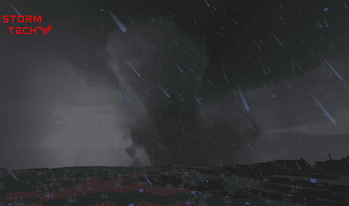
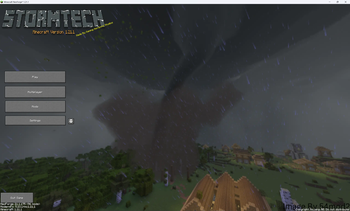
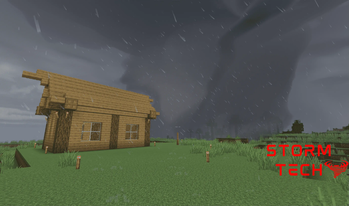
StormTech this is of one the first modpack to feature ProtoManly’s Weather Mod and our own mod (coming soon). And lots of other mods
Screenshots

Über dieses Modpack

🌩️ Welcome to StormTech
StormTech is one of the first modpacks to feature ProtoManly’s Weather Mod—a groundbreaking addition that brings extreme weather events like storms and tornadoes to Minecraft. It also includes an upcoming custom mod by the pack creator, expanding gameplay possibilities even further.
This pack blends technical automation, weather realism, and seasonal survival into a performance-optimized experience perfect for both seasoned modded players and newcomers looking for something fresh.
⸻
🔧 What Does StormTech Add?
StormTech introduces a well-balanced mix of survival, tech, and world-generation mods. Key features include:
• 🌪️ Dynamic Weather — ProtoManly’s Weather Mod adds immersive atmospheric storms, wind, and tornadoes.
• ⚙️ Technical Progression — Create complex machines and automate your world with Create, Mekanism, and Applied Energistics 2.
• 🍂 Seasons & Survival — Serene Seasons, Sophisticated Backpacks, and other survival mods deepen gameplay.
• 🌍 World Generation Overhaul — better structures with YUNG’s mods.
• 💻 Quality-of-Life Client Tools — AppleSkin, Jade, BetterF3, and more improve your user experience.
• 🚀 Performance-Boosted — Featuring Sodium, ModernFix, and Clumps for smoother gameplay on a wide range of systems.
⸻
🌟 Why Download StormTech?
• ✅ Be Among the First — Play with ProtoManly’s Weather Mod in a curated, optimized modpack.
• ⚙️ Perfect for Tech Lovers & Explorers — Balance between automation, survival, and visual immersion.
• 🖥️ Runs on Modern PCs — Performance mods are included to keep gameplay smooth, even on less powerful machines.
• 🧊 Immersive Gameplay — From storms and seasons to detailed structures and storage solutions, it’s a fresh take on modded Minecraft.
⸻
⚙️ System Requirements
Minimum GPU: NVIDIA GTX 1660 SUPER / AMD RX 590
Recommended GPU: NVIDIA RTX 3060 / AMD RX 6600 XT
Performance settings and visual downgrade options included for lower-end machines.
⸻
🌀 Final Notes
Whether you’re surviving dangerous weather, automating complex systems, or exploring vast overhauled worlds, StormTech delivers an immersive, future-ready modded Minecraft experience.
Stay tuned for updates, including the upcoming exclusive mod by the creator!
⸻
🎥 Everyone That Make a Video With This Pack
Verfügbare Versionen
StormTech Server einrichten
Server bestellen
Wähle mindestens 6 GB RAM (8 GB empfohlen für StormTech). Je nach Spieleranzahl: +1 GB pro 5 Spieler.
Modpack im Dashboard installieren
Öffne den Modpack-Browser im Dashboard, suche nach "StormTech" und klicke "Installieren". Der neoforge-Loader und Minecraft 1.21.1 werden automatisch konfiguriert.
Server starten & spielen
Starte den Server – alle Mods werden automatisch geladen. Teile die Server-IP mit Freunden und spielt zusammen!
Häufige Fragen
StormTech Server crasht oder startet nicht – was tun?
Häufigste Ursachen: zu wenig RAM oder falscher neoforge-Loader. Prüfe latest.log auf "OutOfMemoryError" → erhöhe RAM auf mindestens 8 GB. Bei "Mixin" oder "ClassNotFoundException": Modpack-Version und Loader stimmen nicht überein. Bei Mado Hosting werden Loader und Minecraft-Version beim Modpack-Install automatisch konfiguriert – das verhindert die meisten Startprobleme.
Wie viel RAM braucht ein StormTech Server wirklich?
Minimum 6 GB, empfohlen 8 GB für stabile Performance. +1 GB pro 5 Spieler. Wichtig: Minecraft-Modpacks brauchen mehr RAM als Vanilla – plane pro zusätzlichem Spieler extra ein. Bei Mado Hosting kannst du den RAM jederzeit live hochskalieren, ohne Datenverlust (ab €7.800000000000001/Monat).
Kann ich eigene Mods zu StormTech hinzufügen, ohne Konflikte?
Ja, aber achte auf die Kompatibilität: Nutze nur Mods für den gleichen Loader (neoforge) und die gleiche Minecraft-Version (1.21.1). Häufige Probleme: ID-Konflikte bei Rezept-Mods und inkompatible Coremod-Versionen. Im Mado Dashboard zeigt der Mod-Browser nur kompatible Mods an und warnt bei bekannten Konflikten.
StormTech Server laggt – Performance-Tipps
1) RAM auf 8 GB+ erhöhen. 2) Server-View-Distance auf 8 reduzieren (server.properties). 3) Pre-Generiere Chunks mit dem "Chunky" Plugin. 4) Prüfe mit /spark profiler welche Mods die meiste Tick-Time verbrauchen. Bei Mado Hosting laufen alle Server auf NVMe-SSDs mit dedizierten CPU-Kernen – das eliminiert Hardware als Engpass.
Ähnliche Modpacks
![Cobblemon Official Modpack [Fabric]](https://cdn.modrinth.com/data/5FFgwNNP/e7f9ee2e9d361623847853fe2ddce42f519ee64f.png)
![COBBLEVERSE - Pokemon Adventure [Cobblemon]](https://cdn.modrinth.com/data/Jkb29YJU/581ecf54530972afb18a04660afd820f2f24f6c7.png)
![Better MC [FABRIC] - BMC2](https://cdn.modrinth.com/data/shFhR8Vx/a19c2bcb51d38f32f138d3607e91cb2b7b8e387f_96.webp)


![Better MC [FORGE] - BMC4](https://cdn.modrinth.com/data/4BV47HRn/7f5ef7cc61b2593609aabef3ed07a866a4f11b73_96.webp)
StormTech Server mieten
Starte deinen eigenen Server mit automatischer Modpack-Installation.
Details
- Lizenz
- GNU General Public License v2.0 only
- Server-seitig
- Erforderlich
- Client-seitig
- Erforderlich
Unterstützte Versionen
Starte deinen StormTech Server jetzt
Ab €7.80/Monat; für die beste Performance werden 8 GB RAM empfohlen.
Server konfigurieren →