
Sundawn
Enhance your vanilla Minecraft experience with immersive and technical mods.
Screenshots
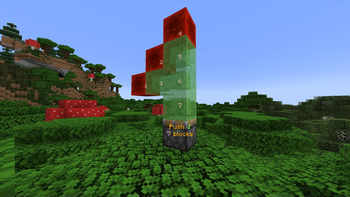
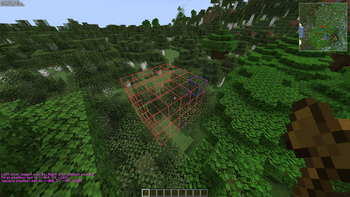
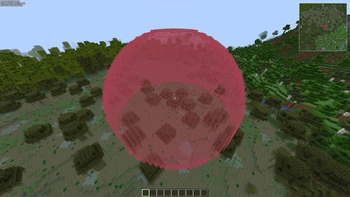

Über dieses Modpack
This modpack is currently in the process of reimagining itself, please hang on while some links and information might not work, be irrelevant or outdated
Hi, this is Avery's Essentials, a modpack I've made that meets all of my personal necessities because no other modpack could.
It includes performance mods, Optifine replacement mods and technical mods.
It also includes No Chat Reports which protects you from global bans where possible.
Warning
Multiple mods in this modpack could be considered cheating on certain servers. Please always check the server's rules and if
necessary ask the server moderators as use of this modpack could be reason for them to punish/ban you!
FAQ
Q What does bleeding-edge mean?
A It means that Avery's Essentials does comparatively less testing on updates than
other modpacks do, this leads to it possibly being less stable but more up-to-date.Q What does rolling release mean?
A Most minecraft modpacks are released on a stable basis, meaning that you get
updates less often but they are bigger and more stable. Avery's Essentials is built on
a rolling release model, meaning that as soon as changes happen that aren't breaking they
get released, which leads to smaller updates more often, that are less likely to break
your existing configuration.Q Can I build off of this pack?
A Yes you can, do as you please.
Q What is this project licensed under?
A It's MIT licensed.
Credits
The following mods are not on Modrinth, so their credits are listed here:
These mods are included with permission from their authors or licenses. If any author has problems with me
including their mod(s) in this modpack, feel free to contact me and I will remove it as soon as possible.
This modpack is open source! Check it out on GitHub!
Verfügbare Versionen
Sundawn Server einrichten
Server bestellen
Wähle mindestens 6 GB RAM (8 GB empfohlen für Sundawn). Je nach Spieleranzahl: +1 GB pro 5 Spieler.
Modpack im Dashboard installieren
Öffne den Modpack-Browser im Dashboard, suche nach "Sundawn" und klicke "Installieren". Der fabric-Loader und Minecraft 1.21.3 werden automatisch konfiguriert.
Server starten & spielen
Starte den Server – alle Mods werden automatisch geladen. Teile die Server-IP mit Freunden und spielt zusammen!
Häufige Fragen
Sundawn Server crasht oder startet nicht – was tun?
Häufigste Ursachen: zu wenig RAM oder falscher fabric-Loader. Prüfe latest.log auf "OutOfMemoryError" → erhöhe RAM auf mindestens 8 GB. Bei "Mixin" oder "ClassNotFoundException": Modpack-Version und Loader stimmen nicht überein. Bei Mado Hosting werden Loader und Minecraft-Version beim Modpack-Install automatisch konfiguriert – das verhindert die meisten Startprobleme.
Wie viel RAM braucht ein Sundawn Server wirklich?
Minimum 6 GB, empfohlen 8 GB für stabile Performance. +1 GB pro 5 Spieler. Wichtig: Minecraft-Modpacks brauchen mehr RAM als Vanilla – plane pro zusätzlichem Spieler extra ein. Bei Mado Hosting kannst du den RAM jederzeit live hochskalieren, ohne Datenverlust (ab €7.800000000000001/Monat).
Kann ich eigene Mods zu Sundawn hinzufügen, ohne Konflikte?
Ja, aber achte auf die Kompatibilität: Nutze nur Mods für den gleichen Loader (fabric) und die gleiche Minecraft-Version (1.21.3). Häufige Probleme: ID-Konflikte bei Rezept-Mods und inkompatible Coremod-Versionen. Im Mado Dashboard zeigt der Mod-Browser nur kompatible Mods an und warnt bei bekannten Konflikten.
Sundawn Server laggt – Performance-Tipps
1) RAM auf 8 GB+ erhöhen. 2) Server-View-Distance auf 8 reduzieren (server.properties). 3) Pre-Generiere Chunks mit dem "Chunky" Plugin. 4) Prüfe mit /spark profiler welche Mods die meiste Tick-Time verbrauchen. Bei Mado Hosting laufen alle Server auf NVMe-SSDs mit dedizierten CPU-Kernen – das eliminiert Hardware als Engpass.
Ähnliche Modpacks


![Cobblemon Official Modpack [Fabric]](https://cdn.modrinth.com/data/5FFgwNNP/e7f9ee2e9d361623847853fe2ddce42f519ee64f.png)
![COBBLEVERSE - Pokemon Adventure [Cobblemon]](https://cdn.modrinth.com/data/Jkb29YJU/581ecf54530972afb18a04660afd820f2f24f6c7.png)

![Better MC [FABRIC] - BMC2](https://cdn.modrinth.com/data/shFhR8Vx/a19c2bcb51d38f32f138d3607e91cb2b7b8e387f_96.webp)
Sundawn Server mieten
Starte deinen eigenen Server mit automatischer Modpack-Installation.
Unterstützte Versionen
Starte deinen Sundawn Server jetzt
Ab €7.80/Monat; für die beste Performance werden 8 GB RAM empfohlen.
Server konfigurieren →