
That Time In Minecraft
A That Time I Got Reincarnated as a Slime modpack based around Magic and Tech
Screenshots
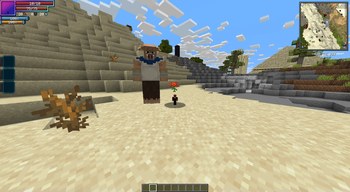
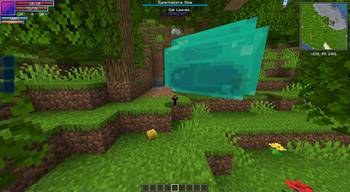
Über dieses Modpack
That Time in Minecraft
Inspired by the anime That Time I Got Reincarnated as a Slime, this modpack immerses you in a limitless world where magic meets technology.
Overview
Built around Tensura:Reincarnated, this pack encourages you to:
- Adventure, build, and evolve.
- Create your very own Jura Federation and guide it into a new era.
Key Features
Meet The Core Mods
- Tensura:Reincarnated The most core of the core mods!
- Mekanism: Make your life easy and power the world.
- Thermal Series: Master energy production and industrial processes.
- Create: Design your steampunk Federation!
- Electrodynamics: Dive into nuclear science and accidentally blow up your base!
Magic Integration
The magic of Tensura:Reincarnated blends seamlessly with mods like Ice & Fire and Iron's Spells 'n Spellbooks. Build a world where medieval fantasy collides with cutting-edge tech, pushing your base beyond the nuclear age and into realms of science most can only dream about. The result is a truly immersive experience.
Adventure Awaits
- Explore vast detailed with Terra and dive into multiple mysterious dimensions.
- Subdue powerful creatures, turn them into allies, and build thriving settlements.
- Face challenges to uncover hidden treasures.
SERVER OWNERS, Please Read
Server Pack
I update this pack as both a client pack and a server pack. The client pack is the default, but server owners like you, should check the versions tab for the "That Time In Minecraft Server" pack that matches your client version.
What’s different in the server pack?
Client-only mods are removed, so you can drop it straight into the server’s mods/ folder.
Server Ram
About 6–12 GB should be on the server. I found the sweet spot to be around 9–12 GB. More than ~12 GB usually hurts performance because of GC pauses.
server.properties
- Set worldgen:
level-type=terra:overworld/overworld.- If this gets changed after first boot, delete the world folder and restart the server.
- Prevent false fly-kicks:
allow-flight=true.
I know how much of a pain this can be sometimes, so I hope this helps! <3
Spoiler
Thank you to the Tensura:Dungeon devs for letting me use their mod in this pack.Verfügbare Versionen
That Time In Minecraft Server einrichten
Server bestellen
Wähle mindestens 6 GB RAM (10 GB empfohlen für That Time In Minecraft). Je nach Spieleranzahl: +1 GB pro 4 Spieler.
Modpack im Dashboard installieren
Öffne den Modpack-Browser im Dashboard, suche nach "That Time In Minecraft" und klicke "Installieren". Der forge-Loader und Minecraft 1.19.2 werden automatisch konfiguriert.
Server starten & spielen
Starte den Server – alle Mods werden automatisch geladen. Teile die Server-IP mit Freunden und spielt zusammen!
Häufige Fragen
That Time In Minecraft Server crasht oder startet nicht – was tun?
Häufigste Ursachen: zu wenig RAM oder falscher forge-Loader. Prüfe latest.log auf "OutOfMemoryError" → erhöhe RAM auf mindestens 10 GB. Bei "Mixin" oder "ClassNotFoundException": Modpack-Version und Loader stimmen nicht überein. Bei Mado Hosting werden Loader und Minecraft-Version beim Modpack-Install automatisch konfiguriert – das verhindert die meisten Startprobleme.
Wie viel RAM braucht ein That Time In Minecraft Server wirklich?
Minimum 6 GB, empfohlen 10 GB für stabile Performance. +1 GB pro 4 Spieler. Wichtig: Minecraft-Modpacks brauchen mehr RAM als Vanilla – plane pro zusätzlichem Spieler extra ein. Bei Mado Hosting kannst du den RAM jederzeit live hochskalieren, ohne Datenverlust (ab €7.800000000000001/Monat).
Kann ich eigene Mods zu That Time In Minecraft hinzufügen, ohne Konflikte?
Ja, aber achte auf die Kompatibilität: Nutze nur Mods für den gleichen Loader (forge) und die gleiche Minecraft-Version (1.19.2). Häufige Probleme: ID-Konflikte bei Rezept-Mods und inkompatible Coremod-Versionen. Im Mado Dashboard zeigt der Mod-Browser nur kompatible Mods an und warnt bei bekannten Konflikten.
That Time In Minecraft Server laggt – Performance-Tipps
1) RAM auf 10 GB+ erhöhen. 2) Server-View-Distance auf 8 reduzieren (server.properties). 3) Pre-Generiere Chunks mit dem "Chunky" Plugin. 4) Prüfe mit /spark profiler welche Mods die meiste Tick-Time verbrauchen. Bei Mado Hosting laufen alle Server auf NVMe-SSDs mit dedizierten CPU-Kernen – das eliminiert Hardware als Engpass.
Ähnliche Modpacks
![Cobblemon Official Modpack [Fabric]](https://cdn.modrinth.com/data/5FFgwNNP/e7f9ee2e9d361623847853fe2ddce42f519ee64f.png)
![COBBLEVERSE - Pokemon Adventure [Cobblemon]](https://cdn.modrinth.com/data/Jkb29YJU/581ecf54530972afb18a04660afd820f2f24f6c7.png)
![Better MC [FABRIC] - BMC2](https://cdn.modrinth.com/data/shFhR8Vx/a19c2bcb51d38f32f138d3607e91cb2b7b8e387f_96.webp)


![Better MC [FORGE] - BMC4](https://cdn.modrinth.com/data/4BV47HRn/7f5ef7cc61b2593609aabef3ed07a866a4f11b73_96.webp)
That Time In Minecraft Server mieten
Starte deinen eigenen Server mit automatischer Modpack-Installation.
Details
- Lizenz
- LicenseRef-All-Rights-Reserved
- Server-seitig
- Erforderlich
- Client-seitig
- Erforderlich
Unterstützte Versionen
Starte deinen That Time In Minecraft Server jetzt
Ab €7.80/Monat; für die beste Performance werden 10 GB RAM empfohlen.
Server konfigurieren →