
Thumbnailing
A collection of mods designed to enhance your Minecraft thumbnail design workflow.
Screenshots


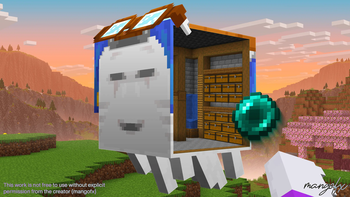
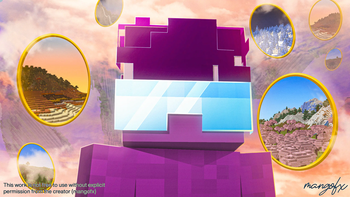
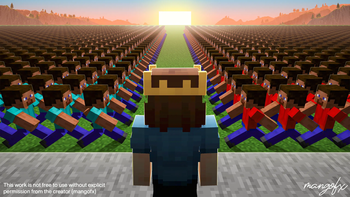

Über dieses Modpack
The definitive Minecraft thumbnail design modpack.
Crafted by a thumbnail designer, for thumbnail designers.
This pack includes the essential tools needed to pose characters, build scenes, capture clean renders, and produce professional thumbnails with speed and consistency.
Features
| Tool | Purpose |
|---|---|
| NPC Studio | Spawn, pose, and animate NPCs for character setups. |
| Voxy | Load and render distant chunks for cinematic backgrounds. |
| Optimization Mods | Various performance mods to ensure a smooth experience. |
| Depth Map Shaders | Generate depth maps for realistic atmospheric fog, lens blur, and depth-based effects in post. |
| Normal Map Shaders | Render normal maps to efficiently shade characters in post. |
| White Entity Mask Shaders | Render white-masked entities to quickly cut out characters in post. |
| Better Default Shaders | Render shadows and ambient occlusion while keeping the default vanilla style intact. |
NPC Studio Guide
FAQ
How do I use NPC Studio?
Watch this video: https://www.youtube.com/watch?v=j3lGA7y5b9oThe NPC Wand isn't working. How do I fix it?
Hold "alt" to bring up the axiom options menu, and ensure the "Tinker" option on the left of the menu is disabled. There may be other Axiom features in that menu that could also impact the NPC Studio tools. If that doesn't fix it, please join the MDH Discord: https://discord.gg/uE7gFcZ7QBCan I use this modpack to make commercial thumbnails?
Yes, commercial use is allowed. However, you may not reupload or redistribute the modpack by another name.How does this compare to software like Blender or Blockbench?
Blender is more powerful, but it comes with a steep learning curve and can be overkill for some Minecraft thumbnails. This modpack is optimized for speed and thumbnail-ready compositions directly in Minecraft, then finished in Photoshop. Furthermore, nearly every prominent thumbnail artist uses some variation of this workflow.I'm having issues with NPC Studio. Where do I get help?
NPC Mod's Discord: https://discord.gg/uE7gFcZ7QBI'm having issues with the modpack in general. Where do I get help?
For troubleshooting or setup questions, please join the Thumbnailers Discord (https://discord.gg/TTC7Uvm2N8), or DM @mangofx.Where can I get feedback on my designs?
Feel free to join Thumbnailers, the biggest Minecraft thumbnail design community: https://discord.gg/TTC7Uvm2N8Disclaimer: I don't own any mods provided in this pack. All credit goes to the original mod developers. I simply compiled these mods into one unified modpack for ease of use.
Want to commission a thumbnail?
Visit https://mangofx.art to learn more about me and my work.
Verfügbare Versionen
Thumbnailing Server einrichten
Server bestellen
Wähle mindestens 4 GB RAM (6 GB empfohlen für Thumbnailing). Je nach Spieleranzahl: +1 GB pro 8 Spieler.
Modpack im Dashboard installieren
Öffne den Modpack-Browser im Dashboard, suche nach "Thumbnailing" und klicke "Installieren". Der fabric-Loader und Minecraft 1.21.11 werden automatisch konfiguriert.
Server starten & spielen
Starte den Server – alle Mods werden automatisch geladen. Teile die Server-IP mit Freunden und spielt zusammen!
Häufige Fragen
Thumbnailing Server crasht oder startet nicht – was tun?
Häufigste Ursachen: zu wenig RAM oder falscher fabric-Loader. Prüfe latest.log auf "OutOfMemoryError" → erhöhe RAM auf mindestens 6 GB. Bei "Mixin" oder "ClassNotFoundException": Modpack-Version und Loader stimmen nicht überein. Bei Mado Hosting werden Loader und Minecraft-Version beim Modpack-Install automatisch konfiguriert – das verhindert die meisten Startprobleme.
Wie viel RAM braucht ein Thumbnailing Server wirklich?
Minimum 4 GB, empfohlen 6 GB für stabile Performance. +1 GB pro 8 Spieler. Wichtig: Minecraft-Modpacks brauchen mehr RAM als Vanilla – plane pro zusätzlichem Spieler extra ein. Bei Mado Hosting kannst du den RAM jederzeit live hochskalieren, ohne Datenverlust (ab €5.2/Monat).
Kann ich eigene Mods zu Thumbnailing hinzufügen, ohne Konflikte?
Ja, aber achte auf die Kompatibilität: Nutze nur Mods für den gleichen Loader (fabric) und die gleiche Minecraft-Version (1.21.11). Häufige Probleme: ID-Konflikte bei Rezept-Mods und inkompatible Coremod-Versionen. Im Mado Dashboard zeigt der Mod-Browser nur kompatible Mods an und warnt bei bekannten Konflikten.
Thumbnailing Server laggt – Performance-Tipps
1) RAM auf 6 GB+ erhöhen. 2) Server-View-Distance auf 8 reduzieren (server.properties). 3) Pre-Generiere Chunks mit dem "Chunky" Plugin. 4) Prüfe mit /spark profiler welche Mods die meiste Tick-Time verbrauchen. Bei Mado Hosting laufen alle Server auf NVMe-SSDs mit dedizierten CPU-Kernen – das eliminiert Hardware als Engpass.
Ähnliche Modpacks

![Cobblemon Official Modpack [Fabric]](https://cdn.modrinth.com/data/5FFgwNNP/e7f9ee2e9d361623847853fe2ddce42f519ee64f.png)
![COBBLEVERSE - Pokemon Adventure [Cobblemon]](https://cdn.modrinth.com/data/Jkb29YJU/581ecf54530972afb18a04660afd820f2f24f6c7.png)
![Better MC [FABRIC] - BMC2](https://cdn.modrinth.com/data/shFhR8Vx/a19c2bcb51d38f32f138d3607e91cb2b7b8e387f_96.webp)


Thumbnailing Server mieten
Starte deinen eigenen Server mit automatischer Modpack-Installation.
Details
- Lizenz
- Creative Commons Attribution Non Commercial No Derivatives 4.0 International
- Server-seitig
- Nicht unterstützt
- Client-seitig
- Erforderlich
Unterstützte Versionen
Starte deinen Thumbnailing Server jetzt
Ab €5.20/Monat; für die beste Performance werden 6 GB RAM empfohlen.
Server konfigurieren →