
Thunder
[26.3 available] Boost FPS, reduce lag, speed up load times, and save resources with this modpack! Perfect for low-end computers. No extra mods, just pure performance improvement.
Screenshots

Über dieses Modpack


🚀Huge Performance Boost
!
Setup: Ryzen 9 7945HX, RTX 4080 Mobile, 16 GB RAM
Tested on fancy graphics, 24 render and 5 simulation distances
⬆️Always Up-to-Date
Thunder is kept current with the latest mods, supporting the newest Minecraft versions while also maintaining compatibility with older versions.
🪶Lightweight and Stable
Thunder includes only proven, stable performance mods and essential dependencies, ensuring a seamless vanilla gameplay experience without sacrificing stability.
📥 Installation
Use the official Modrinth app or any launcher that supports Modrinth modpacks (e.g., MultiMC, Prism). For detailed instructions, check the Modrinth documentation.
❓ FAQ
Is there a version available for Minecraft 1.X?
Thunder supports the most popular and recent Minecraft versions, including snapshots when available.
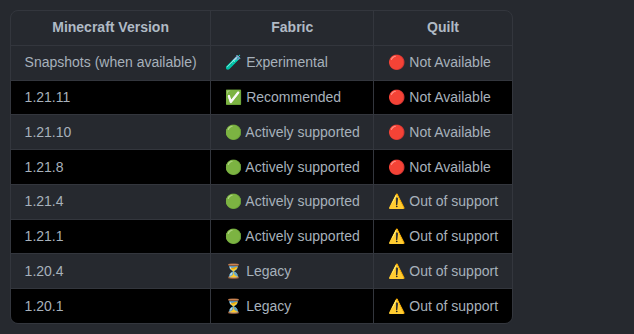
For deprectaed realeases and further deatils see this webpage.
Which mods are included?
Check the download page for each version for a detailed list of included mods.
What should I do if I find a bug or want to suggest a mod?
Report bugs or suggest changes by opening an issue on the GitHub repo. Thank you for your support!
Can I use Thunder as a base for my modpack?
Absolutely! Just follow these two conditions:
- Include a note in the description linking back to this page.
- Do not just reupload the pack, its assets, or it's branding. Also, avoid creating derivative works with minimal additions (e.g. adding just a couple of mods).
In case of doubt feel free to contact me on Discord
🙏 Support the Project
Verfügbare Versionen
Thunder Server einrichten
Server bestellen
Wähle mindestens 4 GB RAM (6 GB empfohlen für Thunder). Je nach Spieleranzahl: +1 GB pro 8 Spieler.
Modpack im Dashboard installieren
Öffne den Modpack-Browser im Dashboard, suche nach "Thunder" und klicke "Installieren". Der quilt-Loader und Minecraft 26.3 werden automatisch konfiguriert.
Server starten & spielen
Starte den Server – alle Mods werden automatisch geladen. Teile die Server-IP mit Freunden und spielt zusammen!
Häufige Fragen
Thunder Server crasht oder startet nicht – was tun?
Häufigste Ursachen: zu wenig RAM oder falscher quilt-Loader. Prüfe latest.log auf "OutOfMemoryError" → erhöhe RAM auf mindestens 6 GB. Bei "Mixin" oder "ClassNotFoundException": Modpack-Version und Loader stimmen nicht überein. Bei Mado Hosting werden Loader und Minecraft-Version beim Modpack-Install automatisch konfiguriert – das verhindert die meisten Startprobleme.
Wie viel RAM braucht ein Thunder Server wirklich?
Minimum 4 GB, empfohlen 6 GB für stabile Performance. +1 GB pro 8 Spieler. Wichtig: Minecraft-Modpacks brauchen mehr RAM als Vanilla – plane pro zusätzlichem Spieler extra ein. Bei Mado Hosting kannst du den RAM jederzeit live hochskalieren, ohne Datenverlust (ab €5.2/Monat).
Kann ich eigene Mods zu Thunder hinzufügen, ohne Konflikte?
Ja, aber achte auf die Kompatibilität: Nutze nur Mods für den gleichen Loader (quilt) und die gleiche Minecraft-Version (26.3). Häufige Probleme: ID-Konflikte bei Rezept-Mods und inkompatible Coremod-Versionen. Im Mado Dashboard zeigt der Mod-Browser nur kompatible Mods an und warnt bei bekannten Konflikten.
Thunder Server laggt – Performance-Tipps
1) RAM auf 6 GB+ erhöhen. 2) Server-View-Distance auf 8 reduzieren (server.properties). 3) Pre-Generiere Chunks mit dem "Chunky" Plugin. 4) Prüfe mit /spark profiler welche Mods die meiste Tick-Time verbrauchen. Bei Mado Hosting laufen alle Server auf NVMe-SSDs mit dedizierten CPU-Kernen – das eliminiert Hardware als Engpass.
Ähnliche Modpacks

![Cobblemon Official Modpack [Fabric]](https://cdn.modrinth.com/data/5FFgwNNP/e7f9ee2e9d361623847853fe2ddce42f519ee64f.png)
![COBBLEVERSE - Pokemon Adventure [Cobblemon]](https://cdn.modrinth.com/data/Jkb29YJU/581ecf54530972afb18a04660afd820f2f24f6c7.png)

![Better MC [FABRIC] - BMC2](https://cdn.modrinth.com/data/shFhR8Vx/a19c2bcb51d38f32f138d3607e91cb2b7b8e387f_96.webp)

Thunder Server mieten
Starte deinen eigenen Server mit automatischer Modpack-Installation.
Unterstützte Versionen
Starte deinen Thunder Server jetzt
Ab €5.20/Monat; für die beste Performance werden 6 GB RAM empfohlen.
Server konfigurieren →