
Toppermon
A Cobblemon Modpack that aims to provide a smooth experience for lovers of both the Pokémon Anime and games.
Screenshots

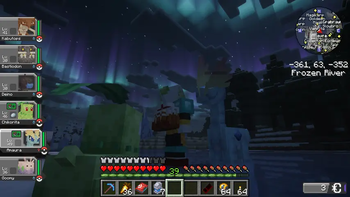


Über dieses Modpack
A simple Cobblemon Modpack that aims to provide a smooth experience for lovers of both the Pokémon Anime and games. The Modpack can be played alone or with a group of friends.
For some Quests, multiple Players are needed. I whole-heartedly recommend to play in a group of 1-8 Players.
Features:
- Capture and train Pokémon
- Explore a beatiful world generated with Terralith
- Explore dozens of new buildings to find loot and legendary Pokémon
- Challenge NPC trainers and Gym Leaders to become the Pokémon Master
- Trade and battle with your friends (Server required)!
- Settle down and enjoy building with new decorative elements
- Quests that help Players adjust to the nature of the modpack
- Try out new foods, cook with and for your Pokémon
- Evolve your Pokémon into their Mega-Evolutions
- Search for new Pokémon by using the Minimap
- Take Pictures of your Pokémon
- Pokémon Music plays during exploration
- Pre-installed Shader
- "Endgame" activities such as shiny hunting, randomly generated gyms that scale with the players level, hunting for legendaries, breeding Pokémon and more!
This Modpack is intended as comfortable package that stays close to the Pokémon games and add enough content to satisfy any player for a long time.
There is also support for FTBQuests, but due to it not being on Modrinth it has to be installed manually.
Extra Mods
For full functionality you will need to manually install the following mods. If you don't you will lose out on all the Quests but the rest of the modpack will work fine.FTB Quest
FTB Library
FTB Teams
FTB XMod Compat
ExtraQuests
Cobblemon Quests
The Quests are still being expanded and are expected to be finshed around Dec. 20th 2025
Warning!
As Cobblemon sometimes needs to load a lot of different mobs at once when loading new chunks, I recommend giving the pack between 6 ~ 8 GB of RAM.
Verfügbare Versionen
Toppermon Server einrichten
Server bestellen
Wähle mindestens 6 GB RAM (8 GB empfohlen für Toppermon). Je nach Spieleranzahl: +1 GB pro 5 Spieler.
Modpack im Dashboard installieren
Öffne den Modpack-Browser im Dashboard, suche nach "Toppermon" und klicke "Installieren". Der fabric-Loader und Minecraft 1.21.1 werden automatisch konfiguriert.
Server starten & spielen
Starte den Server – alle Mods werden automatisch geladen. Teile die Server-IP mit Freunden und spielt zusammen!
Häufige Fragen
Toppermon Server crasht oder startet nicht – was tun?
Häufigste Ursachen: zu wenig RAM oder falscher fabric-Loader. Prüfe latest.log auf "OutOfMemoryError" → erhöhe RAM auf mindestens 8 GB. Bei "Mixin" oder "ClassNotFoundException": Modpack-Version und Loader stimmen nicht überein. Bei Mado Hosting werden Loader und Minecraft-Version beim Modpack-Install automatisch konfiguriert – das verhindert die meisten Startprobleme.
Wie viel RAM braucht ein Toppermon Server wirklich?
Minimum 6 GB, empfohlen 8 GB für stabile Performance. +1 GB pro 5 Spieler. Wichtig: Minecraft-Modpacks brauchen mehr RAM als Vanilla – plane pro zusätzlichem Spieler extra ein. Bei Mado Hosting kannst du den RAM jederzeit live hochskalieren, ohne Datenverlust (ab €7.800000000000001/Monat).
Kann ich eigene Mods zu Toppermon hinzufügen, ohne Konflikte?
Ja, aber achte auf die Kompatibilität: Nutze nur Mods für den gleichen Loader (fabric) und die gleiche Minecraft-Version (1.21.1). Häufige Probleme: ID-Konflikte bei Rezept-Mods und inkompatible Coremod-Versionen. Im Mado Dashboard zeigt der Mod-Browser nur kompatible Mods an und warnt bei bekannten Konflikten.
Toppermon Server laggt – Performance-Tipps
1) RAM auf 8 GB+ erhöhen. 2) Server-View-Distance auf 8 reduzieren (server.properties). 3) Pre-Generiere Chunks mit dem "Chunky" Plugin. 4) Prüfe mit /spark profiler welche Mods die meiste Tick-Time verbrauchen. Bei Mado Hosting laufen alle Server auf NVMe-SSDs mit dedizierten CPU-Kernen – das eliminiert Hardware als Engpass.
Ähnliche Modpacks
![Cobblemon Official Modpack [Fabric]](https://cdn.modrinth.com/data/5FFgwNNP/e7f9ee2e9d361623847853fe2ddce42f519ee64f.png)
![COBBLEVERSE - Pokemon Adventure [Cobblemon]](https://cdn.modrinth.com/data/Jkb29YJU/581ecf54530972afb18a04660afd820f2f24f6c7.png)
![Better MC [FABRIC] - BMC2](https://cdn.modrinth.com/data/shFhR8Vx/a19c2bcb51d38f32f138d3607e91cb2b7b8e387f_96.webp)


![Better MC [FORGE] - BMC4](https://cdn.modrinth.com/data/4BV47HRn/7f5ef7cc61b2593609aabef3ed07a866a4f11b73_96.webp)
Toppermon Server mieten
Starte deinen eigenen Server mit automatischer Modpack-Installation.
Unterstützte Versionen
Starte deinen Toppermon Server jetzt
Ab €7.80/Monat; für die beste Performance werden 8 GB RAM empfohlen.
Server konfigurieren →