
Ultimate PBR Essentials
Enhanced visuals with PBR, POM, colormap support, and legacy OptiFine features.
Screenshots
Über dieses Modpack
Ultimate PBR Essentials
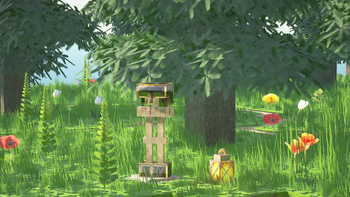
Ultimate PBR Essentials is the modpack for players who want to experience Minecraft with unparalleled visual enhancements while retaining the classic functionality they love. This modpack adds support for POM & PBR texturepack which previously used Optifine's features.
Who Is It For?
If you're looking to play with nearly any newer texture pack, whether it be realistic, vanilla, or one with minor tweaks, most require specific features and mods to provide these features. This modpack allows you to play with them effortlessly and also includes performance enhancements.
Isn't this just another Fabulously Optimized?
While the majority of mods are indeed common, however it does not mainly include visually game-altering mods, which are required/best suited for some PBR texture packs.
Classic OptiFine Features
Connected Textures:
Seamless glass, bookshelves, and other blocks using Continuity.
Dynamic Lighting:
Carry torches that illuminate surroundings using Sodium Dynamic Lights
Colormap Support
Using Polytone for legacy Optifine colormap, however compatibility with some older resource packs may not work.
Custom Splash Screen
Using Puzzle
Support for Entities
Using EMF and ETF
Performance Enhancements:
Optimize FPS without sacrificing quality, better fps in memory-hungry biomes
Mods used:
- Sodium
- BetterGrassify
- Cull Leaves
- ClLumps
- Dynamic FPS
- Entity Culling
- Enhanced Block Entities
- Ferrite Core
- ModernFix
- Lithium
- ImmediatelyFast
Controller Support
Using Controlify
Zoom Options
Using Zoomify
Gameplay & Graphical Improvements
Not Enough Animations
Model Gap Fix
3D Skin Layers
Better Third Person
Capes
Optimum Realism
Ambient Sounds
Remove Loading Screen
Shader Compatibility
Using Iris
Shaders themselves are not included, however pre-made configuration files for balanced performance and quality have been provided for some shaders.
Other Minor Enhancements
This modpack has libraries that are required by some of the mods mentioned above, and other mods. Some mods may have been added later and may not be mentioned in the list above however they will be suited for the modpack.
Please note that this Modpack is not perfect, and was originally created to make the installation of mods for Optimum Realism texturepack easier and more uniform, however it should cover the mods required for almost all other texture packs that previously used Optifine's feature and are currently in the loop with newer mods. If you have suggestions, please refer to the discord server. This modpack also includes additional files that are not on Modrinth, these files cannot be redistributed or modified.
Verfügbare Versionen
Ultimate PBR Essentials Server einrichten
Server bestellen
Wähle mindestens 4 GB RAM (6 GB empfohlen für Ultimate PBR Essentials). Je nach Spieleranzahl: +1 GB pro 8 Spieler.
Modpack im Dashboard installieren
Öffne den Modpack-Browser im Dashboard, suche nach "Ultimate PBR Essentials" und klicke "Installieren". Der fabric-Loader und Minecraft 26.1.2 werden automatisch konfiguriert.
Server starten & spielen
Starte den Server – alle Mods werden automatisch geladen. Teile die Server-IP mit Freunden und spielt zusammen!
Häufige Fragen
Ultimate PBR Essentials Server crasht oder startet nicht – was tun?
Häufigste Ursachen: zu wenig RAM oder falscher fabric-Loader. Prüfe latest.log auf "OutOfMemoryError" → erhöhe RAM auf mindestens 6 GB. Bei "Mixin" oder "ClassNotFoundException": Modpack-Version und Loader stimmen nicht überein. Bei Mado Hosting werden Loader und Minecraft-Version beim Modpack-Install automatisch konfiguriert – das verhindert die meisten Startprobleme.
Wie viel RAM braucht ein Ultimate PBR Essentials Server wirklich?
Minimum 4 GB, empfohlen 6 GB für stabile Performance. +1 GB pro 8 Spieler. Wichtig: Minecraft-Modpacks brauchen mehr RAM als Vanilla – plane pro zusätzlichem Spieler extra ein. Bei Mado Hosting kannst du den RAM jederzeit live hochskalieren, ohne Datenverlust (ab €5.2/Monat).
Kann ich eigene Mods zu Ultimate PBR Essentials hinzufügen, ohne Konflikte?
Ja, aber achte auf die Kompatibilität: Nutze nur Mods für den gleichen Loader (fabric) und die gleiche Minecraft-Version (26.1.2). Häufige Probleme: ID-Konflikte bei Rezept-Mods und inkompatible Coremod-Versionen. Im Mado Dashboard zeigt der Mod-Browser nur kompatible Mods an und warnt bei bekannten Konflikten.
Ultimate PBR Essentials Server laggt – Performance-Tipps
1) RAM auf 6 GB+ erhöhen. 2) Server-View-Distance auf 8 reduzieren (server.properties). 3) Pre-Generiere Chunks mit dem "Chunky" Plugin. 4) Prüfe mit /spark profiler welche Mods die meiste Tick-Time verbrauchen. Bei Mado Hosting laufen alle Server auf NVMe-SSDs mit dedizierten CPU-Kernen – das eliminiert Hardware als Engpass.
Ähnliche Modpacks


![Better MC [FABRIC] - BMC2](https://cdn.modrinth.com/data/shFhR8Vx/a19c2bcb51d38f32f138d3607e91cb2b7b8e387f_96.webp)
![Better MC [FORGE] - BMC4](https://cdn.modrinth.com/data/4BV47HRn/7f5ef7cc61b2593609aabef3ed07a866a4f11b73_96.webp)


Ultimate PBR Essentials Server mieten
Starte deinen eigenen Server mit automatischer Modpack-Installation.
Details
- Lizenz
- LicenseRef-All-Rights-Reserved
- Server-seitig
- Nicht unterstützt
- Client-seitig
- Erforderlich
Unterstützte Versionen
Starte deinen Ultimate PBR Essentials Server jetzt
Ab €5.20/Monat; für die beste Performance werden 6 GB RAM empfohlen.
Server konfigurieren →