
Unbeatably Optimized
Unbeatably Optimized boosts Minecraft: Java Edition's FPS to the maximum and adds features like shader support, zoom and dynamic lighting.
Screenshots
Über dieses Modpack
Minecraft: Java Edition has been poorly optimized since its initial release. Many low-end devices can't run it smoothly, and even midrange and high-end devices don't get the FPS they should with their hardware.
Unbeatably Optimized aims to give players the maximum FPS possible using mods that optimize different aspects of the game.
It also adds many features to the game:
- Shader support
- Zoom
- Dynamic lighting
- Connected textures/glass
- Cleaner F3 Menu
- Option to set the render distance higher than possible in vanilla Minecraft
- More video settings, such as the option to change the fog distance or even disable fog
- Support for resource packs with custom entity models/textures
So if you want to maximize your FPS in Minecraft: Java Edition, be able to play with shaders, and get many other features on top, you need this modpack!
!!! Important !!!
Allocate more RAM
To get the maximum performance, please follow these steps:
- After installing the modpack, go to your library.
- Click "Unbeatably Optimized".
- Click "Options".
- Scroll down until you find "Java Memory".
- Ensure "Override global memory settings" is checked.
- Drag the slider to about the middle.
And you are done.
Bind zoom key correctly
With default key binds, Zoom conflicts with Save Hotbar Activator
- Go to Options --> Controls --> Key Binds
- Change either Zoom (Hold) or Save Hotbar Activator to some key that's not C, my recommendation: just unbind Save Hotbar Activator, at least, I never use it
Hints:
"How can I turn off the FPS display in the top left corner?"
To disable the FPS display in the top left corner (in newer versions it defaults to being off):
- Head to Options -> Video Settings -> Extras.
- Disable "Show FPS".
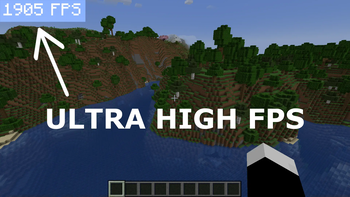
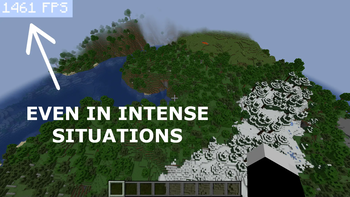
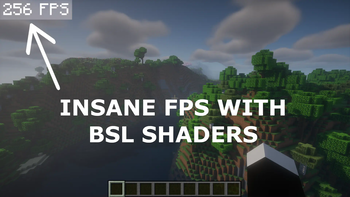
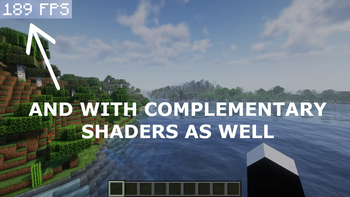
"I want to get crazy FPS like in the Screenshots!"
If you want to get more FPS than your monitor can show (if your PC can handle it, of course):
- Head to Options --> Video Settings --> General
- Turn off VSync, consider adjusting Max Framerate
Keep in mind that this consumes more power.
Verfügbare Versionen
Unbeatably Optimized Server einrichten
Server bestellen
Wähle mindestens 4 GB RAM (6 GB empfohlen für Unbeatably Optimized). Je nach Spieleranzahl: +1 GB pro 8 Spieler.
Modpack im Dashboard installieren
Öffne den Modpack-Browser im Dashboard, suche nach "Unbeatably Optimized" und klicke "Installieren". Der fabric-Loader und Minecraft 1.21.5 werden automatisch konfiguriert.
Server starten & spielen
Starte den Server – alle Mods werden automatisch geladen. Teile die Server-IP mit Freunden und spielt zusammen!
Häufige Fragen
Unbeatably Optimized Server crasht oder startet nicht – was tun?
Häufigste Ursachen: zu wenig RAM oder falscher fabric-Loader. Prüfe latest.log auf "OutOfMemoryError" → erhöhe RAM auf mindestens 6 GB. Bei "Mixin" oder "ClassNotFoundException": Modpack-Version und Loader stimmen nicht überein. Bei Mado Hosting werden Loader und Minecraft-Version beim Modpack-Install automatisch konfiguriert – das verhindert die meisten Startprobleme.
Wie viel RAM braucht ein Unbeatably Optimized Server wirklich?
Minimum 4 GB, empfohlen 6 GB für stabile Performance. +1 GB pro 8 Spieler. Wichtig: Minecraft-Modpacks brauchen mehr RAM als Vanilla – plane pro zusätzlichem Spieler extra ein. Bei Mado Hosting kannst du den RAM jederzeit live hochskalieren, ohne Datenverlust (ab €5.2/Monat).
Kann ich eigene Mods zu Unbeatably Optimized hinzufügen, ohne Konflikte?
Ja, aber achte auf die Kompatibilität: Nutze nur Mods für den gleichen Loader (fabric) und die gleiche Minecraft-Version (1.21.5). Häufige Probleme: ID-Konflikte bei Rezept-Mods und inkompatible Coremod-Versionen. Im Mado Dashboard zeigt der Mod-Browser nur kompatible Mods an und warnt bei bekannten Konflikten.
Unbeatably Optimized Server laggt – Performance-Tipps
1) RAM auf 6 GB+ erhöhen. 2) Server-View-Distance auf 8 reduzieren (server.properties). 3) Pre-Generiere Chunks mit dem "Chunky" Plugin. 4) Prüfe mit /spark profiler welche Mods die meiste Tick-Time verbrauchen. Bei Mado Hosting laufen alle Server auf NVMe-SSDs mit dedizierten CPU-Kernen – das eliminiert Hardware als Engpass.
Ähnliche Modpacks

![Cobblemon Official Modpack [Fabric]](https://cdn.modrinth.com/data/5FFgwNNP/e7f9ee2e9d361623847853fe2ddce42f519ee64f.png)
![COBBLEVERSE - Pokemon Adventure [Cobblemon]](https://cdn.modrinth.com/data/Jkb29YJU/581ecf54530972afb18a04660afd820f2f24f6c7.png)
![Better MC [FABRIC] - BMC2](https://cdn.modrinth.com/data/shFhR8Vx/a19c2bcb51d38f32f138d3607e91cb2b7b8e387f_96.webp)


Unbeatably Optimized Server mieten
Starte deinen eigenen Server mit automatischer Modpack-Installation.
Unterstützte Versionen
Starte deinen Unbeatably Optimized Server jetzt
Ab €5.20/Monat; für die beste Performance werden 6 GB RAM empfohlen.
Server konfigurieren →