
Vulkan Optimized
Optimized modpack based on VulkanMod
Screenshots
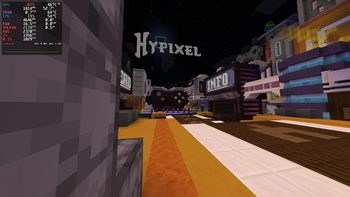
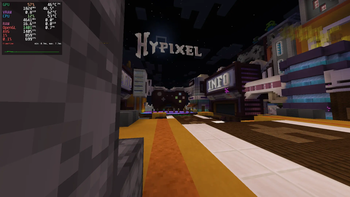
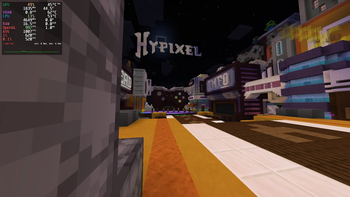
Über dieses Modpack
I got tired of OpenGL being OpenGL. So I built this.
VulkanMod core. Full engine swap — OpenGL 3.2 out, Vulkan 1.2 in. Not a wrapper. Not Sodium with extra steps. Actual renderer replacement.
Runs on Xwayland not native Wayland. If you're on X11 it'll work there too.
Probably works on Windows 11 (or 10).
The numbers
Tested on my daily driver:
| FPS | Vulkan Optimized | Sodium | Vanilla |
|---|---|---|---|
| AVG | 2370 | 1405 | 1007 |
| 1% | 1356 | 859 | 620 |
| 0.1% | 1029 | 699 | 520 |
| Power draw | 52.7W | 46.5W | 44.5W |
| FPS/W (AVG) | 44.97 | 30.22 | 22.63 |
+68% over Sodium. +135% over vanilla. And yeah, it pulls more watts — because it's actually using the GPU instead of letting the CPU bottleneck everything. It will probably more power efficient on vsync or fixed fps scenario.
see the Gallery for more information.
My rig
- CPU: Ryzen 5 5600X @ 4.65 GHz
- GPU: RX 9060 XT 16GB
- RAM: 32 GB
- OS: Alpine Linux 3.24
- Kernel: 7.1.3-0-stable
- Display: KWin (Wayland) → Xwayland
- JVM:
-Xmx6G -Xms6G -XX:+UseZGC -XX:+AlwaysPreTouch
Note: This test is using Prism Launcher on flatpak environment. You will probably gain more fps if you run it natively.
What's in the pack
VulkanMod. That's it for rendering. No Sodium, no OptiFine, no Canvas — they're all OpenGL rewrites and they fight with VulkanMod.
Everything else is curated for compatibility. No bloat. If it doesn't work with VulkanMod, it's not here.
Heads up
- Shader packs won't work. VulkanMod's shader support is improving but it's not OptiFine.
- Fabric only. No Forge version, don't ask.
- If you're on NVIDIA, your mileage may vary. AMD's where this shines.
That's it. Download it or don't. The numbers are above if you need convincing.
Verfügbare Versionen
Vulkan Optimized Server einrichten
Server bestellen
Wähle mindestens 4 GB RAM (6 GB empfohlen für Vulkan Optimized). Je nach Spieleranzahl: +1 GB pro 8 Spieler.
Modpack im Dashboard installieren
Öffne den Modpack-Browser im Dashboard, suche nach "Vulkan Optimized" und klicke "Installieren". Der fabric-Loader und Minecraft 26.1.2 werden automatisch konfiguriert.
Server starten & spielen
Starte den Server – alle Mods werden automatisch geladen. Teile die Server-IP mit Freunden und spielt zusammen!
Häufige Fragen
Vulkan Optimized Server crasht oder startet nicht – was tun?
Häufigste Ursachen: zu wenig RAM oder falscher fabric-Loader. Prüfe latest.log auf "OutOfMemoryError" → erhöhe RAM auf mindestens 6 GB. Bei "Mixin" oder "ClassNotFoundException": Modpack-Version und Loader stimmen nicht überein. Bei Mado Hosting werden Loader und Minecraft-Version beim Modpack-Install automatisch konfiguriert – das verhindert die meisten Startprobleme.
Wie viel RAM braucht ein Vulkan Optimized Server wirklich?
Minimum 4 GB, empfohlen 6 GB für stabile Performance. +1 GB pro 8 Spieler. Wichtig: Minecraft-Modpacks brauchen mehr RAM als Vanilla – plane pro zusätzlichem Spieler extra ein. Bei Mado Hosting kannst du den RAM jederzeit live hochskalieren, ohne Datenverlust (ab €5.2/Monat).
Kann ich eigene Mods zu Vulkan Optimized hinzufügen, ohne Konflikte?
Ja, aber achte auf die Kompatibilität: Nutze nur Mods für den gleichen Loader (fabric) und die gleiche Minecraft-Version (26.1.2). Häufige Probleme: ID-Konflikte bei Rezept-Mods und inkompatible Coremod-Versionen. Im Mado Dashboard zeigt der Mod-Browser nur kompatible Mods an und warnt bei bekannten Konflikten.
Vulkan Optimized Server laggt – Performance-Tipps
1) RAM auf 6 GB+ erhöhen. 2) Server-View-Distance auf 8 reduzieren (server.properties). 3) Pre-Generiere Chunks mit dem "Chunky" Plugin. 4) Prüfe mit /spark profiler welche Mods die meiste Tick-Time verbrauchen. Bei Mado Hosting laufen alle Server auf NVMe-SSDs mit dedizierten CPU-Kernen – das eliminiert Hardware als Engpass.
Ähnliche Modpacks

![Cobblemon Official Modpack [Fabric]](https://cdn.modrinth.com/data/5FFgwNNP/e7f9ee2e9d361623847853fe2ddce42f519ee64f.png)
![COBBLEVERSE - Pokemon Adventure [Cobblemon]](https://cdn.modrinth.com/data/Jkb29YJU/581ecf54530972afb18a04660afd820f2f24f6c7.png)
![Better MC [FABRIC] - BMC2](https://cdn.modrinth.com/data/shFhR8Vx/a19c2bcb51d38f32f138d3607e91cb2b7b8e387f_96.webp)


Vulkan Optimized Server mieten
Starte deinen eigenen Server mit automatischer Modpack-Installation.
Details
- Lizenz
- LicenseRef-All-Rights-Reserved
- Server-seitig
- Nicht unterstützt
- Client-seitig
- Erforderlich
Unterstützte Versionen
Starte deinen Vulkan Optimized Server jetzt
Ab €5.20/Monat; für die beste Performance werden 6 GB RAM empfohlen.
Server konfigurieren →