
Vulkanite
A modpack that makes Minecraft run extremely well all thanks to Vulkan.
Über dieses Modpack
Vulkanite
Vulkanite is a modpack based on the excellent mod VulkanMod. (From 20.1.0, Vulkanite now also provides Beryl, so it's technically Vulkanite/Berylite.)
Major Modpack Update following versions 20.1.0 and up
After the announcement that Minecraft is switching to native Vulkan, the goal of the modpack has changed. It keeps its role of giving an easy-to-install, fully fledged, vanilla+, performance-enhancing modpack, but now it works with Beryl in order to bring "Vibrant Visuals"-like shaders to Minecraft Java. You can always turn off the shader aesthetic in the Video Settings.
How does the modpack work?
Using the VulkanMod changes the rendering from OpenGL 3.2 to Vulkan 1.2+. This allows the average Minecraft player to play at a very high framerate while making the most of their hardware.
With that, Vulkanite also includes libraries that help with the user interface, like Jade 🔍 and adds support for custom textures, models and sounds.
C²ME is also a core part of the performance optimisation, and it benefits greatly from using Java 22 (until Minecraft 1.21.11 included).
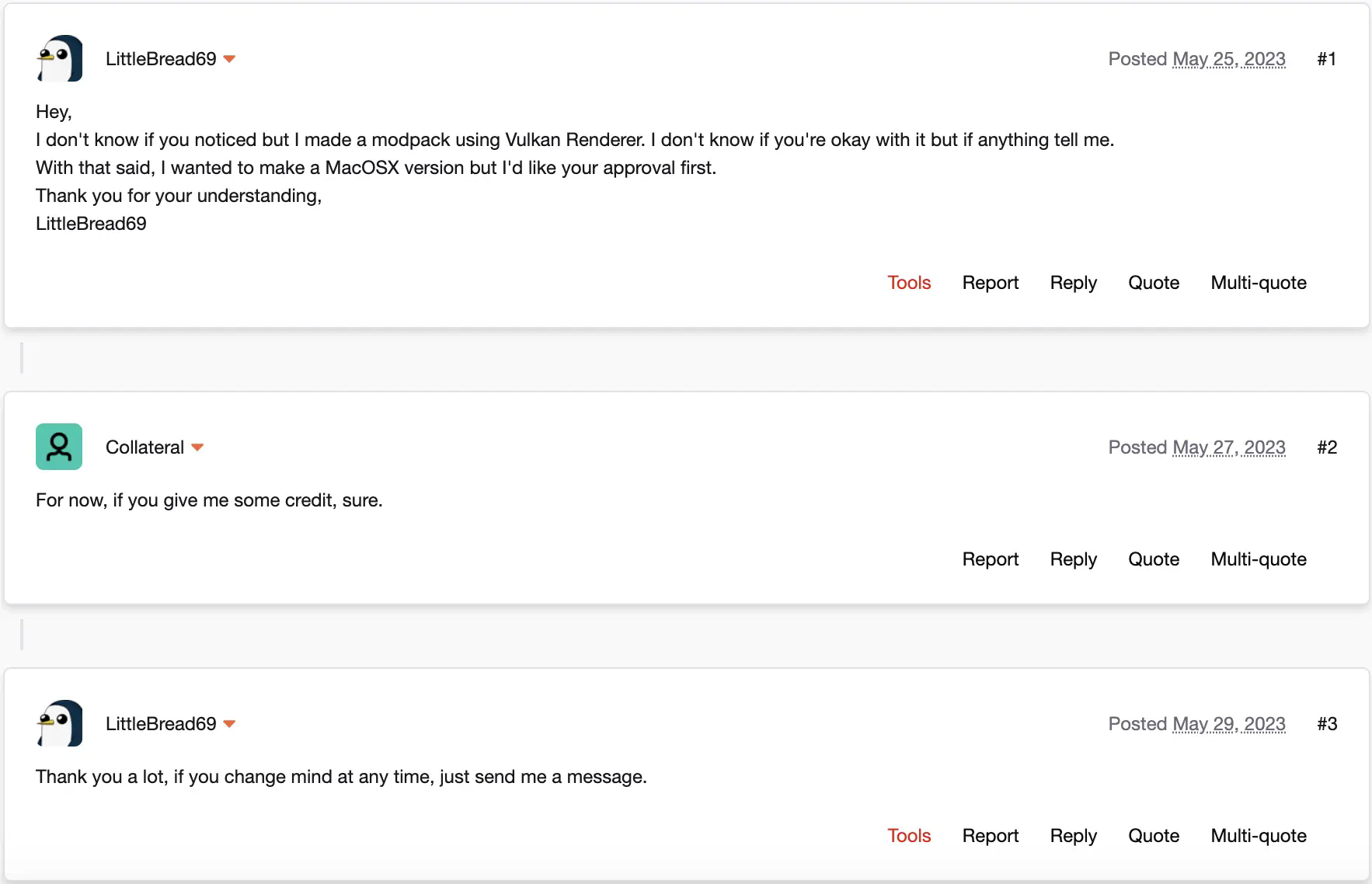
This modpack is approved by xCollateral, the developer of the mod at its core: Vulkan Renderer/VulkanMod.
This modpack should run on Windows without any problems and should run on Linux pretty much equally well. The modpack should work on MacOS too (1.20.6+).
Requirements
These requirements were tested on previous versions of Vulkanite, so here be dragons.
Minimum
- 4-core CPU
- 2 GHz base clock
- iGPU
- 2 GB RAM
- 2 GB VRAM
- Java 21
Recommended
- 6-core CPU
- 2.8 GHz base clock
- dGPU GTX 970 or better
- 8 GB RAM
- 4 GB VRAM
- Java 22 (C2ME benefits a lot from it)
Modpack approval by xCollateral
Verfügbare Versionen
Vulkanite Server einrichten
Server bestellen
Wähle mindestens 4 GB RAM (6 GB empfohlen für Vulkanite). Je nach Spieleranzahl: +1 GB pro 8 Spieler.
Modpack im Dashboard installieren
Öffne den Modpack-Browser im Dashboard, suche nach "Vulkanite" und klicke "Installieren". Der fabric-Loader und Minecraft 1.21.11 werden automatisch konfiguriert.
Server starten & spielen
Starte den Server – alle Mods werden automatisch geladen. Teile die Server-IP mit Freunden und spielt zusammen!
Häufige Fragen
Vulkanite Server crasht oder startet nicht – was tun?
Häufigste Ursachen: zu wenig RAM oder falscher fabric-Loader. Prüfe latest.log auf "OutOfMemoryError" → erhöhe RAM auf mindestens 6 GB. Bei "Mixin" oder "ClassNotFoundException": Modpack-Version und Loader stimmen nicht überein. Bei Mado Hosting werden Loader und Minecraft-Version beim Modpack-Install automatisch konfiguriert – das verhindert die meisten Startprobleme.
Wie viel RAM braucht ein Vulkanite Server wirklich?
Minimum 4 GB, empfohlen 6 GB für stabile Performance. +1 GB pro 8 Spieler. Wichtig: Minecraft-Modpacks brauchen mehr RAM als Vanilla – plane pro zusätzlichem Spieler extra ein. Bei Mado Hosting kannst du den RAM jederzeit live hochskalieren, ohne Datenverlust (ab €5.2/Monat).
Kann ich eigene Mods zu Vulkanite hinzufügen, ohne Konflikte?
Ja, aber achte auf die Kompatibilität: Nutze nur Mods für den gleichen Loader (fabric) und die gleiche Minecraft-Version (1.21.11). Häufige Probleme: ID-Konflikte bei Rezept-Mods und inkompatible Coremod-Versionen. Im Mado Dashboard zeigt der Mod-Browser nur kompatible Mods an und warnt bei bekannten Konflikten.
Vulkanite Server laggt – Performance-Tipps
1) RAM auf 6 GB+ erhöhen. 2) Server-View-Distance auf 8 reduzieren (server.properties). 3) Pre-Generiere Chunks mit dem "Chunky" Plugin. 4) Prüfe mit /spark profiler welche Mods die meiste Tick-Time verbrauchen. Bei Mado Hosting laufen alle Server auf NVMe-SSDs mit dedizierten CPU-Kernen – das eliminiert Hardware als Engpass.
Ähnliche Modpacks

![Cobblemon Official Modpack [Fabric]](https://cdn.modrinth.com/data/5FFgwNNP/e7f9ee2e9d361623847853fe2ddce42f519ee64f.png)
![COBBLEVERSE - Pokemon Adventure [Cobblemon]](https://cdn.modrinth.com/data/Jkb29YJU/581ecf54530972afb18a04660afd820f2f24f6c7.png)

![Better MC [FABRIC] - BMC2](https://cdn.modrinth.com/data/shFhR8Vx/a19c2bcb51d38f32f138d3607e91cb2b7b8e387f_96.webp)

Vulkanite Server mieten
Starte deinen eigenen Server mit automatischer Modpack-Installation.
Unterstützte Versionen
Starte deinen Vulkanite Server jetzt
Ab €5.20/Monat; für die beste Performance werden 6 GB RAM empfohlen.
Server konfigurieren →