
W1 Optimized
Optimization, Performance, FPS
Screenshots
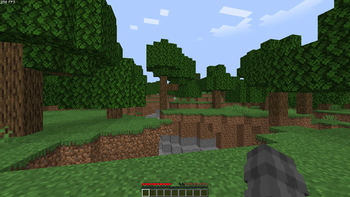
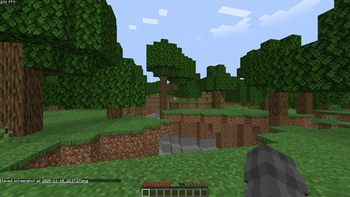
Über dieses Modpack
Modpack that do minecraft works on all potatos:) intel uhd graphics over 260fps in fancy setting 8 render, intel hd 4000 works 120fps+ too,
Even on your smart watch will go up to 70 fps, enjoy your fps boost:)
W1 Optimized – Lightweight & Performance-Focused Modpack
Want to play Minecraft smoothly on lower-end PCs and laptops? W1 Optimized delivers stable 60 FPS in Full HD while keeping things fast, clean, and optimized.
Performance Boosts: Reduced lag, faster load times, optimized mods
Minimal Yet Functional Content: Only essential mods to enhance gameplay
Forge/Fabric Compatible: Easy installation via Minecraft Launcher / Modrinth
Ready to Play: Just download the .mrpack and jump in
Regular Updates & Support: Bug fixes and new versions on time
Perfect for:
Players with laptops or lower-end PCs
Anyone who wants Minecraft optimized without unnecessary bloat
Gamers who value speed and stability
W1 Optimized – Play fast, play smooth, play lag-free
THE BEST OPTIMIZATION MODPACK FOR FABRIC
(This modpack contains mods created by other authors.
All mods remain the property of their respective creators.
This pack is distributed for personal use only and does not claim ownership of any included mods.)
Verfügbare Versionen
W1 Optimized Server einrichten
Server bestellen
Wähle mindestens 4 GB RAM (6 GB empfohlen für W1 Optimized). Je nach Spieleranzahl: +1 GB pro 8 Spieler.
Modpack im Dashboard installieren
Öffne den Modpack-Browser im Dashboard, suche nach "W1 Optimized" und klicke "Installieren". Der fabric-Loader und Minecraft 26.1.2 werden automatisch konfiguriert.
Server starten & spielen
Starte den Server – alle Mods werden automatisch geladen. Teile die Server-IP mit Freunden und spielt zusammen!
Häufige Fragen
W1 Optimized Server crasht oder startet nicht – was tun?
Häufigste Ursachen: zu wenig RAM oder falscher fabric-Loader. Prüfe latest.log auf "OutOfMemoryError" → erhöhe RAM auf mindestens 6 GB. Bei "Mixin" oder "ClassNotFoundException": Modpack-Version und Loader stimmen nicht überein. Bei Mado Hosting werden Loader und Minecraft-Version beim Modpack-Install automatisch konfiguriert – das verhindert die meisten Startprobleme.
Wie viel RAM braucht ein W1 Optimized Server wirklich?
Minimum 4 GB, empfohlen 6 GB für stabile Performance. +1 GB pro 8 Spieler. Wichtig: Minecraft-Modpacks brauchen mehr RAM als Vanilla – plane pro zusätzlichem Spieler extra ein. Bei Mado Hosting kannst du den RAM jederzeit live hochskalieren, ohne Datenverlust (ab €5.2/Monat).
Kann ich eigene Mods zu W1 Optimized hinzufügen, ohne Konflikte?
Ja, aber achte auf die Kompatibilität: Nutze nur Mods für den gleichen Loader (fabric) und die gleiche Minecraft-Version (26.1.2). Häufige Probleme: ID-Konflikte bei Rezept-Mods und inkompatible Coremod-Versionen. Im Mado Dashboard zeigt der Mod-Browser nur kompatible Mods an und warnt bei bekannten Konflikten.
W1 Optimized Server laggt – Performance-Tipps
1) RAM auf 6 GB+ erhöhen. 2) Server-View-Distance auf 8 reduzieren (server.properties). 3) Pre-Generiere Chunks mit dem "Chunky" Plugin. 4) Prüfe mit /spark profiler welche Mods die meiste Tick-Time verbrauchen. Bei Mado Hosting laufen alle Server auf NVMe-SSDs mit dedizierten CPU-Kernen – das eliminiert Hardware als Engpass.
Ähnliche Modpacks

![Cobblemon Official Modpack [Fabric]](https://cdn.modrinth.com/data/5FFgwNNP/e7f9ee2e9d361623847853fe2ddce42f519ee64f.png)
![COBBLEVERSE - Pokemon Adventure [Cobblemon]](https://cdn.modrinth.com/data/Jkb29YJU/581ecf54530972afb18a04660afd820f2f24f6c7.png)
![Better MC [FABRIC] - BMC2](https://cdn.modrinth.com/data/shFhR8Vx/a19c2bcb51d38f32f138d3607e91cb2b7b8e387f_96.webp)


W1 Optimized Server mieten
Starte deinen eigenen Server mit automatischer Modpack-Installation.
Details
- Lizenz
- LicenseRef-W1-Optimized-Fabric-Modpack-License
- Server-seitig
- Nicht unterstützt
- Client-seitig
- Erforderlich
Unterstützte Versionen
Starte deinen W1 Optimized Server jetzt
Ab €5.20/Monat; für die beste Performance werden 6 GB RAM empfohlen.
Server konfigurieren →