
World of Wynncraft
Wynncraft RTX, better menus, and all my wynn mods in one place!
Screenshots

Über dieses Modpack
Please Read the Installation Section Below!!!
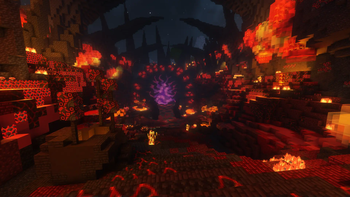
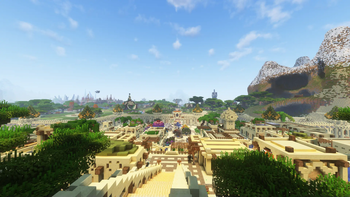
This modpack is very close to how I dreamed Wynncraft would one day look back in 2013. Distant Horizons allows for unlimited render distance, Rethinking Voxels provides ray-traced lighting, the wonderful Wynntils and WynnVentory add all the features vanilla Wynncraft lacks.
What's Up
Yeah, we got raytracing in this bad mama jama, and there are a few other things too, bra.
Wynncraft RTX
This ain't for the faint of heart. A BeefyTM computer is a must-have, or those on low-end computers could switch to BSL which I've also included with a custom preset.
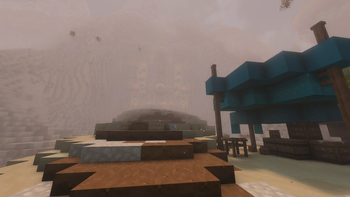
Dynamic Weather + Dynamic LODs
Using the Wynncraft dynamic weather engine mod created by Quikjay for use in his modpack (which you should also check out) and WynnVista created by me for use in this modpack!
Custom Main Menu, Options, Pause, and Loading Screen
All my most used tings now at your fingertips. Oh, and it looks pretty too.
Overhauled Inventory
WynnVentory displays the price of items on the trade market, my mod Wynn Weapon Viewer adds an enlarged preview of your weapon model (which now looks amazing thanks to Mythos). There are also buttons to toggle the weapon viewer and quickly share your build with a link, using the wonderful WynnBuild mod. We also got some neat animations thanks to Immersive UI.
Some stuff you may want to know
- Distant Horizons set to 80 chunks to preserve the feeling of multiple continents
- Visually based around WynnEdits Dark Theme
- Custom WynnToolTips resourcepack for Dark Theme
- Wynntils config included but knowing y'all sweats you probably gunna import your own
- Custom version of the Nimble mod created by me specifically for Wynncraft.
This modpack is far from finished and I will be continuously updating it as more mods port to 1.21, check out a list of mods I'm waiting on here.
Installation
"WAH WAH MY RENDER DISTANCE IS SO SMALL" Does this sound like the voice in your head? Well, due to filesize limitations on Modrinth, the Distant Horizons LODs files aren't included in the download, you must accept the download after loading into the game. If you clicked reject already you can still download the LODs by typing /wynn_lod_yes make sure to include the underscores.
Addons: WynnAspects (Optional)
- This mod automatically tracks your aspects after every raid and has a very cool website dashboard.
- If you are interested, download the latest version and place the .jar in the mods folder inside the modpack folder and follow the instructions once in-game.
Configurations
- Wynncraft Settings:
If you are using my Wynntils config and not importing your own, I recommend typing the following commands once you join a world.
/toggle beacon
/toggle queststartbeacon
- Keybinds and Video Settings:
I recommend you change what buttons cast each spell in the Wynntils section in the Keybinds menu. You can also setup your own keybind profiles for each class in the Class Keybind Profiles Mod Menu settings page.
I've set the render distance at 12 chunks with DH at 80 chunks, the shader pack is tuned for this specifically so you might need to mess with shader pack settings if you edit the video settings.
The modpack is best played in fullscreen, but it can be played in windowed mode as long as you make the window large enough to accommodate the custom menus.
Modlist and Credits
You can view the modlist with links to all the mods for any version uploaded on the Modrinth project page The following resourcepacks were also used with permission from the authors.
- The Alagard Font by Hewett Tsoi
- Baby Ice Snake's and Meteors by onepointseven
- Acrobat Audio QOL by Elysium
- Domix Wynncraft Overhaul
- Mythos by ProbsWinter
- Wynncraft: Fables & Legends by Rythew
- Wynn ToolTips by FocalSalt
Support and My Mods
Please report any bugs or feature suggestions on the Github Issues page, I'll be updating this frequently with community feedback and ideas! You can also join my discord if you need direct support, or want to stay updated with all of my mods.
Check out all my projects!
Verfügbare Versionen
World of Wynncraft Server einrichten
Server bestellen
Wähle mindestens 6 GB RAM (8 GB empfohlen für World of Wynncraft). Je nach Spieleranzahl: +1 GB pro 5 Spieler.
Modpack im Dashboard installieren
Öffne den Modpack-Browser im Dashboard, suche nach "World of Wynncraft" und klicke "Installieren". Der fabric-Loader und Minecraft 1.21.11 werden automatisch konfiguriert.
Server starten & spielen
Starte den Server – alle Mods werden automatisch geladen. Teile die Server-IP mit Freunden und spielt zusammen!
Häufige Fragen
World of Wynncraft Server crasht oder startet nicht – was tun?
Häufigste Ursachen: zu wenig RAM oder falscher fabric-Loader. Prüfe latest.log auf "OutOfMemoryError" → erhöhe RAM auf mindestens 8 GB. Bei "Mixin" oder "ClassNotFoundException": Modpack-Version und Loader stimmen nicht überein. Bei Mado Hosting werden Loader und Minecraft-Version beim Modpack-Install automatisch konfiguriert – das verhindert die meisten Startprobleme.
Wie viel RAM braucht ein World of Wynncraft Server wirklich?
Minimum 6 GB, empfohlen 8 GB für stabile Performance. +1 GB pro 5 Spieler. Wichtig: Minecraft-Modpacks brauchen mehr RAM als Vanilla – plane pro zusätzlichem Spieler extra ein. Bei Mado Hosting kannst du den RAM jederzeit live hochskalieren, ohne Datenverlust (ab €7.800000000000001/Monat).
Kann ich eigene Mods zu World of Wynncraft hinzufügen, ohne Konflikte?
Ja, aber achte auf die Kompatibilität: Nutze nur Mods für den gleichen Loader (fabric) und die gleiche Minecraft-Version (1.21.11). Häufige Probleme: ID-Konflikte bei Rezept-Mods und inkompatible Coremod-Versionen. Im Mado Dashboard zeigt der Mod-Browser nur kompatible Mods an und warnt bei bekannten Konflikten.
World of Wynncraft Server laggt – Performance-Tipps
1) RAM auf 8 GB+ erhöhen. 2) Server-View-Distance auf 8 reduzieren (server.properties). 3) Pre-Generiere Chunks mit dem "Chunky" Plugin. 4) Prüfe mit /spark profiler welche Mods die meiste Tick-Time verbrauchen. Bei Mado Hosting laufen alle Server auf NVMe-SSDs mit dedizierten CPU-Kernen – das eliminiert Hardware als Engpass.
Ähnliche Modpacks
![Cobblemon Official Modpack [Fabric]](https://cdn.modrinth.com/data/5FFgwNNP/e7f9ee2e9d361623847853fe2ddce42f519ee64f.png)
![COBBLEVERSE - Pokemon Adventure [Cobblemon]](https://cdn.modrinth.com/data/Jkb29YJU/581ecf54530972afb18a04660afd820f2f24f6c7.png)
![Better MC [FABRIC] - BMC2](https://cdn.modrinth.com/data/shFhR8Vx/a19c2bcb51d38f32f138d3607e91cb2b7b8e387f_96.webp)


![Better MC [FORGE] - BMC4](https://cdn.modrinth.com/data/4BV47HRn/7f5ef7cc61b2593609aabef3ed07a866a4f11b73_96.webp)
World of Wynncraft Server mieten
Starte deinen eigenen Server mit automatischer Modpack-Installation.
Details
- Lizenz
- GNU Lesser General Public License v3.0 only
- Server-seitig
- Optional
- Client-seitig
- Erforderlich
Unterstützte Versionen
Starte deinen World of Wynncraft Server jetzt
Ab €7.80/Monat; für die beste Performance werden 8 GB RAM empfohlen.
Server konfigurieren →