
Wynncraft Cakedition
Yet another Wynncraft client modpack. That might solve you map being black. Current outdated now. 112.2 and 1.19.4 are achieved and won't received further update.
Screenshots
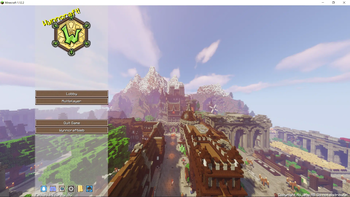
Über dieses Modpack

Yet Another wynncraft client modpack 欸對,又是一個wynncraft的模組包。
Forge Version still WIP
NOTIFICATION: THIS MODPACK IS CURRENTLY OUTDATED
What does it have
- Performance
Wynncraft Cakedition provides you decent performance boost , thanks to great mods like Sodium(1.19.4) , Betterfps(1.12.2) and many more!
- QoL
Mainly Wynntils(Mirrored) and a few more but don't affect performance like Invhud and others!
- Minimum unnecessary graphic
This pack don't came up with too much graphic enhancement so it can reduce the impact to performance by some. But still , shader support mod is install in 1.19.4 Iris and come with a great shader pack complementary-reimagined!
For 1.12.2 you'll need to manually install Optifine by yourself due to the license issue.
How to install it.
1. Click Optifine.2. Find for Minecraft 1.12.2 version and download it.
3. Run the installer and click "Extract" and put it where you can find it easy.
4. Drag Optifine mod into your .minecraft/mods folder .
5. Enjoy!
- Minor Chinese Support 些微的中文支持 (1.12.2 only)
The 1.12.2 version start with Chinese having WCT-R providing minor translations on item stats and others on default.
預設下,WCT-R(詞條翻譯)是開啟的狀態。
How to turn on translation from wynntils 如何打開wynntils翻譯功能!
1. Esc and click Wynntils menu. Esc 並單擊 Wynntils 菜單。2. Click configuration. 單擊 configuration。
3. Click search bar for and type "translation" , and scroll down to click the translation button on left side then click to enable translation and select target language to "zh" . and click apply .
點擊搜索欄並輸入 "翻譯",然後向下滾動,點擊左側的translation條例。 然後點擊啟用traslation並將language選擇為 "zh",然後點左下的apply。
Useful Links
Contact me on Wynntils Discord server or Unofficial Wynncraft qq group for issues and suggestions.
GithubPage(WIP)
Mod List
You can find the mods list from version (scroll down a bit) , underneath is for mods aren't in modrinth.
Modlist for 1.12.2!
- Better HUD
- Blur
- CleanView
- Custom Loading Screen
- Custom Main Menu (Customized Version that added images and change default options inside .jar)
- noautojump
- Wynncraft Inventory Manager
- Wynncraft Chinese Translate (Chinese version only)
Credits
Thanks gensokyo-reimagined-qol for configurations of many mods.
Thanks WukiBaka for mirrored wynntils.
Thanks Moe_Block for language support.
Thanks Moe_Muyo for texture support.
Thanks NotAFish for wynncraft assets permission consult.
Disclamer
This modpack is not affiliated with Wynntils or any other mod included or Wynncraft. Do not report any modpack related bugs or issues to them. Report them directly to me instead.
Verfügbare Versionen
Wynncraft Cakedition Server einrichten
Server bestellen
Wähle mindestens 6 GB RAM (8 GB empfohlen für Wynncraft Cakedition). Je nach Spieleranzahl: +1 GB pro 5 Spieler.
Modpack im Dashboard installieren
Öffne den Modpack-Browser im Dashboard, suche nach "Wynncraft Cakedition" und klicke "Installieren". Der fabric-Loader und Minecraft 1.20.2 werden automatisch konfiguriert.
Server starten & spielen
Starte den Server – alle Mods werden automatisch geladen. Teile die Server-IP mit Freunden und spielt zusammen!
Häufige Fragen
Wynncraft Cakedition Server crasht oder startet nicht – was tun?
Häufigste Ursachen: zu wenig RAM oder falscher fabric-Loader. Prüfe latest.log auf "OutOfMemoryError" → erhöhe RAM auf mindestens 8 GB. Bei "Mixin" oder "ClassNotFoundException": Modpack-Version und Loader stimmen nicht überein. Bei Mado Hosting werden Loader und Minecraft-Version beim Modpack-Install automatisch konfiguriert – das verhindert die meisten Startprobleme.
Wie viel RAM braucht ein Wynncraft Cakedition Server wirklich?
Minimum 6 GB, empfohlen 8 GB für stabile Performance. +1 GB pro 5 Spieler. Wichtig: Minecraft-Modpacks brauchen mehr RAM als Vanilla – plane pro zusätzlichem Spieler extra ein. Bei Mado Hosting kannst du den RAM jederzeit live hochskalieren, ohne Datenverlust (ab €7.800000000000001/Monat).
Kann ich eigene Mods zu Wynncraft Cakedition hinzufügen, ohne Konflikte?
Ja, aber achte auf die Kompatibilität: Nutze nur Mods für den gleichen Loader (fabric) und die gleiche Minecraft-Version (1.20.2). Häufige Probleme: ID-Konflikte bei Rezept-Mods und inkompatible Coremod-Versionen. Im Mado Dashboard zeigt der Mod-Browser nur kompatible Mods an und warnt bei bekannten Konflikten.
Wynncraft Cakedition Server laggt – Performance-Tipps
1) RAM auf 8 GB+ erhöhen. 2) Server-View-Distance auf 8 reduzieren (server.properties). 3) Pre-Generiere Chunks mit dem "Chunky" Plugin. 4) Prüfe mit /spark profiler welche Mods die meiste Tick-Time verbrauchen. Bei Mado Hosting laufen alle Server auf NVMe-SSDs mit dedizierten CPU-Kernen – das eliminiert Hardware als Engpass.
Ähnliche Modpacks
![Cobblemon Official Modpack [Fabric]](https://cdn.modrinth.com/data/5FFgwNNP/e7f9ee2e9d361623847853fe2ddce42f519ee64f.png)
![COBBLEVERSE - Pokemon Adventure [Cobblemon]](https://cdn.modrinth.com/data/Jkb29YJU/581ecf54530972afb18a04660afd820f2f24f6c7.png)
![Better MC [FABRIC] - BMC2](https://cdn.modrinth.com/data/shFhR8Vx/a19c2bcb51d38f32f138d3607e91cb2b7b8e387f_96.webp)


![Better MC [FORGE] - BMC4](https://cdn.modrinth.com/data/4BV47HRn/7f5ef7cc61b2593609aabef3ed07a866a4f11b73_96.webp)
Wynncraft Cakedition Server mieten
Starte deinen eigenen Server mit automatischer Modpack-Installation.
Unterstützte Versionen
Starte deinen Wynncraft Cakedition Server jetzt
Ab €7.80/Monat; für die beste Performance werden 8 GB RAM empfohlen.
Server konfigurieren →