
Accessible Step
Step up full blocks without reaching for the jump button. Now for multiple mod loaders!
Screenshots
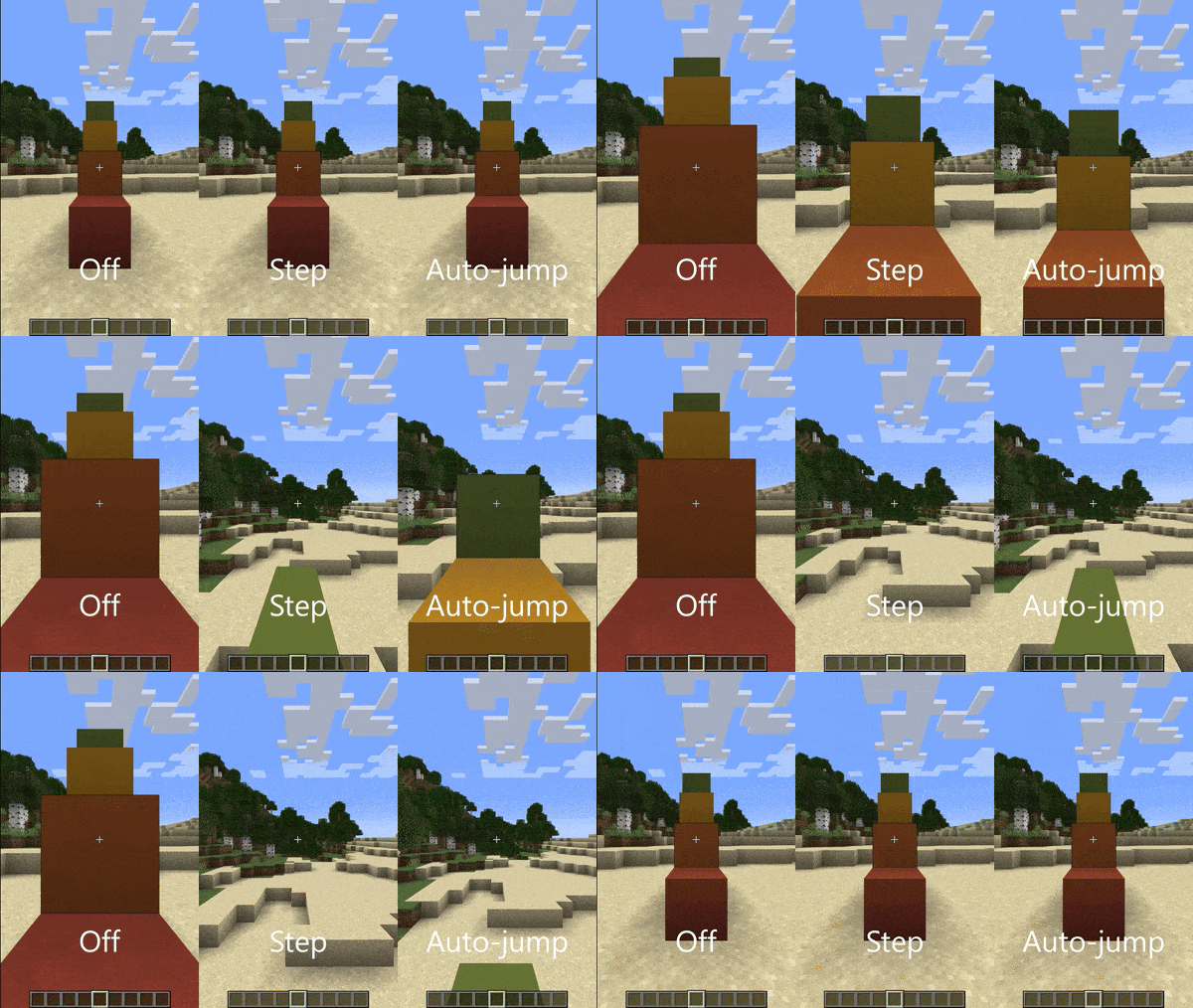
Über diese Mod
Accessible Step
Walk up full-height blocks without reaching for the jump button.
- Fabric releases of this mod require Fabric API.
- Neoforge/Forge releases do not require any other mods.
This mod adds a new "Step Assistance" option into the Accessibility and Controls screens, replacing the auto-jump option. Like auto-jump, it is off by default on new installations of Minecraft, so you will need to turn it on yourself.
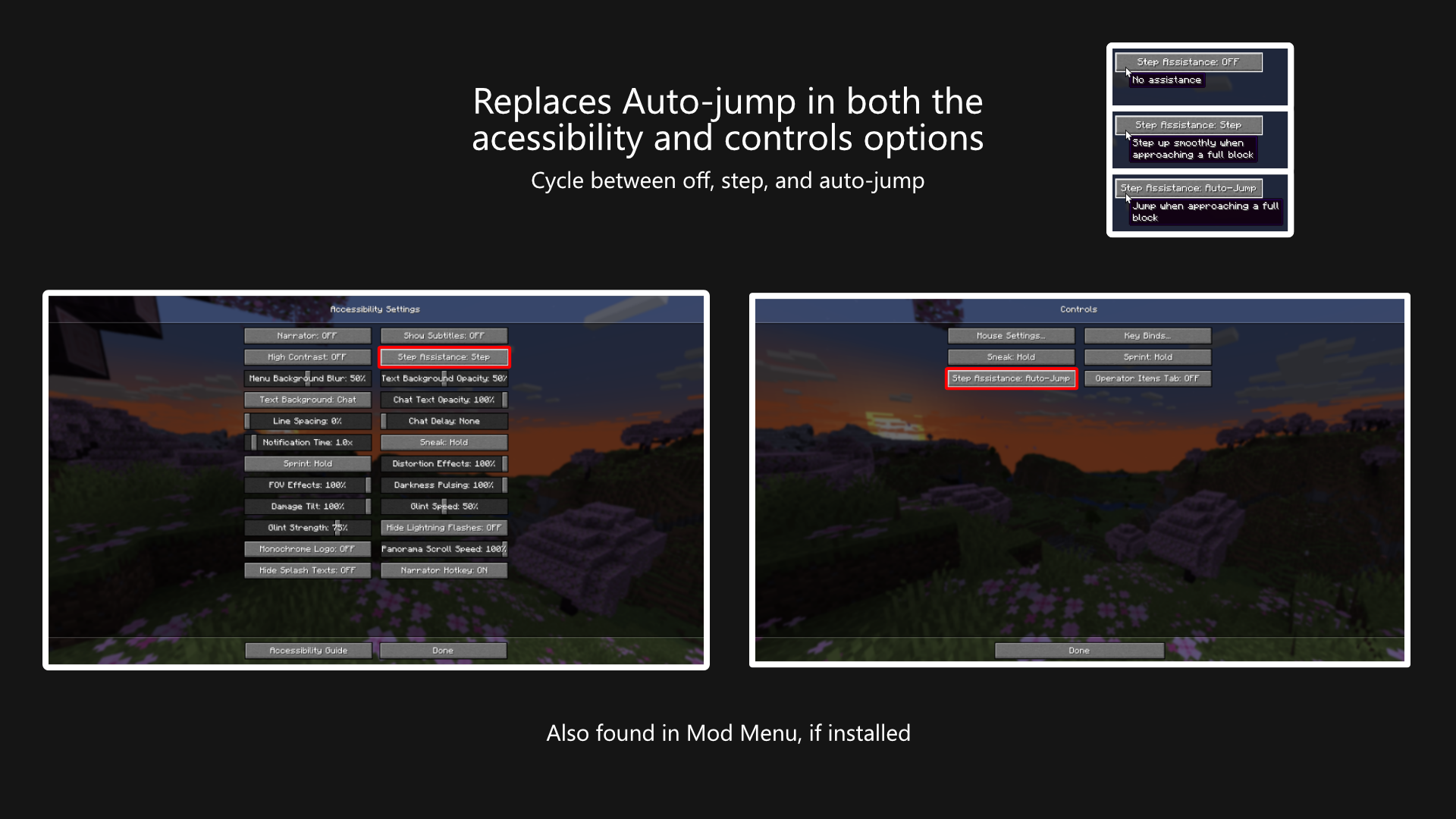
The option can be cycled between three values:
- Off, where no assistance is given.
- Step, where the player's step height is increased to cover full blocks.
- Auto-jump, where Minecraft's built-in auto-jump is used.
Does this work on Multiplayer?
Yes, this mod works on multiplayer. This mod does not have to be installed on the server.
Why yet another stepping-up-blocks mod?
Mostly, it's because I'm learning to mod and small projects like these are good ways to learn new parts of the game's code.
But also I've wanted to maintain a small set of mods that I commonly use so I can update them whenever I like. I've since over-engineered some automation to update things automatically, so I'm more confident that I can actually maintain these mods over a longer term.
I'm probably not going to port this further back than 1.20, but if you find yourself needing this for earlier versions, check out StepUp for Fabric, or StepItUp for Forge.
Translation
A big thank you to the following people for their work:
- VladAndreiMorariu - Italian
- se5473351 - Chinese (Simplified)
- FluorescentLava - Chinese (Simplified)
If you want to help make this mod easier to use for people around the earth, then please don't hesitate to create a pull request adding/updating the language files on GitHub.
License
This mod is licensed under the Mozilla Public License 2.0. You may use this mod in your mod packs.
Verfügbare Versionen
Accessible Step auf deinem Client installieren
Mod-Loader lokal installieren
Installiere fabric für deine lokale Minecraft-Version.
Passende Datei herunterladen
Wähle die Accessible Step-Datei für fabric und Minecraft 26.3.
Mod installieren
Lege die .jar-Datei in deinem lokalen .minecraft/mods-Ordner ab und starte Minecraft neu. Eine Installation auf dem Server ist nicht nötig.
Kompatibilität
Mod-Loader
Minecraft-Versionen
26.3, 26.2, 26.1.2 (+21 weitere)
Server-seitig
✗ Nicht unterstütztEmpfohlener RAM
4 GB(min. 3 GB)Häufige Fragen
Muss Accessible Step auf dem Minecraft Server installiert werden?
Nein. Modrinth kennzeichnet Accessible Step serverseitig als nicht unterstützt. Installiere die Mod nur im lokalen Minecraft-Mods-Ordner. Dein Server kann unverändert bleiben, sofern die Mod-Seite keine zusätzliche Abhängigkeit nennt.
Welche Version und welchen Loader braucht Accessible Step?
Nutze eine Datei für fabric, forge, neoforge und exakt deine Minecraft-Version. Unterstützte Versionen sind unter anderem 26.3, 26.2, 26.1.2. Loader-Dateien sind nicht untereinander austauschbar.
Accessible Step funktioniert nicht – was kann ich prüfen?
Prüfe zuerst Minecraft-Version, Loader-Version und erforderliche Abhängigkeiten. Lege die .jar-Datei im lokalen .minecraft/mods-Ordner ab und entferne ältere Duplikate. Da die Mod clientseitig ist, löst mehr Server-RAM dieses Problem nicht.
Ähnliche Mods




![[ETF] Entity Texture Features](https://cdn.modrinth.com/data/BVzZfTc1/af683d206d50b05258d865b0d6e4aa2f2cee12f2_96.webp)

Minecraft Server für deine Gruppe
Accessible Step bleibt auf deinem Client. Hoste dazu eine kompatible Welt für deine Mitspieler.