![[ETF] Entity Texture Features](https://cdn.modrinth.com/data/BVzZfTc1/af683d206d50b05258d865b0d6e4aa2f2cee12f2_96.webp)
[ETF] Entity Texture Features
Emissive, Random & Custom texture support for entities in resourcepacks just like Optifine but for Fabric
Screenshots

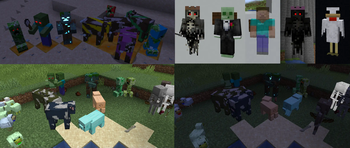

Über diese Mod
Entity Texture Features


About
ETF is a Fabric, Forge & NeoForge mod that adds many Entity Texture Features, including entity and player skin features!
ETF primarily supports the OptiFine format, acting as one of the alternative mods to OptiFine, but with many more features and options!
If you want more OptiFine features on Fabric, you can either check this list, made by LambdaAurora, or you can use the Fabulously Optimized modpack, which includes all the OptiFine parity mods!
Features
- Custom & random entity textures with the OptiFine format, including even more properties! [guide]
- Emissive/glowing entity textures with the OptiFine format, [guide]
- Simple format for blinking mobs. [guide]
- Player skin features, including blinking, emissive textures, and more! [guide]
Compatible with
- OptiFine's random/custom or emissive entity resource packs
- Entity Model Features (EMF)
- dorianpb's old CEM mod
- Sodium
- Iris Shaders (Support varies depending on the shader)
- Modded entities (Only if the mod creator uses the vanilla rendering code to render their mobs)
- And many more
Settings & configuration
Settings can be changed in-game using Mod Menu, the settings button in the resource pack screen, or by editing the config file, located under config/entity_texture_features.json
Mod support
This mod should be compatible with any mod added entities as long as they use regular vanilla rendering
Any mod displaying an entity in a custom GUI can force the default texture by having the entity.getblockstate set to either null or of type VOID_AIR, the same can be achieved by settings the display mob's UUID to UUID.nameUUIDFromBytes(("GENERIC").getBytes()).
Changelog
You can find the changelog here.
Need help or have questions?
You can reach out on my Discord (preferred) or open an issue on GitHub.
Hosting Partner deal

Verfügbare Versionen
[ETF] Entity Texture Features auf deinem Client installieren
Mod-Loader lokal installieren
Installiere fabric für deine lokale Minecraft-Version.
Passende Datei herunterladen
Wähle die [ETF] Entity Texture Features-Datei für fabric und Minecraft 26.3.
Mod installieren
Lege die .jar-Datei in deinem lokalen .minecraft/mods-Ordner ab und starte Minecraft neu. Eine Installation auf dem Server ist nicht nötig.
Kompatibilität
Mod-Loader
Minecraft-Versionen
26.3, 26.2, 26.1.2 (+49 weitere)
Server-seitig
✗ Nicht unterstütztEmpfohlener RAM
4 GB(min. 3 GB)Häufige Fragen
Muss [ETF] Entity Texture Features auf dem Minecraft Server installiert werden?
Nein. Modrinth kennzeichnet [ETF] Entity Texture Features serverseitig als nicht unterstützt. Installiere die Mod nur im lokalen Minecraft-Mods-Ordner. Dein Server kann unverändert bleiben, sofern die Mod-Seite keine zusätzliche Abhängigkeit nennt.
Welche Version und welchen Loader braucht [ETF] Entity Texture Features?
Nutze eine Datei für fabric, forge, neoforge, quilt und exakt deine Minecraft-Version. Unterstützte Versionen sind unter anderem 26.3, 26.2, 26.1.2. Loader-Dateien sind nicht untereinander austauschbar.
[ETF] Entity Texture Features funktioniert nicht – was kann ich prüfen?
Prüfe zuerst Minecraft-Version, Loader-Version und erforderliche Abhängigkeiten. Lege die .jar-Datei im lokalen .minecraft/mods-Ordner ab und entferne ältere Duplikate. Da die Mod clientseitig ist, löst mehr Server-RAM dieses Problem nicht.
Ähnliche Mods

![[EMF] Entity Model Features](https://cdn.modrinth.com/data/4I1XuqiY/6e5bbd0d06b1741bfdab6c0cfab6de8fdaf0064c_96.webp)




Minecraft Server für deine Gruppe
[ETF] Entity Texture Features bleibt auf deinem Client. Hoste dazu eine kompatible Welt für deine Mitspieler.
Details
- Lizenz
- GNU Lesser General Public License v3.0 only
- Server-seitig
- Nicht unterstützt