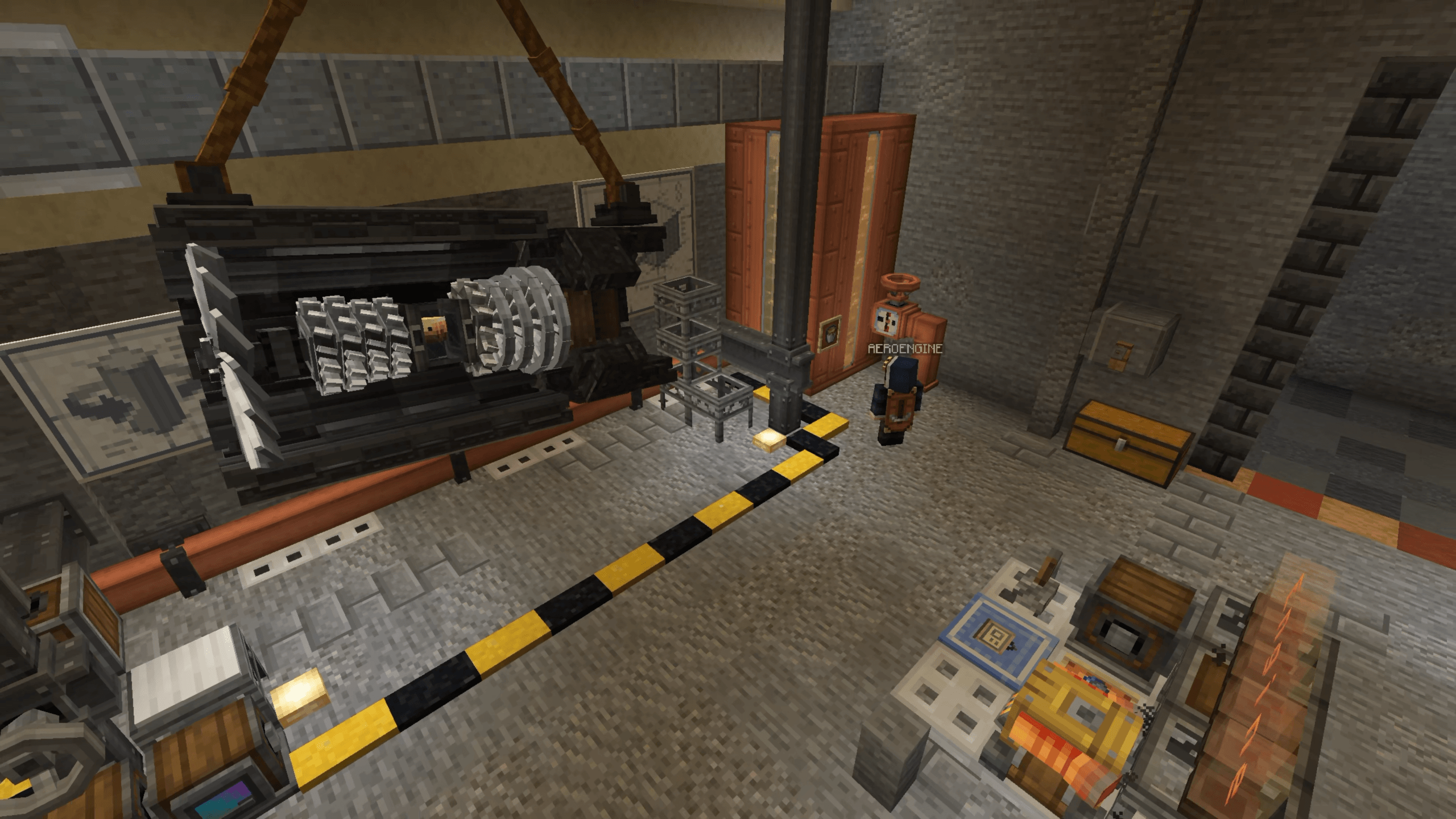

Modrinth · NeoForge
AeroEngine auf deinem Minecraft Server
AeroEngine läuft auf Minecraft Servern mit NeoForge. Bestell deinen Server, stell den Loader im Panel ein und installiere die Mod mit einem Klick im Mod-Browser.
AeroEngine is a Create addon that adds modular aircraft engines and a pilot HUD for flight control and navigation.
- Downloads
- 251.1K
- Autor
- w843373525
- Loader
- NeoForge
- Minecraft
- 1.21.1
- Aktualisiert
- –
Screenshots
So sieht AeroEngine aus


Bilder: AeroEngine auf Modrinth, vom Projektteam veröffentlicht.
Einrichtung
AeroEngine auf dem Server installieren
Server und Spieler brauchen denselben Loader und dieselbe Minecraft-Version. Sichere die Welt, bevor du Mods hinzufügst oder aktualisierst.
- 01
Konfigurieren
4 GB RAM sind vorausgewählt. Laufzeit und Add-ons wählst du selbst, bezahlt wird per Kreditkarte oder PayPal.
- 02
Loader einstellen
Stell im Panel die Serversoftware auf NeoForge und wähl die passende Minecraft-Version, zum Beispiel 1.21.1.
- 03
Mod installieren
Such im Mod-Browser nach „AeroEngine“ und installiere die Version für deinen Loader. Alternativ lädst du die .jar per SFTP in den Ordner mods. Erforderliche Abhängigkeiten stehen auf der Projektseite.
- 04
Verbinden
Alle Spieler installieren AeroEngine in derselben Version lokal und verbinden sich über die Serveradresse aus dem Panel.
- Auf dem Server
- Erforderlich
- Auf dem Client
- Erforderlich
- Loader
- NeoForge
- Minecraft
- 1.21.1
- Lizenz
- LicenseRef-All-Rights-Reserved
Das Panel
Mods installieren, Fehler finden.
Echte Screenshots aus dem Mado Panel. Beides ist bei jedem Minecraft Server enthalten.
Mod-Browser
Modrinth und CurseForge direkt im Panel.
Der Browser filtert nach deiner Minecraft-Version. Mods installierst du mit einem Klick, ohne .jar-Dateien hochzuladen.

KI-Crash-Analyse
Wenn ein Mod crasht, liest die Analyse das Log.
Mods scheitern oft an einer falschen Loader-Version, Java-Version oder fehlenden Abhängigkeit. Die Analyse nennt eine wahrscheinliche Ursache und einen Lösungsvorschlag.

Versionen
Veröffentlichte Versionen
Nimm die Datei, die zu Loader und Minecraft-Version deines Servers passt. Server und Spieler brauchen dieselbe Version.
AeroEngine · ModrinthOriginalbeschreibung des Projektautors
AeroEngine / Aero Engineering
AeroEngine is a Create-style add-on mod for NeoForge 1.21.1, focused on aero-engine systems and flight instruments.
This mod allows players to assemble an aero engine in a Create-like way, with fuel supply, control logic, and thrust output, and connect it to physics systems such as Aeronautics / Sable. It also provides a Pilot Helmet HUD system for real-time flight monitoring.
The project is still in development. Blocks, textures, models, recipes, Ponder tutorials, and gameplay mechanics may be adjusted in future versions.
promotional video
Features / Features
- Modular aero-engine structure / Modular aero-engine structure
- Basic, afterburning and vectoring turbofan engines / Basic, afterburning and vectoring turbofan engines
- Liquid fuel based operation / Liquid fuel based operation (Aviation Kerosene)
- Redstone-controlled power and afterburner / Redstone-controlled power and afterburner
- Create-style multiblock assembly / Create-style multiblock assembly
- Pilot Helmet HUD system / Pilot Helmet HUD system
- Coordinate navigation and waypoints / Coordinate navigation and waypoints
- Ponder tutorial support / Ponder tutorial support
- Integration with Aeronautics / Sable / Integration with Aeronautics / Sable
Engine Components / Engine Components
Core Blocks / Core Blocks
- Engine Fan--- Engine Fan--- Air intake and engine inlet
- Engine Compressor--- Engine Compressor--- Compresses incoming air
- Engine Combustor--- Engine Combustor--- Burns aviation kerosene and uses redstone to control power
- Engine Turbine---Engine Turbine--- Drives the compressor
- Engine Exhaust Cone--- Engine Exhaust Cone--- Basic turbofan tail section with reverse thrust support
- Engine Afterburner--- Engine Afterburner--- Afterburning turbofan tail section with redstone-controlled afterburner mode
- Vector Bearing--- Vector Bearing--- Vector thrust control
Casing & Nozzle / Casing & Nozzle
- Engine Casing--- Engine Casing--- Encloses the engine core and improves thrust
- Engine Exhaust Nozzle--- Engine Exhaust Nozzle--- Installed at the rear of the engine for additional thrust
- Copycat Engine Casing--- Copycat Engine Casing--- Customizable engine casing appearance, including stairs/slabs
- Copycat Engine Nozzle--- Copycat Engine Nozzle--- Customizable nozzle appearance, including stairs/slabs
Transmission / Transmission
- Engine Encased Fluid Pipe--- Engine Encased Fluid Pipe--- Fluid pipe enclosed in engine casing
- Engine Encased Shaft--- Engine Encased Shaft--- Shaft enclosed in engine casing
- Engine Gearbox--- Engine Gearbox--- Power transmission and direction conversion
Engine Structures / Engine Structures
- Basic Turbofan / Basic Turbofan Engine
Engine Fan → Engine Compressor → Engine Combustor → Engine Turbine → Engine Exhaust Cone
- Afterburning Turbofan / Afterburning Turbofan Engine
Engine Fan → Engine Compressor → Engine Combustor → Engine Turbine → Engine Afterburner
- Vectoring Turbofan / Vectoring Turbofan Engine
Engine Fan → Engine Compressor → Engine Combustor → Engine Turbine → Vector Bearing
Fuel and Control / Fuel and Control
Aviation Kerosene / Aviation Kerosene
Engines use Aviation Kerosene as fuel, which is supplied to the Engine Combustor through the Create fluid system.
Redstone Control / Redstone Control
- Engine Combustor: Shift + Right Click to configure redstone frequency and power step, controlling engine power
- Engine Afterburner: Independent redstone frequency control for toggling afterburner mode
- Engine Exhaust Cone: Redstone-controlled reverse thrust mode
- Vector Bearing: Six-axis redstone signal control for thrust direction
Pilot Helmet / Pilot Helmet
The Pilot Helmet is a wearable HUD system used for real-time flight monitoring.
Features
- Bind up to 12 blocks to the same physical structure
- Supports multiple sensor types: altitude, velocity, attitude, and navigation
- Customizable HUD display content and layout
- Supports renaming, hiding, and direction correction
Sensor Types
Sensor Function
- Altitude Sensor (Altitude Sensor)----Altimeter
- Velocity Sensor (Velocity Sensor)----Speed and heading
- Gimbal Sensor (Gimbal Sensor)----Pitch and roll
- Navigation Table (Navigation Table)----Waypoints and target direction
Usage
- Hold the Pilot Helmet and Shift + Right Click a readable block to bind it
- Equip the helmet and press the HUD management key, default H
- Select a target to rename it, hide it, or configure displayed items
Materials / Materials
- Netherite Powder---- Netherite Powder---- Alloy raw material
- Aviation Alloy Ingot---- Aviation Alloy Ingot---- Engine crafting material
- Aviation Alloy Sheet---- Aviation Alloy Sheet---- Engine crafting material
- Engine Blade---- Engine Blade---- Fan/turbine component
- Compressor Component---- Compressor Component---- Compressor crafting component
- Turbine Component---- Turbine Component---- Turbine crafting component
- Vector Component---- Vector Component---- Vector bearing crafting component
- Coordinate Form---- Coordinate Form---- Navigation waypoint configuration
Ponder Tutorials / Ponder Tutorials
AeroEngine provides Ponder tutorials to demonstrate engine core assembly, fuel input, redstone control, casing enclosure, and afterburning turbofan structures.
Currently included:
- basic_turbofan_engine — Basic turbofan engine operation
- afterburning_turbofan_engine — Afterburning turbofan engine operation
- afterburning_vector_turbofan_engine — Vectoring afterburning turbofan engine operation
- pilot_helmet — Pilot Helmet binding and configuration
Compatibility / Compatibility
AeroEngine is currently built for Minecraft 1.21.1 + NeoForge. Cross-version Minecraft compatibility usually requires a separate port and cannot be guaranteed simply by expanding the supported version range.
Declared runtime ranges / Declared runtime ranges
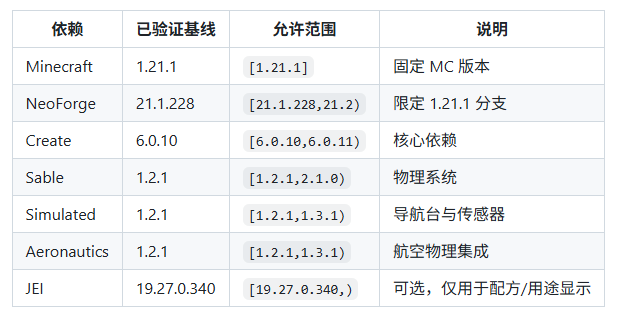
JEI is an optional dependency: when JEI is installed, recipe and usage display will be enabled; without JEI, the mod should still load normally.
Development / Development Notes
The project is still in early development. Current work mainly includes engine blocks, fluid system, particles, rendering, multiblock validation, and Ponder scenes.
Future improvements will include:
- survival recipes / Survival mode recipes
- thrust calculation / Thrust calculation
- sound effects / Engine sound effects
- animations / Animations
- balancing / Balance adjustments
License / License
This project is licensed under All Rights Reserved.
Copyright (c) 2026 cxw
The compiled mod, JAR file, may be freely distributed for use in Minecraft, but the source code may not be copied, modified, or redistributed.
AeroEngine Server crasht beim Start – was tun?
Häufige Ursachen: Loader- oder Minecraft-Version passen nicht zur Mod-Datei, eine Abhängigkeit fehlt oder der RAM reicht nicht. Such im Log (latest.log) nach „OutOfMemoryError“, „Mixin“ oder fehlenden Mods. Bei Mado wertet die KI-Crash-Analyse das Log aus und schlägt eine Ursache vor. Loader und Version änderst du im Panel.
Mit welchem Loader läuft AeroEngine?
Laut Modrinth unterstützt AeroEngine NeoForge für Minecraft 1.21.1.
Wie viel RAM braucht ein Server mit AeroEngine?
Als Orientierung 3–4 GB für einen Server mit dieser Mod. Das ist eine Schätzung, keine gemessene Mindestanforderung. Weitere Mods, viele Spieler und große Sichtweiten brauchen mehr. Ob eine Mod die Tick-Zeit belastet, siehst du mit dem spark-Profiler.
Ähnliche Mods
Beliebte Mods aus derselben Kategorie
 Server-fähig

VeinMiner
von Miraculixx
Mine the whole vein on mining a single ore/block. Make the tedious mining experience to something satisfying and fun! FTB Ultimine alternative
 Nur Client

Euphoria Patches
von SpacEagle17
Euphoria Patches is an add-on for Complementary Shaders, extending it with more optional features and settings.
 Server-fähig

Create
von simibubi
Aesthetic Technology that empowers the Player
 Server-fähig

Nature's Compass
von Chaosyr
Allows you to locate biomes anywhere in the world.
Bereit für deinen Server mit AeroEngine?
4 GB RAM ab 8,00 € im Monat. 35 % auf den 1. Monat mit MADO35.