
Day Counter
Day Counter is a fully customizable Minecraft mod that tracks the passage of time in your world and brings it to life. It adds a whole new layer of progression and atmosphere to your gameplay.
Screenshots

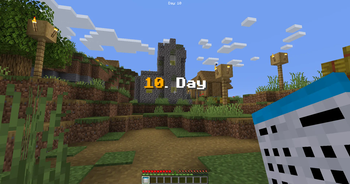

Über diese Mod

📝About:
- Day Counter is a fully customizable Minecraft mod that tracks the passage of time in your world and brings it to life. With features like date system, multiple UI options, Calendar item and block, and configurable day-based events and rewards, it adds a whole new layer of progression and atmosphere to your gameplay. Whether you're running a server or playing solo, Day Counter helps you stay in sync with your world day by day.
⚙️Features:
- Automaticaly counts
- Calendar block
- Calendar item
- Calendar item lore (V4.0 - V5.0)
- Commands
- Fully Customizable
- Sound
- In-game overlay UI text (V3.3 < [Hud Texts mod])
- Variables for our Hud Texts mod
- New Day text display: Title, Subtitle, Chat, Actionbar
- Server & Player day(s)
- Week days (V3.1 - V3.2)
- Rewards on Specific day(s) (From: V4.0)
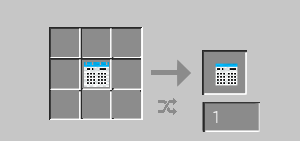
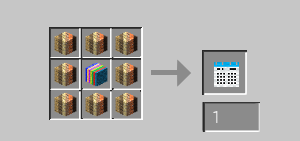
- For the crafts please see the images.
- Date system (From: V5.0)
❗️Required mods:
- Hud Texts | From V3.4
✅Compatible mods:

⌨️Commands:
/daycounter add
- With this you can add day(s) to player or server days.
/daycounter set
- With this you can set day(s) to player or server days.
/daycounter reset
- With this you can reset the player or server days.
/daycounter help
- With this you can see the help in the chat.
/daycounter reload
- With this you can reload the config file.
📜Our partner:

💡Ideas:
- If you have an idea which makes the mod better then,
- please write it on our discord server in the #💡idea-suggestions forum.
👾Bugs:
- If you have found a bug then,
- please write it on our discord server in the #🧰bug-reports forum.
👫Social:


❤️Support Us:

Verfügbare Versionen
Day Counter auf dem Server installieren
Server bestellen
Bestelle einen Minecraft Java Server mit mindestens 3 GB RAM (4 GB empfohlen).
forge Loader setzen
Wähle im Panel unter "Egg" den forge-Loader und die passende Minecraft-Version (26.1.2).
Mod installieren
Öffne den Mod-Browser im Dashboard und suche nach "Day Counter". Klicke "Installieren" – fertig! Alternativ: Lade die .jar via SFTP in den /mods Ordner.
Kompatibilität
Mod-Loader
Minecraft-Versionen
26.1.2, 1.21.8, 1.21.4 (+9 weitere)
Server-seitig
✓ ErforderlichEmpfohlener RAM
4 GB(min. 3 GB)Häufige Fragen
Day Counter Server crasht beim Start – was tun?
Häufigste Ursache: falsche forge-Version oder zu wenig RAM. Prüfe im Server-Log (latest.log), ob ein "OutOfMemoryError" oder "Mixin"-Fehler auftritt. Bei Mado Hosting: Stelle sicher, dass mindestens 3 GB RAM zugewiesen sind und der Loader zur Mod-Version passt (26.1.2). Über das Panel kannst du den Loader mit einem Klick wechseln.
Ist Day Counter mit forge und neoforge kompatibel?
Day Counter unterstützt offiziell forge, neoforge für Minecraft 26.1.2, 1.21.8, 1.21.4. Im Mado Dashboard werden inkompatible Loader-Kombinationen automatisch erkannt.
Server laggt mit Day Counter – wie optimiere ich die Performance?
Empfohlener RAM: 4 GB (+1 GB pro 8 Spieler). Prüfe mit /spark profiler, ob Day Counter den meisten Tick-Time verbraucht. Häufige Fixes: Server-View-Distance auf 8-10 reduzieren, bei Forge "performant" oder "starlight" als Zusatz-Mod installieren. Bei Mado Hosting läuft dein Server auf NVMe-SSDs mit dedizierten CPU-Kernen für minimale Latenz.
Ähnliche Mods




Modded Server mieten
Installiere Day Counter mit nur einem Klick auf deinem Server.