
AlaHorde
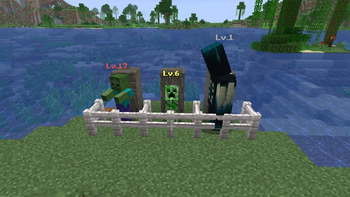
Hostile mobs grow stronger the more you kill them. A global per-species kill counter raises HP, damage, speed and XP for every new spawn, with an RPG-style level label above each mob.
Screenshots
Über diese Mod
AlaHorde
Hostile mobs grow stronger as you kill them — a global per-species kill counter raises HP, damage, speed and XP for every new spawn.
- Minecraft: 1.21.10 (26.1.2)
- Loader: NeoForge 26.1.2.28-beta
- Side: both client and server (vanilla clients can join a server with this mod)
- License: MIT
- Languages: English, Русский, Українська, Deutsch, Español, Français, Português (BR), 日本語, 简体中文, Polski
How it works
Every hostile mob (MobCategory.MONSTER — zombie, skeleton, creeper, witch, enderman, blaze, ghast, wither, ender dragon, warden, …) has its own world-wide kill counter. Every 25 player kills of a species bumps that species to the next level — every NEW spawn of that species after that point comes in stronger.
| Stat | Per-level scaling | Attribute |
|---|---|---|
| Max health | +10% over base | MAX_HEALTH |
| Attack damage | +8% over base | ATTACK_DAMAGE |
| Movement speed | +5% over base | MOVEMENT_SPEED |
| XP drop | +10% over base | via LivingExperienceDropEvent |
Cap at level 20 by default. All thresholds and multipliers are configurable in serverconfig/alahorde-server.toml or via the in-game Mods → AlaHorde → Settings UI.
Each spawned mob gets a styled [Lv.N] label above its head, color-tiered by level (gray Lv.1 → white 2-5 → yellow 6-10 → gold 11-15 → red 16-20). The label is occluded by solid blocks — no X-Ray cheating; the level only shows when the mob is in line of sight.
When a species levels up, all players within the configured radius get a chat broadcast and flame/smoke particles burst at the kill site.
Bosses (Wither, Ender Dragon, Warden) are included by default — only attribute base values are touched, so boss AI phases stay intact.
Commands
| Command | Permission | What it does |
|---|---|---|
/alahorde info |
everyone | Shows the tracked species with current level, kill count and threshold to the next level |
/alahorde reset all |
op (level 2) | Resets every species' kill counter to zero |
/alahorde reset <mob_id> |
op (level 2) | Resets a single species (e.g. /alahorde reset minecraft:zombie) |
Configuration
The config file lives at <world>/serverconfig/alahorde-server.toml. The same options are editable from the in-game Mods → AlaHorde → Settings screen.
| Option | Default | Description |
|---|---|---|
general.enabled |
true |
Master switch — when off, the mod is fully inert (no scaling, no labels, no kill counting) |
general.killsPerLevel |
25 |
Kills required per level-up |
general.maxLevel |
20 |
Level cap; kills are still counted past it |
general.excludedMobs |
[] |
Entity ids opted out of the system (e.g. ["minecraft:bat"]) |
scaling.hpMultiplierPerLevel |
0.10 |
HP gain per level (0.10 = +10%) |
scaling.dmgMultiplierPerLevel |
0.08 |
Attack damage gain per level |
scaling.speedMultiplierPerLevel |
0.05 |
Movement speed gain per level |
scaling.xpMultiplierPerLevel |
0.10 |
XP drop gain per level |
visuals.showLevelLabel |
true |
Show [Lv.N] above mobs |
visuals.showLevelUpMessage |
true |
Broadcast a chat message on level-up |
visuals.levelUpMessageRadius |
-1 |
Notify radius (blocks); -1 = entire server |
Installation
- Install NeoForge 26.1.2.28-beta for Minecraft 1.21.10.
- Download the latest
alahorde-26.1.2-<version>.jarfrom the Files tab on this page. - Drop the jar into
.minecraft/mods/(client) or<server>/mods/(server). - Launch.
Compatibility
- Multiplayer: progress is stored in the world's
SavedData, shared across all players on the server. - Other mods: mob tags / categories from other mods are respected. Use
excludedMobsto opt out specific species. - Modpacks: zero hard dependencies. Drop in and go.
License
MIT © Artem Pavelko (Ma3auka).
Verfügbare Versionen
AlaHorde auf dem Server installieren
Server bestellen
Bestelle einen Minecraft Java Server mit mindestens 3 GB RAM (4 GB empfohlen).
neoforge Loader setzen
Wähle im Panel unter "Egg" den neoforge-Loader und die passende Minecraft-Version (26.1.2).
Mod installieren
Öffne den Mod-Browser im Dashboard und suche nach "AlaHorde". Klicke "Installieren" – fertig! Alternativ: Lade die .jar via SFTP in den /mods Ordner.
Kompatibilität
Mod-Loader
Minecraft-Versionen
26.1.2
Server-seitig
✓ ErforderlichEmpfohlener RAM
4 GB(min. 3 GB)Häufige Fragen
AlaHorde Server crasht beim Start – was tun?
Häufigste Ursache: falsche neoforge-Version oder zu wenig RAM. Prüfe im Server-Log (latest.log), ob ein "OutOfMemoryError" oder "Mixin"-Fehler auftritt. Bei Mado Hosting: Stelle sicher, dass mindestens 3 GB RAM zugewiesen sind und der Loader zur Mod-Version passt (26.1.2). Über das Panel kannst du den Loader mit einem Klick wechseln.
Ist AlaHorde mit neoforge kompatibel?
AlaHorde unterstützt offiziell neoforge für Minecraft 26.1.2. Im Mado Dashboard werden inkompatible Loader-Kombinationen automatisch erkannt.
Server laggt mit AlaHorde – wie optimiere ich die Performance?
Empfohlener RAM: 4 GB (+1 GB pro 8 Spieler). Prüfe mit /spark profiler, ob AlaHorde den meisten Tick-Time verbraucht. Häufige Fixes: Server-View-Distance auf 8-10 reduzieren, bei Forge "performant" oder "starlight" als Zusatz-Mod installieren. Bei Mado Hosting läuft dein Server auf NVMe-SSDs mit dedizierten CPU-Kernen für minimale Latenz.
Ähnliche Mods
![[EMF] Entity Model Features](https://cdn.modrinth.com/data/4I1XuqiY/6e5bbd0d06b1741bfdab6c0cfab6de8fdaf0064c_96.webp)


Modded Server mieten
Installiere AlaHorde mit nur einem Klick auf deinem Server.