Alien Evolution
A Ben 10 mod for Palladium! Transform into a variety of high quality aliens with unique moves and playstyles!
Screenshots
Über diese Mod

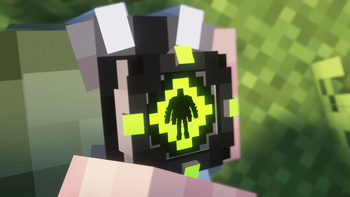
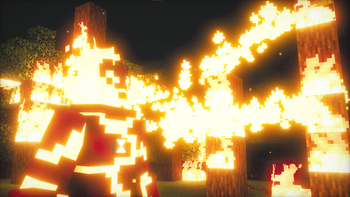
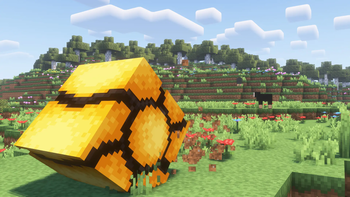
Alien Evolution is a Palladium-based Ben 10 mod for Minecraft 1.20.1.Our goal is to respect the vision of the Ben 10 franchise and its community. All aspects of this mod are created to be faithful and accurate, yet balanced and integrated to expand Minecraft's progression system. Expect updates adding new features, aliens, and omnitrices as we continue development on this project.
Join our discord server! Become a part of the community and view teasers, ask questions, and suggest features!
If you would like to support our team and get early access to sneak peaks, development builds, and priority suggestions, feel free to support us on Patreon!
Join our discord server! Become a part of the community and view teasers, ask questions, and suggest features!
If you would like to support our team and get early access to sneak peaks, development builds, and priority suggestions, feel free to support us on Patreon!
https://www.patreon.com/cw/alienevo

Features:
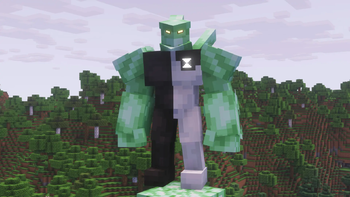
- Craft the Prototype Omnitrix and wield the ability to transform into 11 unique aliens with carefully crafted movesets and abilities!
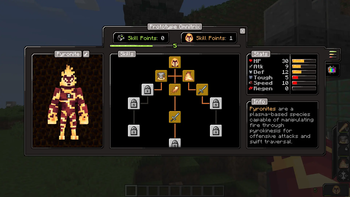
- View the stats and descriptions of your aliens through a special power screen! Track your progress, level up your aliens, and purchase new abilities as you gain experience.
- Upgrade your omnitrix by mastering alien skill trees, unlocking new watch functions like quick change, decouple, and codes!
- Edit every individual color of your aliens with an easy-to-use interface for endless combinations! Or, place your Omnitrix on the Omnitrix Workbench to customize the colors of its individual parts!
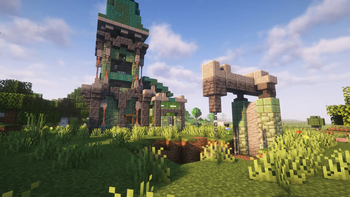
- Trade with Galvan villagers for ancient relics that will lead you to rare, dangerous structures containing Code Tablets for Self Destruct and Master Control.
Requirements:
Palladium, Geckolib, KubeJS, Rhino, Architectury API, Pehkui
Commands:
/mastercontrol (player name)
/alienautoadd (alien_id)
/alienevoplaylist (player name) (playlist #) (slot #) (alien_id)
/maxaliens (player name)


Credits: Sounds & Suggestions: Yo Fadda
Concept Reference (With Permission): elmike9
Verfügbare Versionen
Alien Evolution auf dem Server installieren
Server bestellen
Bestelle einen Minecraft Java Server mit mindestens 3 GB RAM (4 GB empfohlen).
fabric Loader setzen
Wähle im Panel unter "Egg" den fabric-Loader und die passende Minecraft-Version (1.20.1).
Mod installieren
Öffne den Mod-Browser im Dashboard und suche nach "Alien Evolution". Klicke "Installieren" – fertig! Alternativ: Lade die .jar via SFTP in den /mods Ordner.
Kompatibilität
Mod-Loader
Minecraft-Versionen
1.20.1
Server-seitig
✓ ErforderlichEmpfohlener RAM
4 GB(min. 3 GB)Häufige Fragen
Alien Evolution Server crasht beim Start – was tun?
Häufigste Ursache: falsche fabric-Version oder zu wenig RAM. Prüfe im Server-Log (latest.log), ob ein "OutOfMemoryError" oder "Mixin"-Fehler auftritt. Bei Mado Hosting: Stelle sicher, dass mindestens 3 GB RAM zugewiesen sind und der Loader zur Mod-Version passt (1.20.1). Über das Panel kannst du den Loader mit einem Klick wechseln.
Ist Alien Evolution mit fabric und forge kompatibel?
Alien Evolution unterstützt offiziell fabric, forge für Minecraft 1.20.1. Achtung: Forge- und Fabric-Mods sind NICHT untereinander kompatibel – wähle einen Loader und bleibe dabei. Im Mado Dashboard werden inkompatible Loader-Kombinationen automatisch erkannt.
Server laggt mit Alien Evolution – wie optimiere ich die Performance?
Empfohlener RAM: 4 GB (+1 GB pro 8 Spieler). Prüfe mit /spark profiler, ob Alien Evolution den meisten Tick-Time verbraucht. Häufige Fixes: Server-View-Distance auf 8-10 reduzieren, bei Forge "performant" oder "starlight" als Zusatz-Mod installieren. Bei Mado Hosting läuft dein Server auf NVMe-SSDs mit dedizierten CPU-Kernen für minimale Latenz.
Ähnliche Mods




Modded Server mieten
Installiere Alien Evolution mit nur einem Klick auf deinem Server.