
An Explosive Filter
A highly configurable chat filter mod where you can make certain words/phrases explode the players saying them in chat.
Screenshots
Über diese Mod
Summary
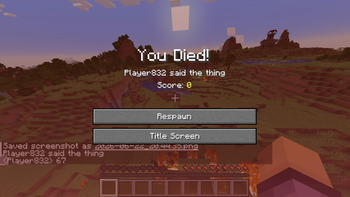
This is supposed to just be a silly little mod where, using a command or config you can make it so saying certain words in chat causes the player saying them to explode and die.
This is highly customisable and is simple, since all config can be adjusted via a command.
How To Use
The mod uses a list of words/phrases and checks if chat messages sent contain any of these, if they are the explosion occurs but the message is still sent.
You can edit all of these areas in the server/world config file or via the /explosivefilter command in game. The command is much easier to use. The command tree is as follows:
/explosivefilter add "phrase" - Adds a phrase that causes an explosion to the config.
/explosionfilter list - Shows all words that can an explosion and their associated power
/explosionfilter remove 'phrase' - Removes a certain phrase from the config (if its there)
/explosionfilter reload - Reloads the json entries - for bug fixing
/explosionfilter damage - Toggles if the explosions actually deal damage
/explosionfilter damageothers - Toggles if the explosions deal damage to other entities that aren't the player
/explosionfilter defaultpower - Sets the default explosion power for the phrases
/explosionfilter dropitems - Toggles if the explosions drop all broken blocks
/explosionfilter fire - Toggles if explosions leave fire
/explosionfilter instakill - Toggles if the player who said the phrase will die regardless of gamemode, armour etc.
/explosionfilter worlddamage - Toggles if the explosions will also damage nearby blocks
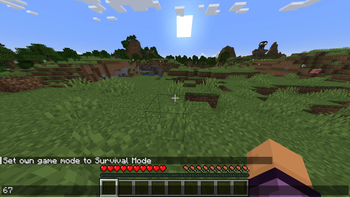
By default the words 67 and 'six seven' will cause explosions if spoken in chat.
This mod only supports English, but contains translatable text.
Verfügbare Versionen
An Explosive Filter auf dem Server installieren
Server bestellen
Bestelle einen Minecraft Java Server mit mindestens 3 GB RAM (4 GB empfohlen).
fabric Loader setzen
Wähle im Panel unter "Egg" den fabric-Loader und die passende Minecraft-Version (1.21.1).
Mod installieren
Öffne den Mod-Browser im Dashboard und suche nach "An Explosive Filter". Klicke "Installieren" – fertig! Alternativ: Lade die .jar via SFTP in den /mods Ordner.
Kompatibilität
Mod-Loader
Minecraft-Versionen
1.21.1
Server-seitig
✓ ErforderlichEmpfohlener RAM
4 GB(min. 3 GB)Häufige Fragen
An Explosive Filter Server crasht beim Start – was tun?
Häufigste Ursache: falsche fabric-Version oder zu wenig RAM. Prüfe im Server-Log (latest.log), ob ein "OutOfMemoryError" oder "Mixin"-Fehler auftritt. Bei Mado Hosting: Stelle sicher, dass mindestens 3 GB RAM zugewiesen sind und der Loader zur Mod-Version passt (1.21.1). Über das Panel kannst du den Loader mit einem Klick wechseln.
Ist An Explosive Filter mit fabric kompatibel?
An Explosive Filter unterstützt offiziell fabric für Minecraft 1.21.1. Im Mado Dashboard werden inkompatible Loader-Kombinationen automatisch erkannt.
Server laggt mit An Explosive Filter – wie optimiere ich die Performance?
Empfohlener RAM: 4 GB (+1 GB pro 8 Spieler). Prüfe mit /spark profiler, ob An Explosive Filter den meisten Tick-Time verbraucht. Häufige Fixes: Server-View-Distance auf 8-10 reduzieren, bei Forge "performant" oder "starlight" als Zusatz-Mod installieren. Bei Mado Hosting läuft dein Server auf NVMe-SSDs mit dedizierten CPU-Kernen für minimale Latenz.
Ähnliche Mods






Modded Server mieten
Installiere An Explosive Filter mit nur einem Klick auf deinem Server.