
OverflowAnimations
The all-you-could-want 1.7, 1.8, and modern animations mod for Minecraft.
Screenshots
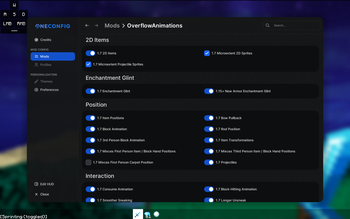
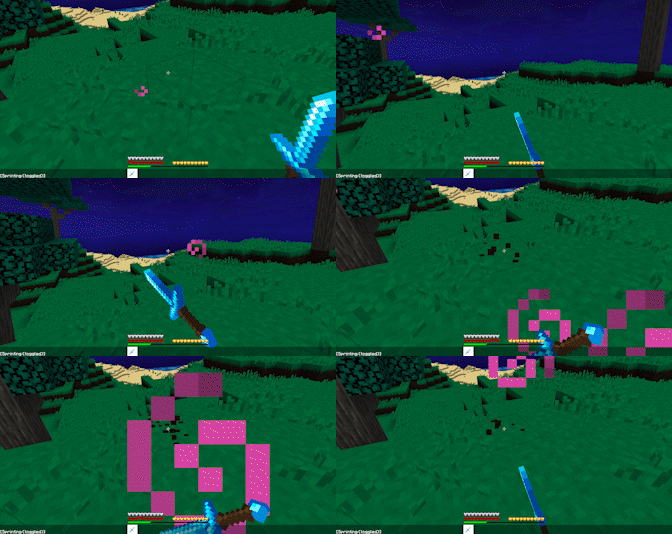
Über diese Mod
OverflowAnimationsV2


Download (Modrinth)
Extremely precise and advanced old animations mod for 1.8.9.
Originally a fork of Sk1erLLC's OldAnimations mod, it has turned into a much larger mod with essentially full 1.7 parity, animations from ancient and modern Minecraft, custom animations, and much more!
Features
All features from Sk1er's Old Animations Mod (1.7 Animations)
- Old Eating
- Old Rod Position
- Old Bow Position
- Old Blockhitting
- Old Swing Animation
- Old Sneak Animation
- Armor turning red when hit
- Old health
- Old blocking
- Old item held
- Punching a block while doing stuff
- 1.7 Debug
- Old Eating Animation
The "Old Debug Hitbox" feature has been removed as PolyHitbox has the same functionality.
Additional features from 1.7
- Old 2D/Fast Dropped Items
- Accurate First/Third Person Item Positions
- Old Held Item Lighting
- Old Projectiles
- Old Item Pickup Animation
- Old Debug and Tab Menu Styles
- Replace cast fishing rod texture with the texture of a stick!
- More features not seen in other old animation mods!
Modern animations
- Modern Armor Enchantment Glint
- Show Bow Pullback / Fishing Cast GUI Animation
- Modern Backwards Walk Animation
Bug Fixes
- Head Yaw Fixes (Fixes MC-105139)
- Block Breaking Fixes (Fixes MC-255057)
Quality of Life
- Disable Hurt Camera Shake
- Allow Particles to No-Clip
- Allow Punching the Ground in Adventure Mode
- Old Lunar/CheatBreaker Block-Hit Position
Custom Item Properties
Includes Custom Positions for: Swing, Eating/Drinking, Sword Block, Dropped Items, Projectiles, Fireballs, and the Fishing Rod Line.
Customization of Item Postions
- Custom Item X Position
- Custom Item Y Position
- Custom Item Z Position
- Custom Item Rotation Yaw
- Custom Item Rotation Pitch
- Custom Item Rotation Roll
- Custom Item Scale
Customization of Item Swing Speed
- Ignore Mining Fatigue Slowness
- Custom Mining Fatigue Speed
- Ignore Haste Speed
- Custom Haste Speed
Customization of Item Re-equip Animation
- Disable Item Re-equip Animation
- Item Re-equip Animation Speed
- Only Play Re-equip Animation Upon Switching Slots
Verfügbare Versionen
OverflowAnimations auf deinem Client installieren
Mod-Loader lokal installieren
Installiere fabric für deine lokale Minecraft-Version.
Passende Datei herunterladen
Wähle die OverflowAnimations-Datei für fabric und Minecraft 26.3.
Mod installieren
Lege die .jar-Datei in deinem lokalen .minecraft/mods-Ordner ab und starte Minecraft neu. Eine Installation auf dem Server ist nicht nötig.
Kompatibilität
Mod-Loader
Minecraft-Versionen
26.3, 26.2, 26.1.2 (+10 weitere)
Server-seitig
✗ Nicht unterstütztEmpfohlener RAM
4 GB(min. 3 GB)Häufige Fragen
Muss OverflowAnimations auf dem Minecraft Server installiert werden?
Nein. Modrinth kennzeichnet OverflowAnimations serverseitig als nicht unterstützt. Installiere die Mod nur im lokalen Minecraft-Mods-Ordner. Dein Server kann unverändert bleiben, sofern die Mod-Seite keine zusätzliche Abhängigkeit nennt.
Welche Version und welchen Loader braucht OverflowAnimations?
Nutze eine Datei für fabric, forge, ornithe und exakt deine Minecraft-Version. Unterstützte Versionen sind unter anderem 26.3, 26.2, 26.1.2. Loader-Dateien sind nicht untereinander austauschbar.
OverflowAnimations funktioniert nicht – was kann ich prüfen?
Prüfe zuerst Minecraft-Version, Loader-Version und erforderliche Abhängigkeiten. Lege die .jar-Datei im lokalen .minecraft/mods-Ordner ab und entferne ältere Duplikate. Da die Mod clientseitig ist, löst mehr Server-RAM dieses Problem nicht.
Ähnliche Mods




![[ETF] Entity Texture Features](https://cdn.modrinth.com/data/BVzZfTc1/af683d206d50b05258d865b0d6e4aa2f2cee12f2_96.webp)

Minecraft Server für deine Gruppe
OverflowAnimations bleibt auf deinem Client. Hoste dazu eine kompatible Welt für deine Mitspieler.
Details
- Lizenz
- GNU General Public License v3.0 or later
- Server-seitig
- Nicht unterstützt