
Araxer's Bestiary
An in-game guide that reveals stats, spawn info, and loot drops for every mob in Minecraft
Screenshots


Über diese Mod
📖 Overview
📘 Explore the unknown, farm with precision, and master your enemies with Araxer’s Bestiary!
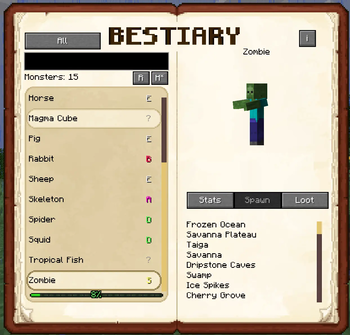
Araxer’s Bestiary is an immersive, dynamically generated in-game compendium of Minecraft’s creatures. It provides players with detailed information about monsters — including stats, spawn locations, and loot — in a clear and interactive UI.
Whether you’re a beginner trying to survive your first night or an expert designing optimized mob farms, this mod helps you understand exactly what you’re fighting.
Unlock new entries of monsters and creatures in progression mode. Use a spyglass to unlock clues about them for a better chance unlocking higher ranks.
NEW in 1.2.0: Use the sighting mode configurable in the config file if you want to unlock all information using the spyglass.
NEW in 1.3.0: New default Ranks mode that uses points to progress rather then by random chance and a progress bar to display progression
🔍 Features
🧟 Dynamic Monster Discovery
Automatically scans the game for hostile entities — no manual entry required but possible to supplement via datapack.
🩸 Mob Stats Display
Shows each mob’s health, attack damage, spawn conditions, and more.
📦 Loot Table Analysis
View all known drops with estimated or actual drop chances — supports modded loot!
🎯 Progressive Bestiary (Optional)
Only unlock mob data as you encounter or defeat them, for RPG-style discovery.
🖥️ User Interface
Clean, readable GUI
🛠️ Singleplayer & Multiplayer Ready
Works seamlessly across both local and server environments
🔔 Get Notified
An in game Toast when you find a new discovery or progress
⚔️ Loot Tracking Mode
An option to track loot that are dropped by mobs dynamically
🧠 Why Use This Mod?
- Learn what mobs drop without external wikis.
- Design better farms with drop rate knowledge.
- Enhance exploration, modpacks, and hardcore gameplay.
- Supports modded mobs
🎮 How to Use
- Craft the Bestiary Book with a Book, Spider Eye, Bone, and Rotten Flesh.
- Or use the Keybind
B(default) to open the Bestiary Screen - Configurable if you don't like using the Keybind and use the Book instead
- Configure progression and visibility in the mod’s config file.
- Filters for the searchbar:
- @[modname]
- #[category] - monster, creature, water, underground, ambient, axolotls and misc
- #boss
- #discovered
- #sighted
- #new
- $[rank] - $s, $a, $b, $c, $d, $e
- %[biome/structure/condition] - %savanna, %fortress, %night
🔧 Configuration
Progression and visibility options are available via Forge config:
- Enable or disable progression-based discovery like the Terraria Bestiary
- Customize UI behavior or filter entities for players
- Add or override information using datapacks
Information about structures or special spawn conditions is not possible to read from the game - hence the possibility to supplement this information
📦 Compatibility
- Supports modded entities and loot tables.
- Fully server-compatible (Forge).
- Does not require other mods or dependencies.
If there are mobs missing you can either add their category into monsterCategories or their name "minecraft:sheep" just directly into the entityIncludeList in the config.
You are allowed to use this mod in any modpack.
Credits:
Thumbnail made by: MHI
Additional Note
I can only emphasize to use loottables to add loot for entities as its easier to read from. Because some mobs have loot and it is just not shown as it's conditional or custom implemented.
For bosses to declare BOSS in the class name or use the approprate interface to implement bosses would make automatic registering easier. Some mods add BOSS as prefix or suffix and for some reason other entities in the same mod do not at all.
For that there is the possibility to add information via datapack if it is missing, so no problem as a modpack creator just more work because mods do their thing. Just declare a mob as boss or override the spawns if they are heavily cusomized from a modpack creator.
I've also created a Modpack with Staged Progression:

Verfügbare Versionen
Araxer's Bestiary auf dem Server installieren
Server bestellen
Bestelle einen Minecraft Java Server mit mindestens 3 GB RAM (4 GB empfohlen).
forge Loader setzen
Wähle im Panel unter "Egg" den forge-Loader und die passende Minecraft-Version (1.20.1).
Mod installieren
Öffne den Mod-Browser im Dashboard und suche nach "Araxer's Bestiary". Klicke "Installieren" – fertig! Alternativ: Lade die .jar via SFTP in den /mods Ordner.
Kompatibilität
Mod-Loader
Minecraft-Versionen
1.20.1
Server-seitig
✓ ErforderlichEmpfohlener RAM
4 GB(min. 3 GB)Häufige Fragen
Araxer's Bestiary Server crasht beim Start – was tun?
Häufigste Ursache: falsche forge-Version oder zu wenig RAM. Prüfe im Server-Log (latest.log), ob ein "OutOfMemoryError" oder "Mixin"-Fehler auftritt. Bei Mado Hosting: Stelle sicher, dass mindestens 3 GB RAM zugewiesen sind und der Loader zur Mod-Version passt (1.20.1). Über das Panel kannst du den Loader mit einem Klick wechseln.
Ist Araxer's Bestiary mit forge kompatibel?
Araxer's Bestiary unterstützt offiziell forge für Minecraft 1.20.1. Im Mado Dashboard werden inkompatible Loader-Kombinationen automatisch erkannt.
Server laggt mit Araxer's Bestiary – wie optimiere ich die Performance?
Empfohlener RAM: 4 GB (+1 GB pro 8 Spieler). Prüfe mit /spark profiler, ob Araxer's Bestiary den meisten Tick-Time verbraucht. Häufige Fixes: Server-View-Distance auf 8-10 reduzieren, bei Forge "performant" oder "starlight" als Zusatz-Mod installieren. Bei Mado Hosting läuft dein Server auf NVMe-SSDs mit dedizierten CPU-Kernen für minimale Latenz.
Ähnliche Mods




Modded Server mieten
Installiere Araxer's Bestiary mit nur einem Klick auf deinem Server.