
ASTRIXVISUALS
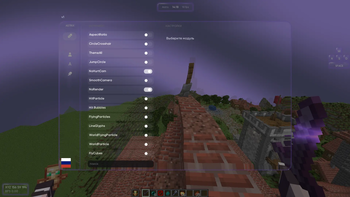
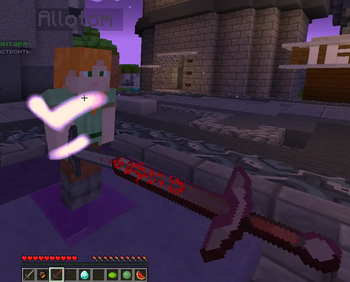
AstrixVisuals blends aesthetics with performance. Soft colors, smooth animations, and a polished interface create a visually pleasing and comfortable PvP experience.
Screenshots
Über diese Mod
AstrixVisuals is a client-side visual mod for Minecraft focused on improving the PvP experience through better interface design, optimized effects, and enhanced visual clarity. It does not provide any gameplay advantages in terms of mechanics, but significantly increases comfort and performance during combat.
The main goal of AstrixVisuals is to reduce visual clutter and make gameplay as clear and responsive as possible. The interface is redesigned in a clean, minimalistic style — only essential information is displayed, with no unnecessary distractions. All GUI elements are carefully balanced to support focus during fights.
The mod features optimized particles, improved hit effects, and refined visual elements that make it easier to track hits, player movement, and overall combat flow. The color palette is designed to enhance contrast and visibility in all situations.
AstrixVisuals is fully suitable for various PvP modes such as duels, BedWars, SkyWars, and more, providing stable performance and smooth visuals even in intense scenarios.
It’s an ideal choice for players who want to improve focus, reduce eye strain, and enjoy a cleaner, more efficient PvP experience without altering game balance.
Verfügbare Versionen
ASTRIXVISUALS auf deinem Client installieren
Mod-Loader lokal installieren
Installiere fabric für deine lokale Minecraft-Version.
Passende Datei herunterladen
Wähle die ASTRIXVISUALS-Datei für fabric und Minecraft 1.21.4.
Mod installieren
Lege die .jar-Datei in deinem lokalen .minecraft/mods-Ordner ab und starte Minecraft neu. Eine Installation auf dem Server ist nicht nötig.
Kompatibilität
Mod-Loader
Minecraft-Versionen
1.21.4
Server-seitig
✗ Nicht unterstütztEmpfohlener RAM
4 GB(min. 3 GB)Häufige Fragen
Muss ASTRIXVISUALS auf dem Minecraft Server installiert werden?
Nein. Modrinth kennzeichnet ASTRIXVISUALS serverseitig als nicht unterstützt. Installiere die Mod nur im lokalen Minecraft-Mods-Ordner. Dein Server kann unverändert bleiben, sofern die Mod-Seite keine zusätzliche Abhängigkeit nennt.
Welche Version und welchen Loader braucht ASTRIXVISUALS?
Nutze eine Datei für fabric und exakt deine Minecraft-Version. Unterstützte Versionen sind unter anderem 1.21.4. Loader-Dateien sind nicht untereinander austauschbar.
ASTRIXVISUALS funktioniert nicht – was kann ich prüfen?
Prüfe zuerst Minecraft-Version, Loader-Version und erforderliche Abhängigkeiten. Lege die .jar-Datei im lokalen .minecraft/mods-Ordner ab und entferne ältere Duplikate. Da die Mod clientseitig ist, löst mehr Server-RAM dieses Problem nicht.
Ähnliche Mods





Minecraft Server für deine Gruppe
ASTRIXVISUALS bleibt auf deinem Client. Hoste dazu eine kompatible Welt für deine Mitspieler.