
Auto Villager (Librarian) Reroll
This mod adds an easy to use feature to automatically reroll for enchanted books with an optional max cost setting.
Screenshots
Über diese Mod
Auto Villager Reroll
Automates librarian lectern rerolls. Configure a list of desired enchanted books, then the mod will repeatedly break and replace a lectern until one of those books appears in the villager's trades.
Usage
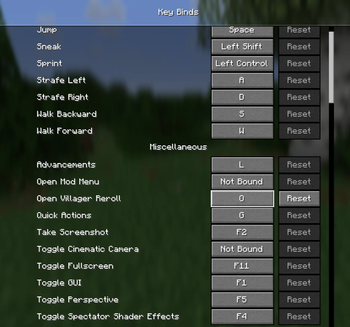
- Open the config screen — Press R (configurable in Controls → Miscellaneous → Open Villager Reroll).
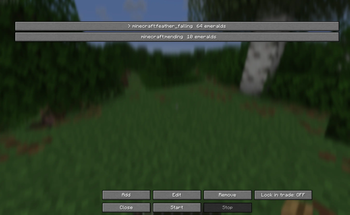
- Add target books — Click Add, pick an enchantment, and set the maximum emerald price you're willing to pay.
- Lock in trade (optional) — Toggle this on to automatically lock in the trade when a match is found.
- Start — Click Start, then right-click a lectern. The mod will:
- Open the trade and check the villager's offers
- If no match, break the lecturn and place a new one from your invetory
- Repeat until a match is found or you stop the mod
- Stop — Click Stop in the GUI, or the mod stops automatically when a match is found.
Controls
| Key | Action |
|---|---|
| R | Open Villager Reroll config screen |
The hotkey can be rebound in Options → Controls → Miscellaneous → Open Villager Reroll.
Config
Saved to config/villager-reroll.json:
- targets — List of enchantments to search for, with max price per book
- range — Search radius for the villager (default: 6)
- jobSite — Lectern position (set automatically when you start)
- lockInTrade — Whether to auto-lock the trade on match
Verfügbare Versionen
Auto Villager (Librarian) Reroll auf deinem Client installieren
Mod-Loader lokal installieren
Installiere fabric für deine lokale Minecraft-Version.
Passende Datei herunterladen
Wähle die Auto Villager (Librarian) Reroll-Datei für fabric und Minecraft 26.2.
Mod installieren
Lege die .jar-Datei in deinem lokalen .minecraft/mods-Ordner ab und starte Minecraft neu. Eine Installation auf dem Server ist nicht nötig.
Kompatibilität
Mod-Loader
Minecraft-Versionen
26.2, 26.1.2, 26.1.1 (+1 weitere)
Server-seitig
✗ Nicht unterstütztEmpfohlener RAM
4 GB(min. 3 GB)Häufige Fragen
Muss Auto Villager (Librarian) Reroll auf dem Minecraft Server installiert werden?
Nein. Modrinth kennzeichnet Auto Villager (Librarian) Reroll serverseitig als nicht unterstützt. Installiere die Mod nur im lokalen Minecraft-Mods-Ordner. Dein Server kann unverändert bleiben, sofern die Mod-Seite keine zusätzliche Abhängigkeit nennt.
Welche Version und welchen Loader braucht Auto Villager (Librarian) Reroll?
Nutze eine Datei für fabric und exakt deine Minecraft-Version. Unterstützte Versionen sind unter anderem 26.2, 26.1.2, 26.1.1. Loader-Dateien sind nicht untereinander austauschbar.
Auto Villager (Librarian) Reroll funktioniert nicht – was kann ich prüfen?
Prüfe zuerst Minecraft-Version, Loader-Version und erforderliche Abhängigkeiten. Lege die .jar-Datei im lokalen .minecraft/mods-Ordner ab und entferne ältere Duplikate. Da die Mod clientseitig ist, löst mehr Server-RAM dieses Problem nicht.
Ähnliche Mods






Minecraft Server für deine Gruppe
Auto Villager (Librarian) Reroll bleibt auf deinem Client. Hoste dazu eine kompatible Welt für deine Mitspieler.