
Automobility: Unofficial Port
Cars in Minecraft! Unofficial Fabric port of FoundationGames' Automobility vehicle mod for Minecraft 26.x.
Screenshots
Über diese Mod
Automobility Unofficial Port
This project is an independently maintained, unofficial Fabric fork/port of Automobility by FoundationGames for Minecraft Java 26.x. Automobility now follows its own 1.x version line; its version numbers do not track upstream releases.
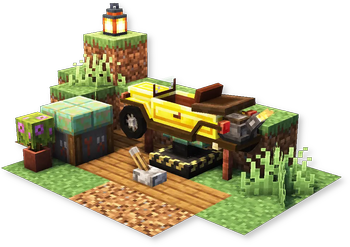
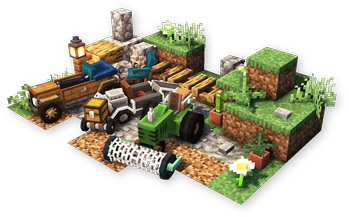
Automobility adds customizable and functional vehicles, vehicle parts, attachments, road-building blocks, driving controls, sounds, and data/resource-pack vehicle support.
This is an unofficial fork/port. It is not affiliated with or endorsed by FoundationGames unless stated otherwise by the upstream maintainers. Please report issues for this port on this project's issue tracker, not on upstream Automobility support channels.
Features
- Customizable automobiles with frames, engines, wheels, and attachments
- Auto Mechanic Table and Automobile Assembler progression
- Garage Bench for servicing one nearby parked car: replace wheel sets or eligible built-in engines and recover the removed parts. The car must be stopped, grounded and unoccupied; its frame is read-only. Engine swaps involving non-built-in engines or detected fuel/battery integrations are refused rather than guessing how to transfer their state.
- Reverse-braking safety: after stopping with the brake held, release it and press it again to reverse
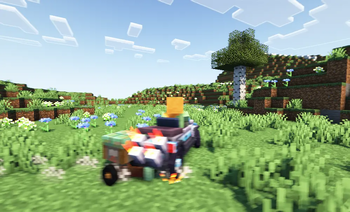
- Drivable vehicles with drifting, horn, sounds, boost FOV, speed HUD, and drift smoke
- Slopes, dash panels, off-road blocks, launch gel, pressure plates, and related road-building tools
- Optional Controlify controller support on Fabric
- Data-pack and resource-pack support for custom vehicles
Current Versions
Fabric builds are available for Minecraft Java 26.1.x, 26.2, and 26.3. Each file lists its exact supported Minecraft versions; builds for different targets are not interchangeable. Addons have their own version coverage, so check each addon before assembling a modpack.
Matching builds (checked 4 October 2026)
| Minecraft | Automobility | Momentum (optional) | RIAutomobility (optional) |
|---|---|---|---|
| 26.1.2 | 1.0.0-beta.1 | 1.0.0-beta.2 | 0.1.0-unofficial.9 |
| 26.2 | 1.0.0-beta.1 | 1.0.0-beta.2 | 0.1.0-unofficial.9 |
| 26.3 | 1.0.0-beta.1 | 1.0.0-beta.2 | 0.1.0-unofficial.10 |
These are matching public Fabric beta builds, not interchangeable Minecraft targets. Momentum and RIA are optional for base Automobility; install each selected addon on both client and server with the Automobility release linked on the same row. Their different version numbers are intentional; RIA .10 for 26.3 updates its core dependency, not a missing feature backport for the older .9 builds. Older files remain available under Versions with their original requirements. This table does not establish compatibility for every optional integration.
Requirements
- A matching Minecraft Java 26.x build
- Fabric Loader for that Minecraft version
- Fabric API
- Java 25 or newer
Optional
- Controlify for controller support
Related Addons
- Momentum for Automobility: Unofficial Port adds handling options, cruise control, brake/drift input sync, and a compact speed HUD.
- RIAutomobility: Unofficial Port adds multi-seat vehicles, mounted seat switching, lorry cargo, and datapack-defined vehicle behavior.
- Automobility: Autoradio adds in-car radio and placed speakers. Choose a matching build from its version page.
- Pumps & Pistons: Automobility connects vehicles to the fuel system in Pumps & Pistons. Use the matching components and dependencies listed on its selected version page.
These addons are optional; none is required for base Automobility. When using an addon in multiplayer, follow its client/server installation requirements and the dependencies listed on its version page. Do not mix Minecraft targets or assume that every addon supports every core version.
Status
This port is beta. Core vehicle gameplay, rendering, sounds, particles, crafting screens, assembler flow, attachments, slopes, and multiplayer vehicle visual sync are working.
Testing has been done in singleplayer and multiplayer Fabric environments, including a larger Fabric mod set with common performance mods, world generation mods, mapping mods, voice chat, controller support, shader/renderer mods, and quality-of-life mods. This does not guarantee compatibility with every modpack, so please include logs and a full mod list when reporting issues.
Verfügbare Versionen
Automobility: Unofficial Port auf dem Server installieren
Server bestellen
Bestelle einen Minecraft Java Server mit mindestens 3 GB RAM (4 GB empfohlen).
fabric Loader setzen
Wähle im Panel unter "Egg" den fabric-Loader und die passende Minecraft-Version (26.3).
Mod installieren
Öffne den Mod-Browser im Dashboard und suche nach "Automobility: Unofficial Port". Klicke "Installieren" – fertig! Alternativ: Lade die .jar via SFTP in den /mods Ordner.
Kompatibilität
Mod-Loader
Minecraft-Versionen
26.3, 26.2, 26.1.2 (+2 weitere)
Server-seitig
✓ ErforderlichEmpfohlener RAM
4 GB(min. 3 GB)Häufige Fragen
Automobility: Unofficial Port Server crasht beim Start – was tun?
Häufigste Ursache: falsche fabric-Version oder zu wenig RAM. Prüfe im Server-Log (latest.log), ob ein "OutOfMemoryError" oder "Mixin"-Fehler auftritt. Bei Mado Hosting: Stelle sicher, dass mindestens 3 GB RAM zugewiesen sind und der Loader zur Mod-Version passt (26.3). Über das Panel kannst du den Loader mit einem Klick wechseln.
Ist Automobility: Unofficial Port mit fabric kompatibel?
Automobility: Unofficial Port unterstützt offiziell fabric für Minecraft 26.3, 26.2, 26.1.2. Im Mado Dashboard werden inkompatible Loader-Kombinationen automatisch erkannt.
Server laggt mit Automobility: Unofficial Port – wie optimiere ich die Performance?
Empfohlener RAM: 4 GB (+1 GB pro 8 Spieler). Prüfe mit /spark profiler, ob Automobility: Unofficial Port den meisten Tick-Time verbraucht. Häufige Fixes: Server-View-Distance auf 8-10 reduzieren, bei Forge "performant" oder "starlight" als Zusatz-Mod installieren. Bei Mado Hosting läuft dein Server auf NVMe-SSDs mit dedizierten CPU-Kernen für minimale Latenz.
Ähnliche Mods




Modded Server mieten
Installiere Automobility: Unofficial Port mit nur einem Klick auf deinem Server.