

Modrinth · Fabric, Forge, NeoForge, Quilt
AzureLib auf deinem Minecraft Server
AzureLib läuft auf Minecraft Servern mit Fabric oder Forge oder NeoForge oder Quilt. Bestell deinen Server, stell den Loader im Panel ein und installiere die Mod mit einem Klick im Mod-Browser.
Java Minecraft mod using Bedrock models to create custom models and animations for items, blocks, entities
- Downloads
- 12.3M
- Autor
- AzureDoom
- Loader
- Fabric, Forge, NeoForge, Quilt
- Minecraft
- 1.12.2 – 26.3
- Aktualisiert
- –
Screenshots
So sieht AzureLib aus
 Header
 JCRAFT: Eyes of Ender (JoJo) - Power with Azurelib!
 Legends: Superheroes Unlimited - Powered with Azurelib!
 Discerning The Eldritch - Powered with Azurelib!
 Celestial Exploration - Powered by AzureLib!
Bilder: AzureLib auf Modrinth, vom Projektteam veröffentlicht.
Einrichtung
AzureLib auf dem Server installieren
Server und Spieler brauchen denselben Loader und dieselbe Minecraft-Version. Sichere die Welt, bevor du Mods hinzufügst oder aktualisierst.
- 01
Konfigurieren
4 GB RAM sind vorausgewählt. Laufzeit und Add-ons wählst du selbst, bezahlt wird per Kreditkarte oder PayPal.
- 02
Loader einstellen
Stell im Panel die Serversoftware auf Fabric oder Forge oder NeoForge oder Quilt und wähl die passende Minecraft-Version, zum Beispiel b1.7.3.
- 03
Mod installieren
Such im Mod-Browser nach „AzureLib“ und installiere die Version für deinen Loader. Alternativ lädst du die .jar per SFTP in den Ordner mods. Erforderliche Abhängigkeiten stehen auf der Projektseite.
- 04
Verbinden
Alle Spieler installieren AzureLib in derselben Version lokal und verbinden sich über die Serveradresse aus dem Panel.
- Auf dem Server
- Erforderlich
- Auf dem Client
- Erforderlich
- Loader
- Fabric, Forge, NeoForge, Quilt
- Minecraft
- b1.7.3, 26.3, 26.2 +23 weitere
- Lizenz
- MIT License
Das Panel
Mods installieren, Fehler finden.
Echte Screenshots aus dem Mado Panel. Beides ist bei jedem Minecraft Server enthalten.
Mod-Browser
Modrinth und CurseForge direkt im Panel.
Der Browser filtert nach deiner Minecraft-Version. Mods installierst du mit einem Klick, ohne .jar-Dateien hochzuladen.

KI-Crash-Analyse
Wenn ein Mod crasht, liest die Analyse das Log.
Mods scheitern oft an einer falschen Loader-Version, Java-Version oder fehlenden Abhängigkeit. Die Analyse nennt eine wahrscheinliche Ursache und einen Lösungsvorschlag.

Versionen
Veröffentlichte Versionen
Nimm die Datei, die zu Loader und Minecraft-Version deines Servers passt. Server und Spieler brauchen dieselbe Version.
AzureLib · Modrinth- azurelib-neo-1.20.1-3.2.9.jar14. November 2026Minecraft 1.20.1 · Forge, NeoForge
- azurelib-fabric-1.20.1-3.2.9.jar14. November 2026Minecraft 1.20.1 · Fabric, Quilt
- azurelib-neo-26.3-4.1.8.jar9. November 2026Minecraft 26.3 · NeoForge
- azurelib-fabric-26.3-4.1.8.jar9. November 2026Minecraft 26.3 · Fabric
- azurelib-fabric-1.21.1-3.2.8.jar9. November 2026Minecraft 1.21.1 · Fabric, Quilt
Originalbeschreibung des Projektautors




AzureLib is an animation and rendering engine for Minecraft mods. It started as a fork of GeckoLib 4.x and has since grown into its own library, with a reworked rendering pipeline, an extended Molang runtime, per-bone hitboxes, procedural animation tools and its own Blockbench plugin. If you've seen a creature in a modpack that crawls, lunges, bursts out of the ground or swings a weapon with real weight, there's a good chance AzureLib is animating it.
Players: you don't need to do anything with this mod. Install it if a mod you use requires it.

Features
Animation
- Keyframe animation from Blockbench: rotation, position and scale on any bone, for entities, items, armor and block entities.
- 30+ easing functions plus per-keyframe interpolation.
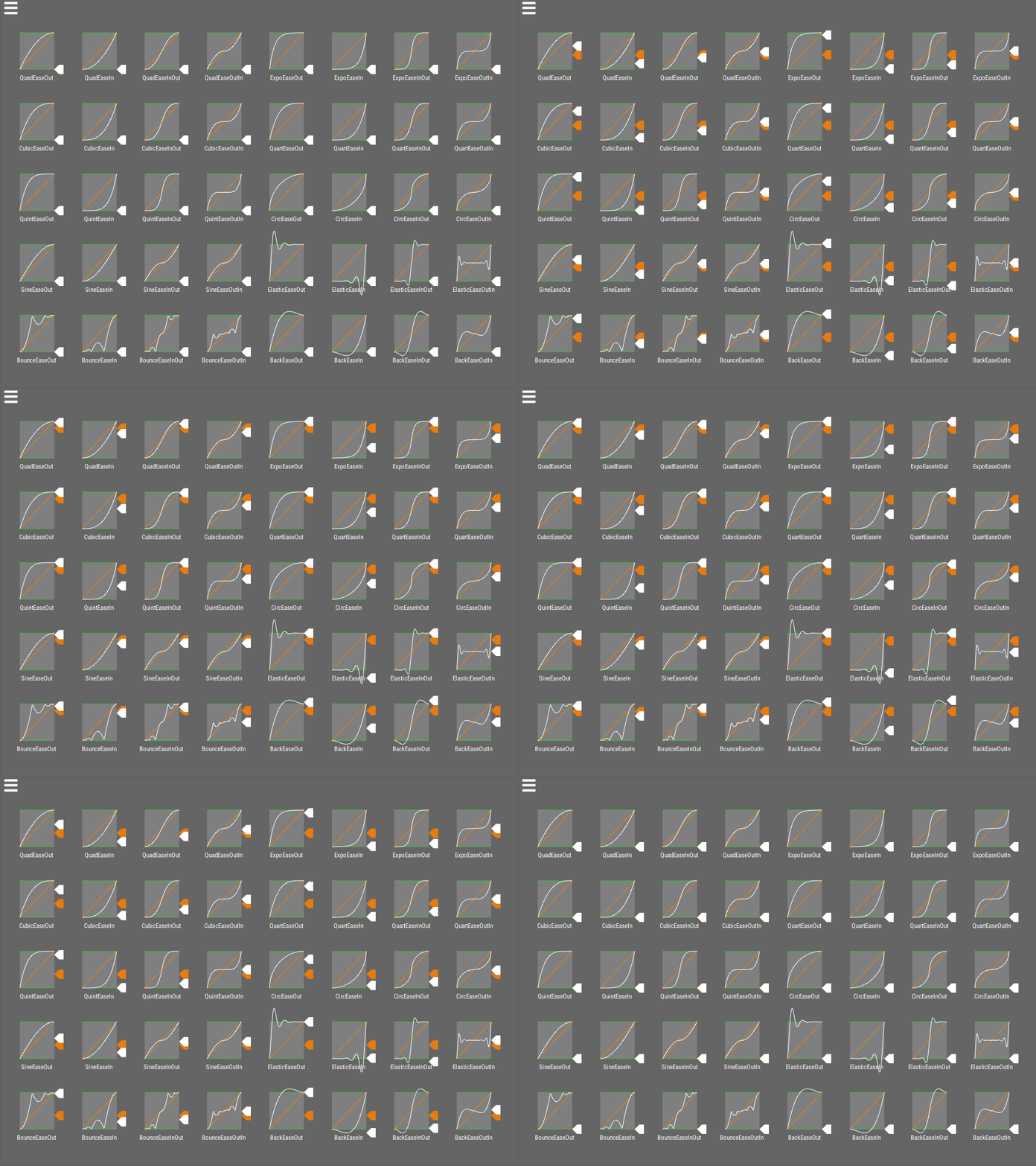
Easing visualization by noisecrime - Multiple controllers at once: run a walk cycle, an attack and a head-look together without them fighting each other.
- Sound, particle and custom event keyframes: trigger effects and your own code at exact moments in an animation.
- Molang support extended toward Bedrock parity: strings, arrays,
for_each,this, and many additional entity queries.
Procedural & Gameplay Tools
- Multi-hitbox system: define hitboxes per bone that follow your animated model, so a long tail or a burrowing worm can be hit where it actually is.

- Bone transform & procedural pose API: drive bones from code on top of keyframed animation, including IK and bone constraints, spring-bone secondary motion, bone sockets/attachments, and 1D/2D blend spaces.

- Morph mod compatibility with Walkers and ReMorphed, so morphed players play your mob's animations.
Performance
- Reduced per-frame allocations and object pooling in the animation pipeline.
- Binary-search keyframe lookup for long animations.
- Optional bone and animation LOD to keep crowded scenes smooth (opt-in per renderer).
Tooling
- AzureLib Blockbench plugin with exports matched to the library, including baking IK into keyframes.
- Examples mod showing entities, items, armor and block entities working end to end.

Made with AzureLib
A few of the mods using AzureLib (see the Gallery tab for more):
- Arachnids
- Aftershock
- JCRAFT: Eyes of Ender (JoJo)
- Legends: Superheroes Unlimited
- Discerning The Eldritch
- Celestial Exploration
- Helios Divinity
Using AzureLib in your mod? Let me know on Discord and I'll add it here.
Supported Versions
| Minecraft | Loaders | AzureLib |
|---|---|---|
| 26.3 | NeoForge / Fabric | 4.1.x |
| 1.21.1 | NeoForge / Fabric | 3.2.x |
| 1.20.1 | Forge / Fabric | 3.2.x |
| 1.18.2 | Forge / Fabric | 3.3.x |
| 1.12.2 | Forge | 1.1.x |
| 1.7.10 | Forge | 1.1.x |
| Beta 1.7.3 | Babric / Ornithe | 1.1.x |
For Developers
Full setup for each loader, plus guides for entities, items, armor and block entities and migrating from GeckoLib, is on the AzureLib wiki.
Support: AzureLib is maintained independently. Questions and bug reports are welcome on Discord or the issue tracker, but I can only help with AzureLib, not GeckoLib.
Pick a plan (4GB or more) and use code azuredoom for 25% off your first month.
AzureLib Server crasht beim Start – was tun?
Häufige Ursachen: Loader- oder Minecraft-Version passen nicht zur Mod-Datei, eine Abhängigkeit fehlt oder der RAM reicht nicht. Such im Log (latest.log) nach „OutOfMemoryError“, „Mixin“ oder fehlenden Mods. Bei Mado wertet die KI-Crash-Analyse das Log aus und schlägt eine Ursache vor. Loader und Version änderst du im Panel.
Mit welchem Loader läuft AzureLib?
Laut Modrinth unterstützt AzureLib Fabric, Forge, NeoForge, Quilt für Minecraft b1.7.3, 26.3, 26.2. Forge- und Fabric-Dateien sind nicht untereinander austauschbar: Wähl einen Loader für Server und Clients.
Wie viel RAM braucht ein Server mit AzureLib?
Als Orientierung 3–4 GB für einen Server mit dieser Mod. Das ist eine Schätzung, keine gemessene Mindestanforderung. Weitere Mods, viele Spieler und große Sichtweiten brauchen mehr. Ob eine Mod die Tick-Zeit belastet, siehst du mit dem spark-Profiler.
Ähnliche Mods
Beliebte Mods aus derselben Kategorie
 Server-fähig

VeinMiner
von Miraculixx
Mine the whole vein on mining a single ore/block. Make the tedious mining experience to something satisfying and fun! FTB Ultimine alternative
 Server-fähig

Geckolib
von Gecko
A 3D animation library for entities, blocks, items, armor, and more!
 Nur Client

VeinMiner Hotkey
von Miraculixx
Veinminer Addon - Use a hotkey to veinmine with a dynamic crosshair & block highlighting
 Server-fähig

Fzzy Config
von fzzyhmstrs
Config API with automatic GUIs, powerful validation options, server-client sync, and more!
Bereit für deinen Server mit AzureLib?
4 GB RAM ab 8,00 € im Monat. 35 % auf den 1. Monat mit MADO35.