
Better Combat Particle
just some particle addition to better combat.
Screenshots
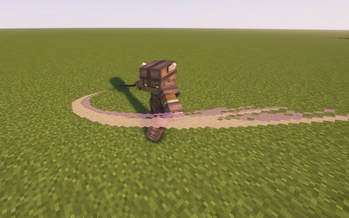


Über diese Mod

Basically just a slash effect particle that spawn after upswing on better combat attack.
Forge doesn't need a connector anymore on version 0.0.3!!
This mod is possible with just a client
please do not ask question in better combat server. it is just an addition mod seperated from better combat and made by different dev.
About Particle Optimization:
Seems like some particle optimization mod will make this particle not visible in first person because it is too close to camera and decide to not render the particle plane. the only thing you can do is to disable the culling for now.
ABOUT CONFIG:
Config also available in config/bc_particle. there is an option to disable and enable the particle. also the transparency of the particle on lit or non lit.
ABOUT CUSTOMIZATION:
You can check and learn it on assets("data" in v0.0.1)/bc_particle(mod_id)/bc_particle/.json
if an animation doesn't have the particle, it means you don't have it registed on the particle_settings.json. you can make your own resource to add that. example: assets("data" in v0.0.1)/malfu_combat_animation/bc_particle/particle_settings.json
particle_type: type of slash texture. there is slash45, slash90, slash 180, slash270, and slash360.
"x_addition": left/right (right bigger float)
"y_addition": up/down (down lower float)
"local_yaw": local rot of the texture (bigger clockwise)
"roll_set": roll rotation of the plane.
"pitch_addition": pitch add. usually i combine it with y_addition.
Spoiler
{
"replace": false,
"values": {
"malfu_combat_animation:axe_updown_lr": [
{
"particle_type": "slash90",
"x_addition": 0.0,
"y_addition": 0.0,
"roll_set": 210.0
}
],
"malfu_combat_animation:two_handed_up_lr": [
{
"particle_type": "slash90",
"x_addition": 0.0,
"y_addition": -0.30,
"local_yaw": 20,
"roll_set": 130
}
]
}
}
you can also add more than one particle, you can check the example on bc_particle assets or malfu combat animation for more info.
there is also enchantment_settings.json and weapon_settings. this contain a color settings and light set for enchantment and custom weapon. simply put the enchantment id and its color and light. well just check on the example in bc_particle data. same with particle_settings.json you should be able to make the datapack.
for color_hex and color_hex_sec. you can put string "remove" to set alpha to 0, basically remove the particle. just in case you want to remove particle for some custom weapon or enchantment
Texture is bad? i've reworked it so many times didn't manage to make it really good, can't paint. well just replace it with your own made texture pack.
Verfügbare Versionen
Better Combat Particle auf dem Server installieren
Server bestellen
Bestelle einen Minecraft Java Server mit mindestens 3 GB RAM (4 GB empfohlen).
fabric Loader setzen
Wähle im Panel unter "Egg" den fabric-Loader und die passende Minecraft-Version (1.21.1).
Mod installieren
Öffne den Mod-Browser im Dashboard und suche nach "Better Combat Particle". Klicke "Installieren" – fertig! Alternativ: Lade die .jar via SFTP in den /mods Ordner.
Kompatibilität
Mod-Loader
Minecraft-Versionen
1.21.1, 1.20.6, 1.20.5 (+4 weitere)
Server-seitig
✓ ErforderlichEmpfohlener RAM
4 GB(min. 3 GB)Häufige Fragen
Better Combat Particle Server crasht beim Start – was tun?
Häufigste Ursache: falsche fabric-Version oder zu wenig RAM. Prüfe im Server-Log (latest.log), ob ein "OutOfMemoryError" oder "Mixin"-Fehler auftritt. Bei Mado Hosting: Stelle sicher, dass mindestens 3 GB RAM zugewiesen sind und der Loader zur Mod-Version passt (1.21.1). Über das Panel kannst du den Loader mit einem Klick wechseln.
Ist Better Combat Particle mit fabric und forge und neoforge kompatibel?
Better Combat Particle unterstützt offiziell fabric, forge, neoforge für Minecraft 1.21.1, 1.20.6, 1.20.5. Achtung: Forge- und Fabric-Mods sind NICHT untereinander kompatibel – wähle einen Loader und bleibe dabei. Im Mado Dashboard werden inkompatible Loader-Kombinationen automatisch erkannt.
Server laggt mit Better Combat Particle – wie optimiere ich die Performance?
Empfohlener RAM: 4 GB (+1 GB pro 8 Spieler). Prüfe mit /spark profiler, ob Better Combat Particle den meisten Tick-Time verbraucht. Häufige Fixes: Server-View-Distance auf 8-10 reduzieren, bei Forge "performant" oder "starlight" als Zusatz-Mod installieren. Bei Mado Hosting läuft dein Server auf NVMe-SSDs mit dedizierten CPU-Kernen für minimale Latenz.
Ähnliche Mods




Modded Server mieten
Installiere Better Combat Particle mit nur einem Klick auf deinem Server.