
Better Zoom
Smoothly zoom with wheel and hotkeys as much as you want, in a simple way with customizations
Über diese Mod

Better Zoom v2.9, allows you to zoom smoothly with wheel scrolling and hotkeys. It offers a simple and efficent zoom with customizations. All of that without any mixin/asm, in order to improve the speed.
The goal of this mod is to provide a simple & suitable zoom with both wheel and hotkeys smooth zooming. No fancy or complicated parameters included. It still offers customizations (see screenshots below) on a Configuration GUI while running without any mixin or any additional library.
It's also meant to be simple, compatible but still including all the necessary features, without fancy stuff.

Press "c" by default to toggle zoom. (Configurable keybind)
Press "+"/"-" or scroll with wheel to zoom in/out ( Configurable) - You can also hold these keybinds!
*A new video and logo are being made!

Configuration GUI (Forge 1.20.1 v2.9.0 reference): (open with ' V' keybind by default) and at mods/config..:
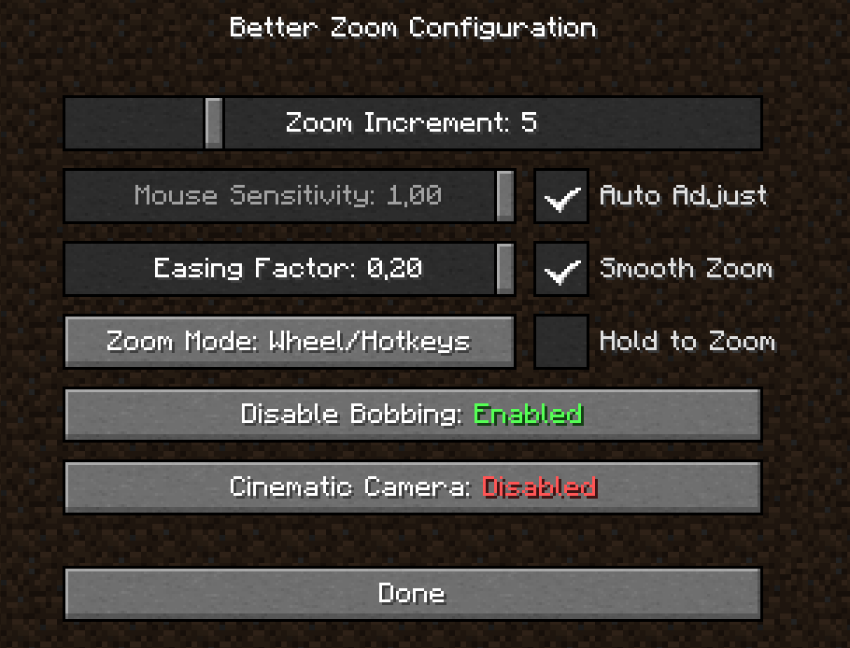
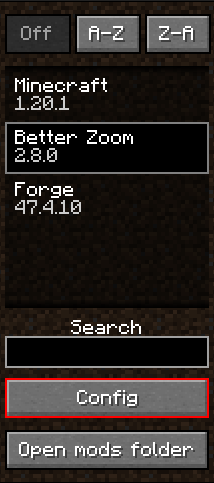
Details:
| Zoom Increment | How much zoom it increments per scroll wheel. (useful to zoom/dezoom very quickly) |
|---|---|
| Mouse Sensitivity | The mouse sensitivity that will be multiplited by when you zoom. (adjust as you need so the camera doesn't move too fast when zooming a lot) |
| Auto Adjust | Adjust the mouse sensitivty automatically according to the zoom level. Less sensitive when Cinematic Camera is on. |
| Smooth Zoom | A real Smooth Fade in/out when zooming |
| Hold to Zoom | Require to hold the zoom keybind in order to keep zooming |
| Easing Factor | Easing factor for the smooth transitions. Lowers = slower/smoother |
| Disable Bobbing | Disable the bob biew/bobbing while zooming |
| Cinematic Camera | Cinematic Camera movements while zooming. Slow and smooth, useful for cinematic animations/videos. Note: it's regulated with Auto-adjust mode, if you want a stronger cinematic feel, disable Auto-adjust and set lower value for Mouse sensitivity |
(Tooltips are avilable ingame for more informations)
Recommended: (What I use :D)
- Zoom Increment: ~5
- Mouse Sensitivity: Auto-adjust
- Easing Factor: 0.20
- Smooth Zoom: enabled
- Hold to Zoom: it depends..
- Zoom Mode: Both (yes, you can use wheel and hotkeys!)
- Disable bobbing: enabled
- Cinematic camera: it depends..
Custom keybinds:
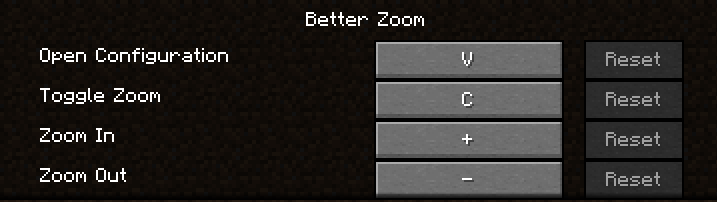
*You can even hold keybinds of zoom in/out

Translations are available for French and English yet. Feel free to suggest better one, or directly add translations on github with a pull request!
Feel free to add the mod in any modpack published on curseforge! This is highly appreciated.
The code is open source: https://github.com/AwesomeHippo/BetterZoom under MIT license
Verfügbare Versionen
Better Zoom auf deinem Client installieren
Mod-Loader lokal installieren
Installiere forge für deine lokale Minecraft-Version.
Passende Datei herunterladen
Wähle die Better Zoom-Datei für forge und Minecraft 1.21.1.
Mod installieren
Lege die .jar-Datei in deinem lokalen .minecraft/mods-Ordner ab und starte Minecraft neu. Eine Installation auf dem Server ist nicht nötig.
Kompatibilität
Mod-Loader
Minecraft-Versionen
1.21.1, 1.20.5, 1.20.4 (+3 weitere)
Server-seitig
✗ Nicht unterstütztEmpfohlener RAM
4 GB(min. 3 GB)Häufige Fragen
Muss Better Zoom auf dem Minecraft Server installiert werden?
Nein. Modrinth kennzeichnet Better Zoom serverseitig als nicht unterstützt. Installiere die Mod nur im lokalen Minecraft-Mods-Ordner. Dein Server kann unverändert bleiben, sofern die Mod-Seite keine zusätzliche Abhängigkeit nennt.
Welche Version und welchen Loader braucht Better Zoom?
Nutze eine Datei für forge, neoforge und exakt deine Minecraft-Version. Unterstützte Versionen sind unter anderem 1.21.1, 1.20.5, 1.20.4. Loader-Dateien sind nicht untereinander austauschbar.
Better Zoom funktioniert nicht – was kann ich prüfen?
Prüfe zuerst Minecraft-Version, Loader-Version und erforderliche Abhängigkeiten. Lege die .jar-Datei im lokalen .minecraft/mods-Ordner ab und entferne ältere Duplikate. Da die Mod clientseitig ist, löst mehr Server-RAM dieses Problem nicht.
Ähnliche Mods




![[ETF] Entity Texture Features](https://cdn.modrinth.com/data/BVzZfTc1/af683d206d50b05258d865b0d6e4aa2f2cee12f2_96.webp)

Minecraft Server für deine Gruppe
Better Zoom bleibt auf deinem Client. Hoste dazu eine kompatible Welt für deine Mitspieler.