
BetterHP
A better visual system for your vanilla HUD ! Fully customizable
Screenshots

Über diese Mod

Overview
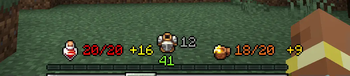
Better HP is a Minecraft client-only mod designed to enhance your gameplay experience by offering a more intuitive and informative way to view and manage your health, armor, and hunger stats in-game. By replacing traditional heart and armor icons with a sleek, customizable numerical system, Better HP allows you to track your health status at a glance.
NO NEED FOR OVERFLOW MODS! Better HP will display over 20 HP and over 20 armor, syncing seamlessly with the player!
Join Our Community! Check out Pixel Dream Studios - an official partner!
Join my Personal Discord here -> Bandit Discord
Features
Numerical Health Display: Experience precision with your health shown as numbers instead of vague hearts. Know exactly how much damage you've taken and how much health you have left!
Armor Value Display: Better HP shows your armor value right on the HUD, eliminating the need to guess your protection level and providing clear insight into your defenses.
Absorption Hearts: Quickly assess the extra protection provided by absorption effects like Golden Apples with a clear display next to your health.
Numerical Hunger Display: Track your hunger with precise numbers, making it easy to manage your food needs efficiently.
Effect-Driven Colors: Visualize the impact of status effects with dynamically changing colors:
Wither Effect: Health text turns a sinister dark purple.
Freezing Effect: Experience an icy aqua color. -
Poison Effect: Watch as your health turns a sickly green.
Customizable Positioning: Optimize the placement of health, armor, and hunger numbers so they're perfectly aligned with other HUD elements, keeping your interface clean and informative.
Configuration File: Easily enable, disable, or customize features to suit your personal preferences.
How It Works
Better HP integrates seamlessly into the Minecraft GUI, replacing default health, armor, and hunger bars. By intercepting the rendering process, the mod provides a numerical display of health, armor, and hunger values. It also adapts to different status effects by changing text color to match the effect currently applied to your character.
Compatibility
Minecraft Version: 1.20.1
Forge Version: 47.0.0 and above
Fabric Version: Compatible with Fabric Loader 0.14.21 and above
Client Only: Designed to run on the client side only, ensuring it doesn't affect server performance and is safe to use on any server that allows client mods.
Installation
Download: Get the latest version of Better HP from the CurseForge page.
Install Forge/Fabric: Ensure you have Forge or Fabric installed and running on your Minecraft client.
Add to Mods Folder: Place the downloaded mod file into your Minecraft mods folder.
Launch Minecraft: Start Minecraft with the Forge or Fabric profile and enjoy the enhanced health, armor, and hunger display!
Frequently Asked Questions (FAQ)
Q: Will Better HP work with other mods?
A: Yes, Better HP is compatible with most other mods. It only changes the client-side HUD, so it doesn't interfere with gameplay mechanics.
Q: Can I change the positioning of the health, armor, Oxygen, and hunger numbers?
A: Yes, you can! The config file allows you to enable or disable armor, health, hunger displays, and customize their locations.
Q: Does this mod affect server performance?
A: No, Better HP is a client-only mod and doesn't interact with server operations. You can use it on any server that permits client-side mods.
Planned Features
Customizable Colors: Set your preferred colors for health, armor, and hunger displays.
Advanced Configuration: Fine-tune the positioning of health, armor, and hunger displays to suit your personal preferences.
HUD Integration: Additional HUD elements for other stats like stamina (future updates).
Summary
This updated description emphasizes the key features of Better HP, including the newly added numerical hunger display, compatibility with Fabric, and client-side-only functionality. The improved configuration options and planned features highlight the mod's flexibility and future growth potential.
If you have any more specific requirements or additional features you'd like to highlight, feel free to let me know!
Verfügbare Versionen
BetterHP auf deinem Client installieren
Mod-Loader lokal installieren
Installiere fabric für deine lokale Minecraft-Version.
Passende Datei herunterladen
Wähle die BetterHP-Datei für fabric und Minecraft 26.1.2.
Mod installieren
Lege die .jar-Datei in deinem lokalen .minecraft/mods-Ordner ab und starte Minecraft neu. Eine Installation auf dem Server ist nicht nötig.
Kompatibilität
Mod-Loader
Minecraft-Versionen
26.1.2, 26.1.1, 26.1 (+12 weitere)
Server-seitig
✗ Nicht unterstütztEmpfohlener RAM
4 GB(min. 3 GB)Häufige Fragen
Muss BetterHP auf dem Minecraft Server installiert werden?
Nein. Modrinth kennzeichnet BetterHP serverseitig als nicht unterstützt. Installiere die Mod nur im lokalen Minecraft-Mods-Ordner. Dein Server kann unverändert bleiben, sofern die Mod-Seite keine zusätzliche Abhängigkeit nennt.
Welche Version und welchen Loader braucht BetterHP?
Nutze eine Datei für fabric, forge, neoforge und exakt deine Minecraft-Version. Unterstützte Versionen sind unter anderem 26.1.2, 26.1.1, 26.1. Loader-Dateien sind nicht untereinander austauschbar.
BetterHP funktioniert nicht – was kann ich prüfen?
Prüfe zuerst Minecraft-Version, Loader-Version und erforderliche Abhängigkeiten. Lege die .jar-Datei im lokalen .minecraft/mods-Ordner ab und entferne ältere Duplikate. Da die Mod clientseitig ist, löst mehr Server-RAM dieses Problem nicht.
Ähnliche Mods




Minecraft Server für deine Gruppe
BetterHP bleibt auf deinem Client. Hoste dazu eine kompatible Welt für deine Mitspieler.