
BiomeInfo
Displays the name of the current biome on screen.
Screenshots
Über diese Mod
Functionality
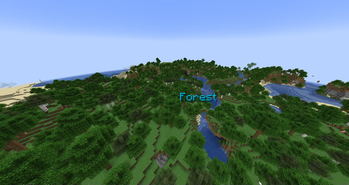
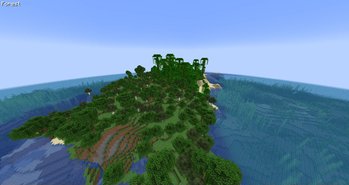
This mod will show a simple text containing the name of the biome the player is currently in.
This is useful if you'd like to have constant information about which biome you're currently traveling in, but don't want your screen to be cluttered with other information.
The info will show once for 1.5 seconds after you entered a new biome. It will then fade out. You can change the time the info appears, or have it shown all the time via the mod's configuration options. To turn the display off completely, toggle the corresponding option.
Config
The text will show at the top left corner of Minecraft by default, however you can completely customize its position and color with the configuration file. There are a few position presets that make it easier for you to choose a position you like without needing to fiddle with the config settings.
To change the text's color, copy the hexadecimal value of a color into the configuration field. For instance, the hex value of white is ffffff (you can use an online tool to get the value of other colors).
Other configuration options include scaling the text, making the text render with a shadow (true by default), and changing the text alignment.
Further Info
- This mod is compatible with any other biome mod, like Biomes o' Plenty.
- Should the debug screen (F3) be open, the biome info will not be rendered (configurable).
- This mod is a client side mod. It will not do anything if installed on a server.
- Please be careful if you use this on a public server, the rules may not allow its usage.
- You are allowed to use this mod in any modpack.
Verfügbare Versionen
BiomeInfo auf deinem Client installieren
Mod-Loader lokal installieren
Installiere fabric für deine lokale Minecraft-Version.
Passende Datei herunterladen
Wähle die BiomeInfo-Datei für fabric und Minecraft 26.3.
Mod installieren
Lege die .jar-Datei in deinem lokalen .minecraft/mods-Ordner ab und starte Minecraft neu. Eine Installation auf dem Server ist nicht nötig.
Kompatibilität
Mod-Loader
Minecraft-Versionen
26.3, 26.2, 26.1.2 (+32 weitere)
Server-seitig
✗ Nicht unterstütztEmpfohlener RAM
4 GB(min. 3 GB)Häufige Fragen
Muss BiomeInfo auf dem Minecraft Server installiert werden?
Nein. Modrinth kennzeichnet BiomeInfo serverseitig als nicht unterstützt. Installiere die Mod nur im lokalen Minecraft-Mods-Ordner. Dein Server kann unverändert bleiben, sofern die Mod-Seite keine zusätzliche Abhängigkeit nennt.
Welche Version und welchen Loader braucht BiomeInfo?
Nutze eine Datei für fabric, forge, neoforge, quilt und exakt deine Minecraft-Version. Unterstützte Versionen sind unter anderem 26.3, 26.2, 26.1.2. Loader-Dateien sind nicht untereinander austauschbar.
BiomeInfo funktioniert nicht – was kann ich prüfen?
Prüfe zuerst Minecraft-Version, Loader-Version und erforderliche Abhängigkeiten. Lege die .jar-Datei im lokalen .minecraft/mods-Ordner ab und entferne ältere Duplikate. Da die Mod clientseitig ist, löst mehr Server-RAM dieses Problem nicht.
Ähnliche Mods




![[ETF] Entity Texture Features](https://cdn.modrinth.com/data/BVzZfTc1/af683d206d50b05258d865b0d6e4aa2f2cee12f2_96.webp)

Minecraft Server für deine Gruppe
BiomeInfo bleibt auf deinem Client. Hoste dazu eine kompatible Welt für deine Mitspieler.