
CC: Create Redstone Link
This mod connects Create Redstone Link networks with CC:Tweaked computers.
Screenshots
Über diese Mod
CC: Create Redstone Link
Based on https://modrinth.com/mod/cc-redstone-link-bridge. I would have simply contributed the additional feature of adding color support there, but unfortunately that mod is not source available (despite the MIT license on its page).
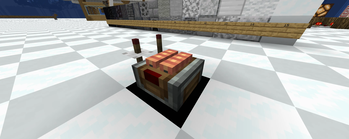
This mod connects Create Redstone Link networks with CC:Tweaked computers. It adds a single block, the CC Redstone Link Bridge, which can be placed in the world and then used as a ComputerCraft peripheral.
This mod requires Create and CC:Tweaked.
What the Mod Does
The bridge acts as a small adapter between two systems:
- Create provides the Redstone Link network.
- CC:Tweaked provides Lua control from computers.
With the bridge block in the world, a connected computer can:
- read the current signal strength of any Redstone Link frequency pair
- send a signal strength to any Redstone Link frequency pair
- optionally tag either frequency slot with a 24-bit RGB dye color
The mod is intentionally minimal. The Lua interface only exposes the operations required for direct network interaction.
How It Works
When the peripheral is used from Lua:
getLinkSignal(freq1, freq2)looks up the current strength for that frequency pair.sendLinkSignal(freq1, freq2, strength)sets the target frequency pair and transmits the chosen strength.
Both functions accept two optional trailing arguments, color1 and color2, which apply a dye color to the corresponding frequency slot.
The frequency values are item IDs written as strings. For example, minecraft:iron_ingot and minecraft:oak_sapling form one valid pair.
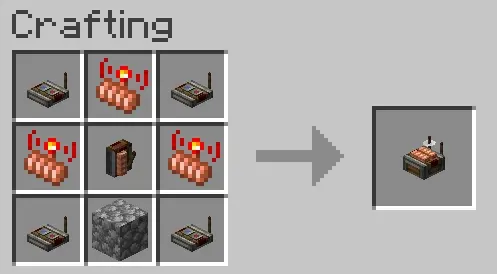
Crafting Recipe
Lua API
Peripheral type:
redstone_link_bridge
Methods:
getLinkSignal(freq1, freq2 [, color1 [, color2]])->numbersendLinkSignal(freq1, freq2, strength [, color1 [, color2]])
Frequency Values
freq1 and freq2 must be item IDs as strings.
Examples:
"minecraft:iron_ingot""minecraft:oak_sapling""minecraft:redstone"
Use an empty string ("") if you want to represent an empty frequency value.
Frequency Colors
color1 and color2 are optional 24-bit RGB integers in the form 0xRRGGBB. They are only meaningful when the corresponding frequency item supports Minecraft's DYED_COLOR data component, which is only leather armor and leather horse armor in vanilla. A colored slot is on a different Redstone Link network from an uncolored slot of the same item, and different colors produce different networks.
The Minecraft Wiki Dye page lists the RGB value each of the 16 standard dyes produces when applied to leather armor in Java Edition. Useful values:
0xB02E26-- Red Dye0x3C44AA-- Blue Dye0xFED83D-- Yellow Dye0x5E7C16-- Green Dye0x1D1D21-- Black Dye0xF9FFFE-- White Dye
Pass nil (or simply omit the argument) for a slot that should remain uncolored. To color only the second slot, pass nil for the first.
Example
local bridge = peripheral.find("redstone_link_bridge")
assert(bridge, "No redstone_link_bridge found")

-- Read an existing frequency pair
local current = bridge.getLinkSignal("minecraft:diamond", "minecraft:redstone")
print("Current signal:", current)

-- Send a signal to a frequency pair
bridge.sendLinkSignal("minecraft:diamond", "minecraft:redstone", 7)

-- Send on a color-tagged channel. This matches a physical Redstone Link
-- whose leather-armor slots were dyed with one Red Dye and one Blue Dye.
bridge.sendLinkSignal(
    "minecraft:leather_chestplate",
    "minecraft:leather_helmet",
    15,
    0xB02E26,   -- Red Dye
    0x3C44AA)   -- Blue Dye

-- Only the second slot is colored
bridge.sendLinkSignal(
    "minecraft:leather_chestplate",
    "minecraft:leather_helmet",
    15,
    nil,
    0x3C44AA)   -- Blue Dye
Verfügbare Versionen
CC: Create Redstone Link auf dem Server installieren
Server bestellen
Bestelle einen Minecraft Java Server mit mindestens 4 GB RAM (6 GB empfohlen).
neoforge Loader setzen
Wähle im Panel unter "Egg" den neoforge-Loader und die passende Minecraft-Version (1.21.11).
Mod installieren
Öffne den Mod-Browser im Dashboard und suche nach "CC: Create Redstone Link". Klicke "Installieren" – fertig! Alternativ: Lade die .jar via SFTP in den /mods Ordner.
Kompatibilität
Mod-Loader
Minecraft-Versionen
1.21.11, 1.21.10, 1.21.9 (+8 weitere)
Server-seitig
✓ ErforderlichEmpfohlener RAM
6 GB(min. 4 GB)Häufige Fragen
CC: Create Redstone Link Server crasht beim Start – was tun?
Häufigste Ursache: falsche neoforge-Version oder zu wenig RAM. Prüfe im Server-Log (latest.log), ob ein "OutOfMemoryError" oder "Mixin"-Fehler auftritt. Bei Mado Hosting: Stelle sicher, dass mindestens 4 GB RAM zugewiesen sind und der Loader zur Mod-Version passt (1.21.11). Über das Panel kannst du den Loader mit einem Klick wechseln.
Ist CC: Create Redstone Link mit neoforge kompatibel?
CC: Create Redstone Link unterstützt offiziell neoforge für Minecraft 1.21.11, 1.21.10, 1.21.9. Im Mado Dashboard werden inkompatible Loader-Kombinationen automatisch erkannt.
Server laggt mit CC: Create Redstone Link – wie optimiere ich die Performance?
Empfohlener RAM: 6 GB (+1 GB pro 5 Spieler). Prüfe mit /spark profiler, ob CC: Create Redstone Link den meisten Tick-Time verbraucht. Häufige Fixes: Server-View-Distance auf 8-10 reduzieren, bei Forge "performant" oder "starlight" als Zusatz-Mod installieren. Bei Mado Hosting läuft dein Server auf NVMe-SSDs mit dedizierten CPU-Kernen für minimale Latenz.
Ähnliche Mods




Modded Server mieten
Installiere CC: Create Redstone Link mit nur einem Klick auf deinem Server.