
Screenshots
Über diese Mod
Mod Introduction
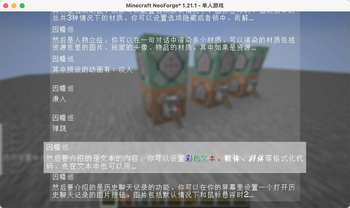
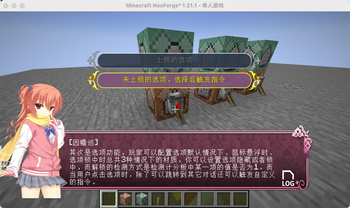
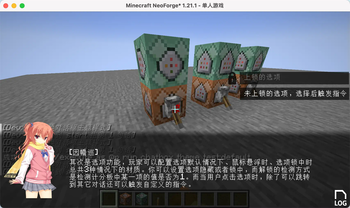
ChatBox is a dialog box mod designed for Minecraft, inspired by the dialog systems found in Galgames. You can configure it using data packs:
Pre-set multiple themes for dialog boxes and switch between them anytime using commands.
Customize the appearance, position, and size of dialog boxes, option boxes, history buttons, and character portraits.
Character portraits support multiple types: images, player avatars, and item textures. You can define custom entry animations for these portraits, with images having 3 preset animations.
Configure dialog text and multiple options for each line. Clicking options can trigger custom commands and jump to other dialogs.
All text elements (dialogs, options) support translation keys.
Since all dialog configurations are implemented through data packs, you can reload all dialog settings directly using the /reload command. Create beautiful dialog systems without modifying any code!
Built-in Commands
Switch themes:
/chatbox theme
Jump to a specific dialog:
/chatbox skip
Open dialog box:
/chatbox open
Event System
For KubeJS users, the mod provides predefined events:
//client_script

// Triggered BEFORE dialog rendering. Provides GuiGraphics for custom rendering. Cancellable.
ChatBoxEvents.renderPre(event=>{
  let getGuiGraphics = event.getGuiGraphics()
  event.cancel()
})

// Triggered AFTER dialog rendering. Provides GuiGraphics for custom rendering.
ChatBoxEvents.renderPost(event=>{
  let getGuiGraphics = event.getGuiGraphics()
})

// Triggered when jumping to a dialog. Provides dialog metadata for custom functionality.
ChatBoxEvents.skipChat(event => {
  let { chatBoxScreen, resourceLocation, group, index } = event
})
Additional Information
Example data packs and documentation are available on GitHub.
Upcoming feature: The author is developing a web-based JSON generator to simplify dialog configuration. Stay tuned for its release!
Verfügbare Versionen
chatbox auf dem Server installieren
Server bestellen
Bestelle einen Minecraft Java Server mit mindestens 3 GB RAM (4 GB empfohlen).
fabric Loader setzen
Wähle im Panel unter "Egg" den fabric-Loader und die passende Minecraft-Version (26.3).
Mod installieren
Öffne den Mod-Browser im Dashboard und suche nach "chatbox". Klicke "Installieren" – fertig! Alternativ: Lade die .jar via SFTP in den /mods Ordner.
Kompatibilität
Mod-Loader
Minecraft-Versionen
26.3, 26.1.2, 1.21.11 (+4 weitere)
Server-seitig
✓ ErforderlichEmpfohlener RAM
4 GB(min. 3 GB)Häufige Fragen
chatbox Server crasht beim Start – was tun?
Häufigste Ursache: falsche fabric-Version oder zu wenig RAM. Prüfe im Server-Log (latest.log), ob ein "OutOfMemoryError" oder "Mixin"-Fehler auftritt. Bei Mado Hosting: Stelle sicher, dass mindestens 3 GB RAM zugewiesen sind und der Loader zur Mod-Version passt (26.3). Über das Panel kannst du den Loader mit einem Klick wechseln.
Ist chatbox mit fabric und forge und neoforge kompatibel?
chatbox unterstützt offiziell fabric, forge, neoforge für Minecraft 26.3, 26.1.2, 1.21.11. Achtung: Forge- und Fabric-Mods sind NICHT untereinander kompatibel – wähle einen Loader und bleibe dabei. Im Mado Dashboard werden inkompatible Loader-Kombinationen automatisch erkannt.
Server laggt mit chatbox – wie optimiere ich die Performance?
Empfohlener RAM: 4 GB (+1 GB pro 8 Spieler). Prüfe mit /spark profiler, ob chatbox den meisten Tick-Time verbraucht. Häufige Fixes: Server-View-Distance auf 8-10 reduzieren, bei Forge "performant" oder "starlight" als Zusatz-Mod installieren. Bei Mado Hosting läuft dein Server auf NVMe-SSDs mit dedizierten CPU-Kernen für minimale Latenz.
Ähnliche Mods




Modded Server mieten
Installiere chatbox mit nur einem Klick auf deinem Server.
Details
- Lizenz
- GNU Affero General Public License v3.0 only
- Server-seitig
- Erforderlich