
Chunk Loader
Adds a chunk loader to the game that allows you - surprise - to permanently load chunks.
Screenshots
Über diese Mod
Chunk Loader



With Chunk Loader Datapack the Chunk Loader is added to the game. With it - surprise - you can permanently load chunks.
This means that you can be anywhere in the world, while the chunk in which the Chunk Loader is placed is still loaded.
In order for the Chunk Loader to load the chunk, it needs 3 Redstone Dust per minute. To fill, simply right-click and place it inside. As soon as there is no more Redstone dust inside, the chunk loader stops working and the chunk will be unloaded until new Redstone dust is added.
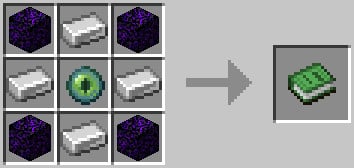
Crafting recipe

Settings
- deactivate fuel consumption:
/scoreboard players set $require_fuel chlo.data 0 - deactivate ambient sound:
/scoreboard players set $sound chlo.data 0 - change fuel consumption speed:
/scoreboard players set $fuel_time chlo.data <time in seconds>
Chunk loading
Because of technical reasons, the Chunk Loader loads the chunks as the following. (every box is a chunk)
| . | . | . | . | . |
|---|---|---|---|---|
| . | TI | TI | TI | . |
| . | TI | ET | TI | . |
| . | TI | TI | TI | . |
| . | . | . | . | . |
.: Not loaded, but mobs count for the mob capTI: Normal except plant growth, mob spawning and mob ticking (movement)ET: Normal except plant growth and mob spawning
Additional info: https://gist.github.com/Drovolon/24bfaae00d57e7a8ca64b792e14fa7c6
Technical Notes
- ONLY the latest version of the datapack for Fabric and Vanilla 1.21.1 is supported
- bug reports and suggestions are ONLY accepted on GitHub
- the Chunk Loader can also be obtained with the command
/loot give @s loot chlo:chunk_loader - there could be problems with other datapacks that forceload many chunks themselves
- to uninstall run the command
/function chlo:core/uninstall - datapack was created with the help of beet
Verfügbare Versionen
Chunk Loader auf dem Server installieren
Server bestellen
Bestelle einen Minecraft Java Server mit mindestens 3 GB RAM (4 GB empfohlen).
datapack Loader setzen
Wähle im Panel unter "Egg" den datapack-Loader und die passende Minecraft-Version (1.21.1).
Mod installieren
Öffne den Mod-Browser im Dashboard und suche nach "Chunk Loader". Klicke "Installieren" – fertig! Alternativ: Lade die .jar via SFTP in den /mods Ordner.
Kompatibilität
Mod-Loader
Minecraft-Versionen
1.21.1, 1.21, 1.20.1 (+5 weitere)
Server-seitig
✓ ErforderlichEmpfohlener RAM
4 GB(min. 3 GB)Häufige Fragen
Chunk Loader Server crasht beim Start – was tun?
Häufigste Ursache: falsche datapack-Version oder zu wenig RAM. Prüfe im Server-Log (latest.log), ob ein "OutOfMemoryError" oder "Mixin"-Fehler auftritt. Bei Mado Hosting: Stelle sicher, dass mindestens 3 GB RAM zugewiesen sind und der Loader zur Mod-Version passt (1.21.1). Über das Panel kannst du den Loader mit einem Klick wechseln.
Ist Chunk Loader mit datapack und fabric und forge und neoforge und quilt kompatibel?
Chunk Loader unterstützt offiziell datapack, fabric, forge, neoforge, quilt für Minecraft 1.21.1, 1.21, 1.20.1. Achtung: Forge- und Fabric-Mods sind NICHT untereinander kompatibel – wähle einen Loader und bleibe dabei. Im Mado Dashboard werden inkompatible Loader-Kombinationen automatisch erkannt.
Server laggt mit Chunk Loader – wie optimiere ich die Performance?
Empfohlener RAM: 4 GB (+1 GB pro 8 Spieler). Prüfe mit /spark profiler, ob Chunk Loader den meisten Tick-Time verbraucht. Häufige Fixes: Server-View-Distance auf 8-10 reduzieren, bei Forge "performant" oder "starlight" als Zusatz-Mod installieren. Bei Mado Hosting läuft dein Server auf NVMe-SSDs mit dedizierten CPU-Kernen für minimale Latenz.
Ähnliche Mods




Modded Server mieten
Installiere Chunk Loader mit nur einem Klick auf deinem Server.
Details
- Lizenz
- GNU Lesser General Public License v3.0 only
- Server-seitig
- Erforderlich