
Chunky Extension
Ce (Chunky-extend) A small extension for Chunky, auto start and stop Chunky if players are online or offline.
Screenshots
Über diese Mod

Chunky Extended
Pregenerate your world without ever lagging your players.
Chunky Extended is a lightweight, server-side companion for the popular Chunky pregenerator. It automatically pauses Chunky while players are online and continues it once the server is empty, so all that heavy chunk generation only happens when nobody is around to feel it. Add an optional time scheduler and you get full control over exactly when pregeneration runs.
No more choosing between a fully pregenerated world and a smooth experience for your players — Chunky Extended gives you both.
Features
- Player-aware auto-pause / continue — Chunky runs only while the server is empty. The moment someone joins, it pauses; when the last player leaves, it resumes.
- Time scheduler — set rules like "continue at 03:00, pause at 08:00, Mon–Fri" so pregeneration runs overnight. Rules are per-day, with a configurable timezone.
- In-game menu — manage everything from a clean GUI, no commands to memorize (see below).
- Commands too — full control via
/chunky-extendif you prefer the console. - Drives Chunky directly — uses Chunky's own
pause/continue, so it stays compatible with however you've configured Chunky. - Multi-loader — one mod for Fabric, Forge, and NeoForge on Minecraft 26.1.2.
How to open the menu
Type the client command:
/cemenu
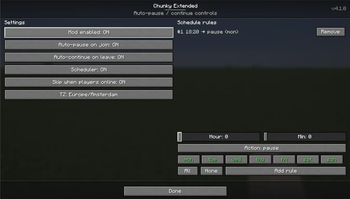
This opens the Chunky Extended control panel, where you can:
- Toggle the mod on/off and the auto-pause / auto-continue behaviour.
- Add and remove schedule rules using simple Hour / Minute sliders and Mon–Sun day toggles — no typing times by hand, so there's nothing to get wrong.
- See the current status and settings at a glance.
Who can edit: server operators (gamemaster / permission level 2) and the singleplayer host can make changes. Everyone else can open the menu in read-only mode.
The menu syncs live with the server, so what you see is always the server's real state — handy on multiplayer where the settings live server-side.
Commands
Everything in the menu is also available through the /chunky-extend command tree:
/chunky-extend enable      # turn auto pause/continue on
/chunky-extend disable     # turn it off
/chunky-extend status      # show current status
/chunky-extend settings    # view settings (e.g. timezone)
/chunky-extend schedule    # add / list / remove scheduled rules
Requirements
Chunky Extended needs two dependencies installed alongside it:
- Chunky — the pregenerator it controls.
- CodxLib — a small shared library used by my mods (powers the menu, networking, and update checks). It's listed under Dependencies, so most launchers install it automatically.
Install all three (Chunky Extended + Chunky + CodxLib) on the server. The /cemenu GUI is client-side, but the mod itself does its work server-side.
Short description
Server-side automation for the Chunky pregenerator: auto-pause while players are online, auto-continue when the server is empty, plus a scheduler and an in-game menu. Fabric / Forge / NeoForge.
Verfügbare Versionen
Chunky Extension auf dem Server installieren
Server bestellen
Bestelle einen Minecraft Java Server mit mindestens 4 GB RAM (6 GB empfohlen).
fabric Loader setzen
Wähle im Panel unter "Egg" den fabric-Loader und die passende Minecraft-Version (26.1.2).
Mod installieren
Öffne den Mod-Browser im Dashboard und suche nach "Chunky Extension". Klicke "Installieren" – fertig! Alternativ: Lade die .jar via SFTP in den /mods Ordner.
Kompatibilität
Mod-Loader
Minecraft-Versionen
26.1.2, 26.1.1, 26.1 (+19 weitere)
Server-seitig
✓ ErforderlichEmpfohlener RAM
6 GB(min. 4 GB)Häufige Fragen
Chunky Extension Server crasht beim Start – was tun?
Häufigste Ursache: falsche fabric-Version oder zu wenig RAM. Prüfe im Server-Log (latest.log), ob ein "OutOfMemoryError" oder "Mixin"-Fehler auftritt. Bei Mado Hosting: Stelle sicher, dass mindestens 4 GB RAM zugewiesen sind und der Loader zur Mod-Version passt (26.1.2). Über das Panel kannst du den Loader mit einem Klick wechseln.
Ist Chunky Extension mit fabric und forge und neoforge und quilt kompatibel?
Chunky Extension unterstützt offiziell fabric, forge, neoforge, quilt für Minecraft 26.1.2, 26.1.1, 26.1. Achtung: Forge- und Fabric-Mods sind NICHT untereinander kompatibel – wähle einen Loader und bleibe dabei. Im Mado Dashboard werden inkompatible Loader-Kombinationen automatisch erkannt.
Server laggt mit Chunky Extension – wie optimiere ich die Performance?
Empfohlener RAM: 6 GB (+1 GB pro 5 Spieler). Prüfe mit /spark profiler, ob Chunky Extension den meisten Tick-Time verbraucht. Häufige Fixes: Server-View-Distance auf 8-10 reduzieren, bei Forge "performant" oder "starlight" als Zusatz-Mod installieren. Bei Mado Hosting läuft dein Server auf NVMe-SSDs mit dedizierten CPU-Kernen für minimale Latenz.
Ähnliche Mods


Modded Server mieten
Installiere Chunky Extension mit nur einem Klick auf deinem Server.