

Modrinth · Fabric, Quilt · Client-Mod
Cinematic Zoom (Fabric)
Cinematic Zoom (Fabric) ist eine clientseitige Mod. Du installierst sie auf deinem Rechner, auf dem Server ist sie nicht nötig.
Smooth, cinematic zoom for Minecraft with animated black bars, per-frame easing, and optional mouse wheel control. Built for Fabric 1.21.7-1.21.11.
- Downloads
- 255.9K
- Autor
- Mel1x
- Loader
- Fabric, Quilt
- Minecraft
- 1.20.1 – 26.3
- Aktualisiert
- –
Einrichtung
Cinematic Zoom (Fabric) auf deinem Client installieren
Clientseitige Mods laufen nur auf deinem Rechner. Mehr Server-RAM ändert an ihrer Leistung nichts.
- 01
Loader lokal installieren
Installiere Fabric oder Quilt für deine Minecraft-Version in deinem Launcher.
- 02
Datei herunterladen
Lade die Cinematic Zoom (Fabric)-Datei für deinen Loader und exakt deine Minecraft-Version herunter, zum Beispiel 26.3.
- 03
In den Mods-Ordner legen
Lege die .jar-Datei in den lokalen Ordner .minecraft/mods und entferne ältere Duplikate.
- 04
Starten
Starte Minecraft mit dem Loader-Profil. Auf dem Server musst du nichts ändern.
- Auf dem Server
- Nicht nötig
- Auf dem Client
- Erforderlich
- Loader
- Fabric, Quilt
- Minecraft
- 26.3, 26.2, 26.1.2 +14 weitere
- Lizenz
- MIT License
Versionen
Veröffentlichte Versionen
Nimm die Datei, die zu Loader und Minecraft-Version deines Servers passt. Server und Spieler brauchen dieselbe Version.
Cinematic Zoom (Fabric) · Modrinth- Cinematic Zoom (Fabric) 1.414. November 2026Minecraft 26.3 · Fabric, Quilt
- Cinematic Zoom (Fabric) 1.414. November 2026Minecraft 26.2 · Fabric, Quilt
- Cinematic Zoom (Fabric) 1.414. November 2026Minecraft 26.1, 26.1.1, 26.1.2 · Fabric, Quilt
- Cinematic Zoom (Fabric) 1.414. November 2026Minecraft 1.21.10, 1.21.11, 1.21.9 · Fabric, Quilt
- Cinematic Zoom (Fabric) 1.414. November 2026Minecraft 1.21.7, 1.21.8 · Fabric, Quilt
Originalbeschreibung des Projektautors
CinematicZoom (Fabric 1.20.1-26.3)
Smooth, cinematic zoom for Minecraft with animated black bars, per-frame easing, and optional mouse wheel control. Built for Fabric 1.20.1-26.3.
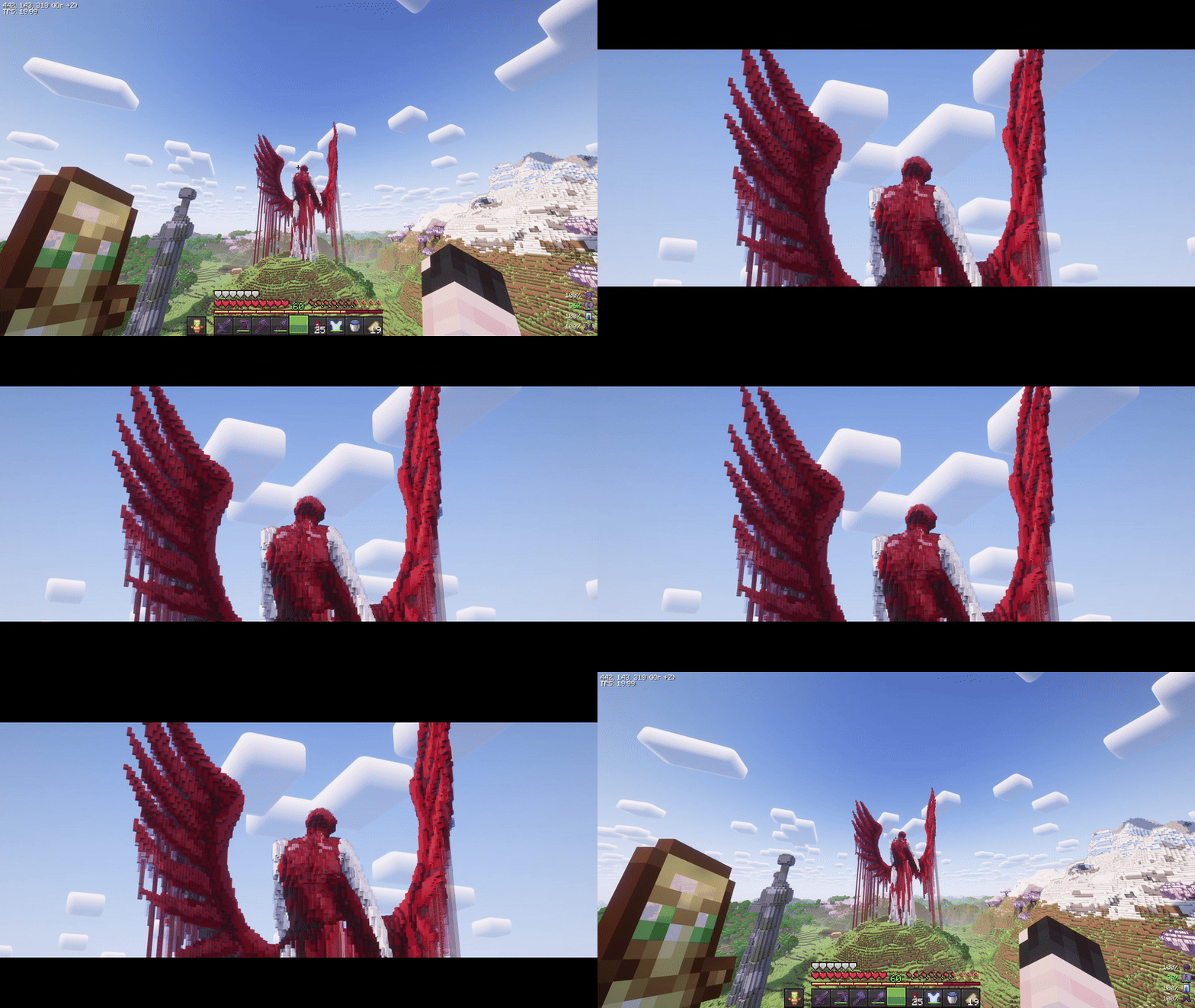
Features
- Hold-to-zoom (default key:
C, rebindable). - Per-frame smoothing (no “steppy” 20 TPS feel).
- Animated black bars (top & bottom, configurable height).
- Mouse wheel adjustment while zooming (optional).
- Hide HUD & crosshair while zooming (optional).
- Cinematic (smooth) camera toggle while zooming (optional).
- Multi-language: English & Russian.
Requirements
- (Optional) Mod Menu (for in-game settings entry)
- (Optional) Cloth Config (for a nice config screen)
Installation
- Install Fabric Loader & Fabric API for Minecraft 1.21.7-1.21.11.
- Put this mod’s JAR into your
mods/folder. - (Optional) Add Mod Menu and Cloth Config for an in-game settings UI.
Usage
- Hold the zoom key (default C) to zoom in.
- While holding zoom, scroll the mouse wheel to fine-tune zoom level (if enabled).
- Release the key to smoothly return to normal FOV and hide the bars.
Zoom, HUD hiding, and cinematic camera are automatically disabled in GUI screens.
Configuration
You can configure the mod in two ways:
In-game (recommended)
If Mod Menu + Cloth Config are installed:
- Open Mods → Cinematic Zoom → Configure.
Config file
Edit (or delete to regenerate defaults):
Credits & Attribution
Original author & idea credit: KubePixel
Their Forge mod for 1.20.1/1.21.1: Cinematic Zoom — https://www.curseforge.com/minecraft/mc-mods/cinematic-zoomFabric implementation (this mod): mix
This project is an independent Fabric implementation inspired by the original concept. Not affiliated with or endorsed by KubePixel.
Original concept and name credit to KubePixel. If you’re on Forge 1.20.1/1.21.1, check out their original mod here: https://www.curseforge.com/minecraft/mc-mods/cinematic-zoom.
Muss Cinematic Zoom (Fabric) auf dem Minecraft Server installiert werden?
Nein. Modrinth kennzeichnet Cinematic Zoom (Fabric) serverseitig als nicht unterstützt. Installiere die Mod nur im lokalen Mods-Ordner. Dein Server kann unverändert bleiben, sofern die Projektseite keine zusätzliche Abhängigkeit nennt.
Welche Version und welchen Loader braucht Cinematic Zoom (Fabric)?
Nutze eine Datei für Fabric, Quilt und exakt deine Minecraft-Version. Unterstützt werden unter anderem 26.3, 26.2, 26.1.2. Dateien für verschiedene Loader sind nicht austauschbar.
Cinematic Zoom (Fabric) funktioniert nicht – was kann ich prüfen?
Prüfe zuerst Minecraft-Version, Loader-Version und erforderliche Abhängigkeiten. Da die Mod clientseitig ist, löst mehr Server-RAM das Problem nicht.
Ähnliche Mods
Beliebte Mods aus derselben Kategorie
 Server-fähig

VeinMiner
von Miraculixx
Mine the whole vein on mining a single ore/block. Make the tedious mining experience to something satisfying and fun! FTB Ultimine alternative
 Server-fähig

Geckolib
von Gecko
A 3D animation library for entities, blocks, items, armor, and more!
 Nur Client

VeinMiner Hotkey
von Miraculixx
Veinminer Addon - Use a hotkey to veinmine with a dynamic crosshair & block highlighting
 Server-fähig

Fzzy Config
von fzzyhmstrs
Config API with automatic GUIs, powerful validation options, server-client sync, and more!
Mods für deinen eigenen Server gesucht?
Im Katalog findest du Mods, die auf Minecraft Servern laufen.