
Modrinth · Fabric, Forge, NeoForge
Civillis auf deinem Minecraft Server
Civillis läuft auf Minecraft Servern mit Fabric oder Forge oder NeoForge. Bestell deinen Server, stell den Loader im Panel ein und installiere die Mod mit einem Klick im Mod-Browser.
Build more, spawn less. Hostile mobs naturally avoid civilized areas.
- Downloads
- 140.1K
- Autor
- MaoxnZ
- Loader
- Fabric, Forge, NeoForge
- Minecraft
- 1.20.1 – 26.1.2
- Aktualisiert
- –
Screenshots
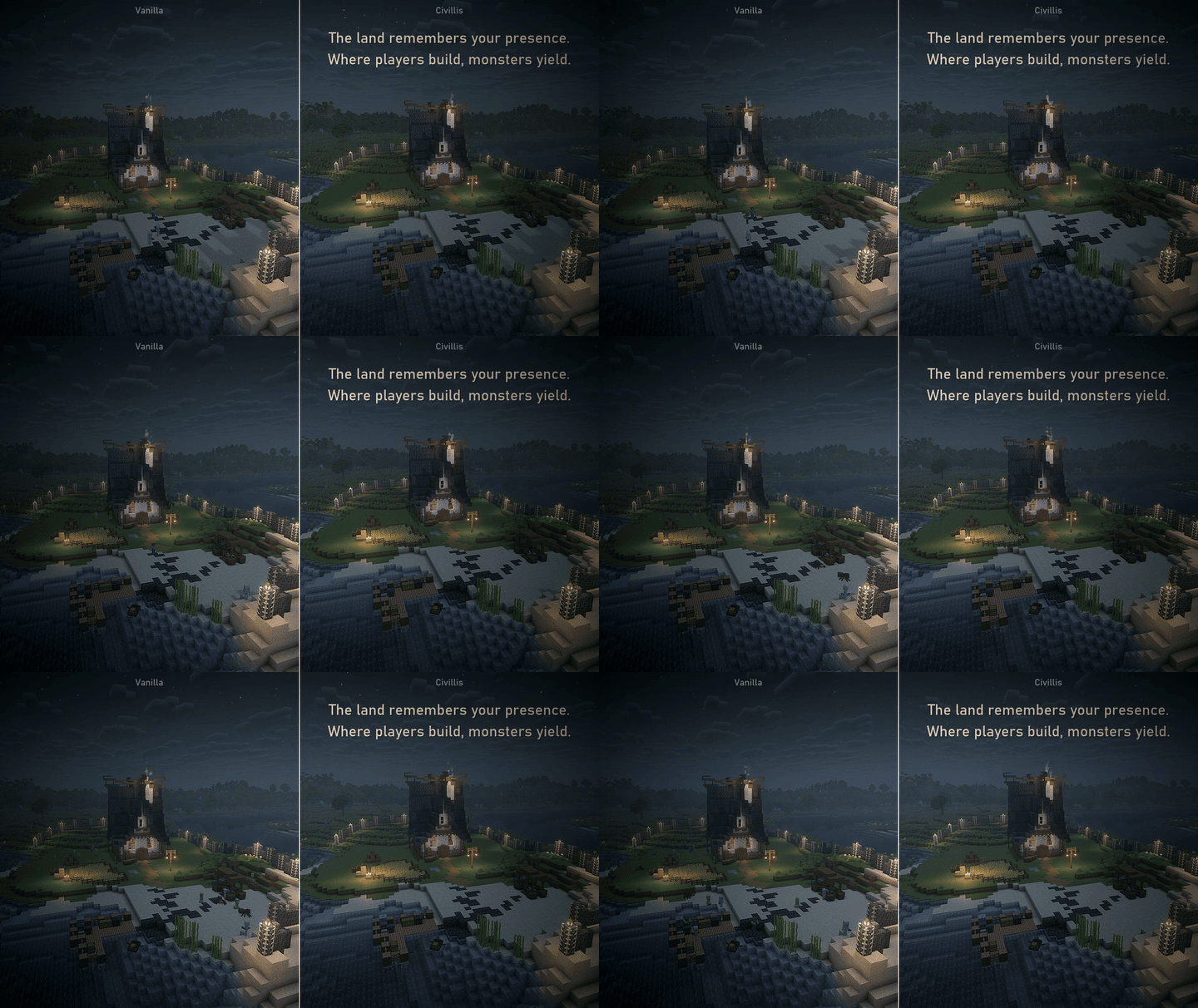
So sieht Civillis aus


Bilder: Civillis auf Modrinth, vom Projektteam veröffentlicht.
Einrichtung
Civillis auf dem Server installieren
Server und Spieler brauchen denselben Loader und dieselbe Minecraft-Version. Sichere die Welt, bevor du Mods hinzufügst oder aktualisierst.
- 01
Konfigurieren
4 GB RAM sind vorausgewählt. Laufzeit und Add-ons wählst du selbst, bezahlt wird per Kreditkarte oder PayPal.
- 02
Loader einstellen
Stell im Panel die Serversoftware auf Fabric oder Forge oder NeoForge und wähl die passende Minecraft-Version, zum Beispiel 26.1.2.
- 03
Mod installieren
Such im Mod-Browser nach „Civillis“ und installiere die Version für deinen Loader. Alternativ lädst du die .jar per SFTP in den Ordner mods. Erforderliche Abhängigkeiten stehen auf der Projektseite.
- 04
Verbinden
Alle Spieler installieren Civillis in derselben Version lokal und verbinden sich über die Serveradresse aus dem Panel.
- Auf dem Server
- Erforderlich
- Auf dem Client
- Erforderlich
- Loader
- Fabric, Forge, NeoForge
- Minecraft
- 26.1.2, 26.1.1, 26.1 +17 weitere
- Lizenz
- LicenseRef-All-Rights-Reserved
Das Panel
Mods installieren, Fehler finden.
Echte Screenshots aus dem Mado Panel. Beides ist bei jedem Minecraft Server enthalten.
Mod-Browser
Modrinth und CurseForge direkt im Panel.
Der Browser filtert nach deiner Minecraft-Version. Mods installierst du mit einem Klick, ohne .jar-Dateien hochzuladen.

KI-Crash-Analyse
Wenn ein Mod crasht, liest die Analyse das Log.
Mods scheitern oft an einer falschen Loader-Version, Java-Version oder fehlenden Abhängigkeit. Die Analyse nennt eine wahrscheinliche Ursache und einen Lösungsvorschlag.

Versionen
Veröffentlichte Versionen
Nimm die Datei, die zu Loader und Minecraft-Version deines Servers passt. Server und Spieler brauchen dieselbe Version.
Civillis · Modrinth- Civillis 2.0.1-release20. Juli 2026Minecraft 1.21.11 · NeoForge
- Civillis 2.0.1-release20. Juli 2026Minecraft 1.21.11 · Fabric
- Civillis 2.0.1-release20. Juli 2026Minecraft 1.21.1 · NeoForge
- Civillis 2.0.1-release20. Juli 2026Minecraft 1.21.1 · Fabric
- Civillis 2.0.1-release20. Juli 2026Minecraft 1.20.1 · Forge
Originalbeschreibung des Projektautors
The land remembers your presence.
Where players build, monsters yield.


What is Civillis?
Have you ever wished your base just felt safe — without flooding every surface with torches or carpeting the ground with slabs?
Civillis makes that happen. It recognizes the signs of civilization you naturally create — a campfire burning, a bed placed, a workbench humming — and silently pushes hostile mobs away. The more your settlement grows, the stronger the protection. No commands, no rituals, no new mechanics to learn — just play, and the land responds.
Leave for too long, and nature slowly reclaims its ground. But a well-established city never truly falls.
How It Works
The mod evaluates a 240×240×48 block area (configurable) around each potential spawn point and computes a civilization score based on nearby structures. Blocks that reflect human presence — furnaces, beds, campfires, beacons, workstations, and others like them — are what the mod looks for.
- Settle and grow → safer land. A thriving city can push monsters back ~90 blocks from its borders.
- Leave for a while → gradual decay. Over time without visits, protection weakens — but a large settlement still keeps a ~40-block safe perimeter.
- A small cabin → modest protection. A lone outpost won't create a fortress, but it helps.
That's millions of blocks evaluated per spawn attempt — and it happens every time, everywhere in the world. See the Wiki to learn how the shard-based civilization engine keeps this at constant time.
Features

The blocks you already use to build your world are what keep you safe. Campfires, beds, furnaces, crafting tables — the things that make a place feel lived in — are exactly what the mod looks for. Build the home you've always wanted, and safety follows.

Hostile mobs inside civilized zones try to leave. In normal situations they drift toward less civilized ground, and in highly civilized city centers they may even give up fighting and retreat. This behavior follows your suppression settings and gives settlements a more believable defensive feel.

The world doesn't stay tamed forever. Unvisited areas gradually lose their protection over time, creating a living, breathing sense of territory that rewards active presence. Offline time in singleplayer doesn't count — your civilization picks up right where you left off.

Want a mob farm in the heart of your city? Build the structure to carve out a pocket of open wilderness inside your civilization. Mobs spawn freely within it, ignoring the surrounding score. Place mob heads inside to attract specific types. Hint: crying obsidian, a soul campfire burning on top, and a bone to sacrifice.

Scan your local civilization level with a sonar pulse. Carry a portable detector (compass + emeralds) for quick on-the-go checks, or place a bell on a lodestone for a more powerful stationary sweep. Color-coded boundaries and custom sound cues tell you exactly how safe (or exposed) your surroundings are.

In high-civilization areas, you can build a small altar and activate it with a totem to create a one-time emergency revival point. If death would occur, you're pulled back to the podium and revived with totem-style effects (regeneration, absorption, and fire resistance) without consuming a totem in hand.

Civillis is built to be tuned by datapacks. Block weights, mob-head attraction lists, zone and dimension policies, and spawn-gate entity lists all load from data files, so packs can reshape how civilization behaves without code. Modpack authors can also assign custom blocks to tiered tags like #civil:high_civilized or #civil:low_civilized to give whole groups of blocks a civilization weight at once.
Show spoiler
Blocks can be added to these tags to make them compatible with Civillis:
#civil:very_very_high_civilized#civil:very_high_civilized#civil:high_civilized#civil:medium_high_civilized#civil:medium_civilized#civil:medium_low_civilized#civil:low_civilized#civil:very_low_civilized#civil:very_very_low_civilized

Built from the ground up for multiplayer. Async database persistence, player-aware cache prefetching, and a dedicated I/O thread pool keep performance rock-solid even on large servers with many players exploring vast worlds.
You strike the anvil — its ring echoes across the village.
They know this is civilization. So they leave.
You murmur over the enchanting table — runes flicker in the dark.
They know this is civilization. So they leave.
You sit by the campfire with old friends — laughter rises into the night.
They know this is civilization. So they leave.
Natural. Dignified. Elegant. This should have been part of the world all along.
Now it is.
Requirements
- Minecraft 1.20.1 ~ 1.21.11
If on Fabric:
- Fabric Loader ≥ 0.15.0
- Fabric API
External Links
Civillis Server crasht beim Start – was tun?
Häufige Ursachen: Loader- oder Minecraft-Version passen nicht zur Mod-Datei, eine Abhängigkeit fehlt oder der RAM reicht nicht. Such im Log (latest.log) nach „OutOfMemoryError“, „Mixin“ oder fehlenden Mods. Bei Mado wertet die KI-Crash-Analyse das Log aus und schlägt eine Ursache vor. Loader und Version änderst du im Panel.
Mit welchem Loader läuft Civillis?
Laut Modrinth unterstützt Civillis Fabric, Forge, NeoForge für Minecraft 26.1.2, 26.1.1, 26.1. Forge- und Fabric-Dateien sind nicht untereinander austauschbar: Wähl einen Loader für Server und Clients.
Wie viel RAM braucht ein Server mit Civillis?
Als Orientierung 3–4 GB für einen Server mit dieser Mod. Das ist eine Schätzung, keine gemessene Mindestanforderung. Weitere Mods, viele Spieler und große Sichtweiten brauchen mehr. Ob eine Mod die Tick-Zeit belastet, siehst du mit dem spark-Profiler.
Ähnliche Mods
Beliebte Mods aus derselben Kategorie
 Server-fähig

Xaero's Minimap
von thexaero
Displays a map of the nearby world terrain, players, mobs, entities in the corner of your screen. Lets you create waypoints which help you find the locations you've marked.
 Server-fähig

Xaero's World Map
von thexaero
Adds a full screen world map which shows you what you have explored in the world. Works great together with Xaero's Minimap.
 Nur Client

Not Enough Animations
von tr7zw
Bringing first-person animations to the third-person
 Nur Client

3D Skin Layers
von tr7zw
Render the player skin layer in 3d!
Bereit für deinen Server mit Civillis?
4 GB RAM ab 8,00 € im Monat. 35 % auf den 1. Monat mit MADO35.