

Modrinth · Fabric, Forge, NeoForge · Client-Mod
ClickThrough Plus
ClickThrough Plus ist eine clientseitige Mod. Du installierst sie auf deinem Rechner, auf dem Server ist sie nicht nötig.
Click through Signs and Item Frames to Chests and other containers - a port of ClickThrough to modern versions.
- Downloads
- 2.2M
- Autor
- Cassian
- Loader
- Fabric, Forge, NeoForge
- Minecraft
- 1.18.2 – 26.3
- Aktualisiert
- –
Einrichtung
ClickThrough Plus auf deinem Client installieren
Clientseitige Mods laufen nur auf deinem Rechner. Mehr Server-RAM ändert an ihrer Leistung nichts.
- 01
Loader lokal installieren
Installiere Fabric oder Forge oder NeoForge für deine Minecraft-Version in deinem Launcher.
- 02
Datei herunterladen
Lade die ClickThrough Plus-Datei für deinen Loader und exakt deine Minecraft-Version herunter, zum Beispiel 26.3-rc-2.
- 03
In den Mods-Ordner legen
Lege die .jar-Datei in den lokalen Ordner .minecraft/mods und entferne ältere Duplikate.
- 04
Starten
Starte Minecraft mit dem Loader-Profil. Auf dem Server musst du nichts ändern.
- Auf dem Server
- Nicht nötig
- Auf dem Client
- Erforderlich
- Loader
- Fabric, Forge, NeoForge
- Minecraft
- 26.3-rc-2, 26.3-rc-1, 26.3-pre-3 +116 weitere
- Lizenz
- MIT License
Versionen
Veröffentlichte Versionen
Nimm die Datei, die zu Loader und Minecraft-Version deines Servers passt. Server und Spieler brauchen dieselbe Version.
ClickThrough Plus · Modrinth- Clickthrough Plus 3.6.5 for 26.3 Fabric8. September 2026Minecraft 26.3, 26.3-pre-3, 26.3-rc-1, 26.3-rc-2 · Fabric
- Clickthrough Plus 3.6.5 for 26.1 NeoForge30. Juni 2026Minecraft 26.1, 26.1.1, 26.1.2, 26.2 · NeoForge
- Clickthrough Plus 3.6.5 for 26.1 Fabric30. Juni 2026Minecraft 26.1, 26.1.1, 26.1.2, 26.2 · Fabric
- Clickthrough Plus 3.6.2 for 1.21.11 NeoForge23. Dezember 2025Minecraft 1.21.11 · NeoForge
- Clickthrough Plus 3.6.2 for 1.21.11 Fabric23. Dezember 2025Minecraft 1.21.11 · Fabric
Originalbeschreibung des Projektautors


This mod helps you access containers (Chests, Shulker Boxes, Barrels, etc.) that are marked with a Sign or Item Frame. Right-clicking a sign or item frame that's attached to a container will open the container instead.
ClickThrough Plus works clientside, and does not need to be installed on the server.
You can still rotate items in item frames or edit signs by sneaking and clicking them.
Installation
ClickThrough Plus is a completely clientside mod for Fabric and NeoForge.
- On Fabric, Fabric API is required.
- On NeoForge, there are no dependencies.
- McQoy is recommended to configure the mod.
Older versions may require Architectury API and Cloth Config.
Mod Compatibility + Config Options
- By default, ClickThrough Plus will only click through to valid containers, including all mods with properly tagged chests, shulker boxes, and similar containers. Additional containers can be added to the mod's config file, or disabled by changing
onlyContainersto false. - ClickThrough Plus has optional compatibility with the Fast Item Frames mod. Note that with ClickThrough active, you will not be able to rotate items, as shift-right clicking a Fast Item Frame does not rotate it, unlike a vanilla Item Frame.
Credits
This is a port of Giselbaer's ClickThrough to Architectury 1.18 and above, allowing for the mod to be used on both Fabric and NeoForge, as well as Quilt and Forge on older versions. ClickThrough is available under the MIT License.
This mod will be kept up to date with the latest versions of Minecraft, with updates and improvements focusing on 1.21.10 and above.
Muss ClickThrough Plus auf dem Minecraft Server installiert werden?
Nein. Modrinth kennzeichnet ClickThrough Plus serverseitig als nicht unterstützt. Installiere die Mod nur im lokalen Mods-Ordner. Dein Server kann unverändert bleiben, sofern die Projektseite keine zusätzliche Abhängigkeit nennt.
Welche Version und welchen Loader braucht ClickThrough Plus?
Nutze eine Datei für Fabric, Forge, NeoForge und exakt deine Minecraft-Version. Unterstützt werden unter anderem 26.3-rc-2, 26.3-rc-1, 26.3-pre-3. Dateien für verschiedene Loader sind nicht austauschbar.
ClickThrough Plus funktioniert nicht – was kann ich prüfen?
Prüfe zuerst Minecraft-Version, Loader-Version und erforderliche Abhängigkeiten. Da die Mod clientseitig ist, löst mehr Server-RAM das Problem nicht.
Ähnliche Mods
Beliebte Mods aus derselben Kategorie
 Server-fähig

FerriteCore
von malte0811
Memory usage optimizations
 Nur Client

Mod Menu
von Prospector
Adds a mod menu to view the list of mods you have installed.
 Server-fähig

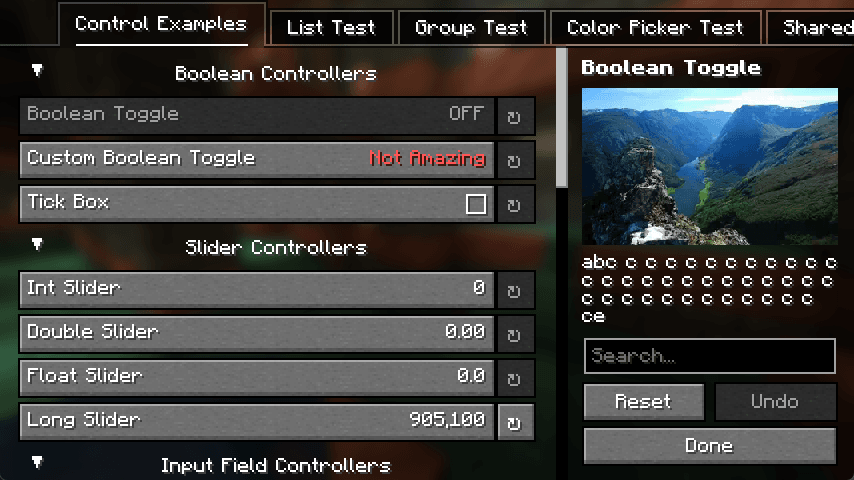
YetAnotherConfigLib (YACL)
von isxander
A builder-based configuration library for Minecraft!
 Server-fähig

Xaero's Minimap
von thexaero
Displays a map of the nearby world terrain, players, mobs, entities in the corner of your screen. Lets you create waypoints which help you find the locations you've marked.
Mods für deinen eigenen Server gesucht?
Im Katalog findest du Mods, die auf Minecraft Servern laufen.