
Cobblemon Firework Capsules
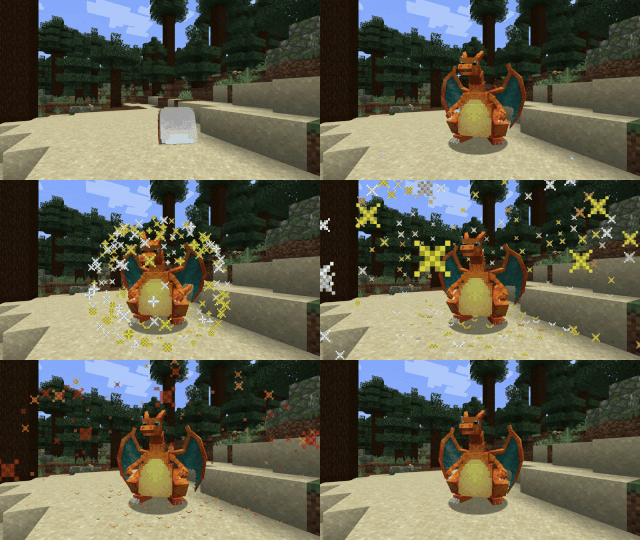
Send out your Pokemon with a bang using fireworks and custom stickers!
Screenshots

Über diese Mod
Cobblemon Firework Capsules
Send out your Pokemon with a bang using fireworks and custom stickers!

Basics
Ball Capsule Recipe

Adding Fireworks
Ball Capsules can be combined with any number of Firework Stars.
Capsule Station Recipe
You can equip your ball capsule to your Pokemon using a Capsule Station.
Special thanks to dogtorbloo for the custom block model!
Stickers
Sticker Recipe
Stickers can be crafted using Paper + Gunpowder + an ingredient.
As of v2.0.0 there are 21 stickers, one for each type, which can be crafted using the type gems, and three unique stickers.
Combining Stickers
Stickers can be combined with a Ball Capsule along with other stickers and Firework Stars to create all kinds of effects.
Addon Support
Stickers rely on the fireworkcapsules:sticker_explosion data component to determine how to render the sticker effects.
In order to create a custom sticker, you can refer to the example resource/datapack.
For more information, refer to the wiki.
The simple codec allows for the following, where id is the only required field.
{
    "id": "fireworkcapsules:thunder_sticker",
    "color": 16769024,
    "sound": "cobblemon:move.thunder.target",
    "type": "BEDROCK"
}
The complex codec, used only for CUSTOM or FIREWORK sticker types allows for the following:
{
    "id": "fireworkcapsules:thunder_sticker",
    "colors": [ 16769024 ],
    "fadeColors": [],
    "hasTrail": false,
    "hasTwinkle": false,
    "sound": "cobblemon:move.thunder.target",
    "type": "CUSTOM"
}
Verfügbare Versionen
Cobblemon Firework Capsules auf dem Server installieren
Server bestellen
Bestelle einen Minecraft Java Server mit mindestens 3 GB RAM (4 GB empfohlen).
fabric Loader setzen
Wähle im Panel unter "Egg" den fabric-Loader und die passende Minecraft-Version (1.21.1).
Mod installieren
Öffne den Mod-Browser im Dashboard und suche nach "Cobblemon Firework Capsules". Klicke "Installieren" – fertig! Alternativ: Lade die .jar via SFTP in den /mods Ordner.
Kompatibilität
Mod-Loader
Minecraft-Versionen
1.21.1
Server-seitig
✓ ErforderlichEmpfohlener RAM
4 GB(min. 3 GB)Häufige Fragen
Cobblemon Firework Capsules Server crasht beim Start – was tun?
Häufigste Ursache: falsche fabric-Version oder zu wenig RAM. Prüfe im Server-Log (latest.log), ob ein "OutOfMemoryError" oder "Mixin"-Fehler auftritt. Bei Mado Hosting: Stelle sicher, dass mindestens 3 GB RAM zugewiesen sind und der Loader zur Mod-Version passt (1.21.1). Über das Panel kannst du den Loader mit einem Klick wechseln.
Ist Cobblemon Firework Capsules mit fabric und neoforge kompatibel?
Cobblemon Firework Capsules unterstützt offiziell fabric, neoforge für Minecraft 1.21.1. Im Mado Dashboard werden inkompatible Loader-Kombinationen automatisch erkannt.
Server laggt mit Cobblemon Firework Capsules – wie optimiere ich die Performance?
Empfohlener RAM: 4 GB (+1 GB pro 8 Spieler). Prüfe mit /spark profiler, ob Cobblemon Firework Capsules den meisten Tick-Time verbraucht. Häufige Fixes: Server-View-Distance auf 8-10 reduzieren, bei Forge "performant" oder "starlight" als Zusatz-Mod installieren. Bei Mado Hosting läuft dein Server auf NVMe-SSDs mit dedizierten CPU-Kernen für minimale Latenz.
Ähnliche Mods




Modded Server mieten
Installiere Cobblemon Firework Capsules mit nur einem Klick auf deinem Server.