
Cobblemon Smartphone
A smartphone with cobblemon integration for quick and portable functions like team healing, open your pc and your ender chest.
Screenshots
Über diese Mod


Cobblemon Smartphone
A Cobblemon addon that adds customizable smartphones to enhance your Pokémon training experience in Cobblemon!
Features
The smartphone comes with an expanding list of features that can be fully customized and toggled in the configuration:
- Pokémon Healing - Quick access to heal your Pokémon team.
- PC Access - Open your Pokémon PC storage system on the go.
- Cloud Storage - Access your Ender Chest anywhere.
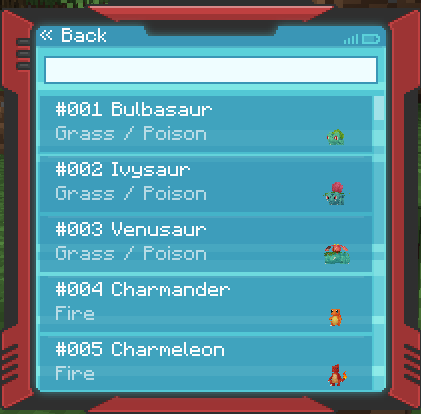
- Pokedex Access - Quick access to your pokedex interface.
- Pokedex Scanner - Use the dedicated hotkey (default
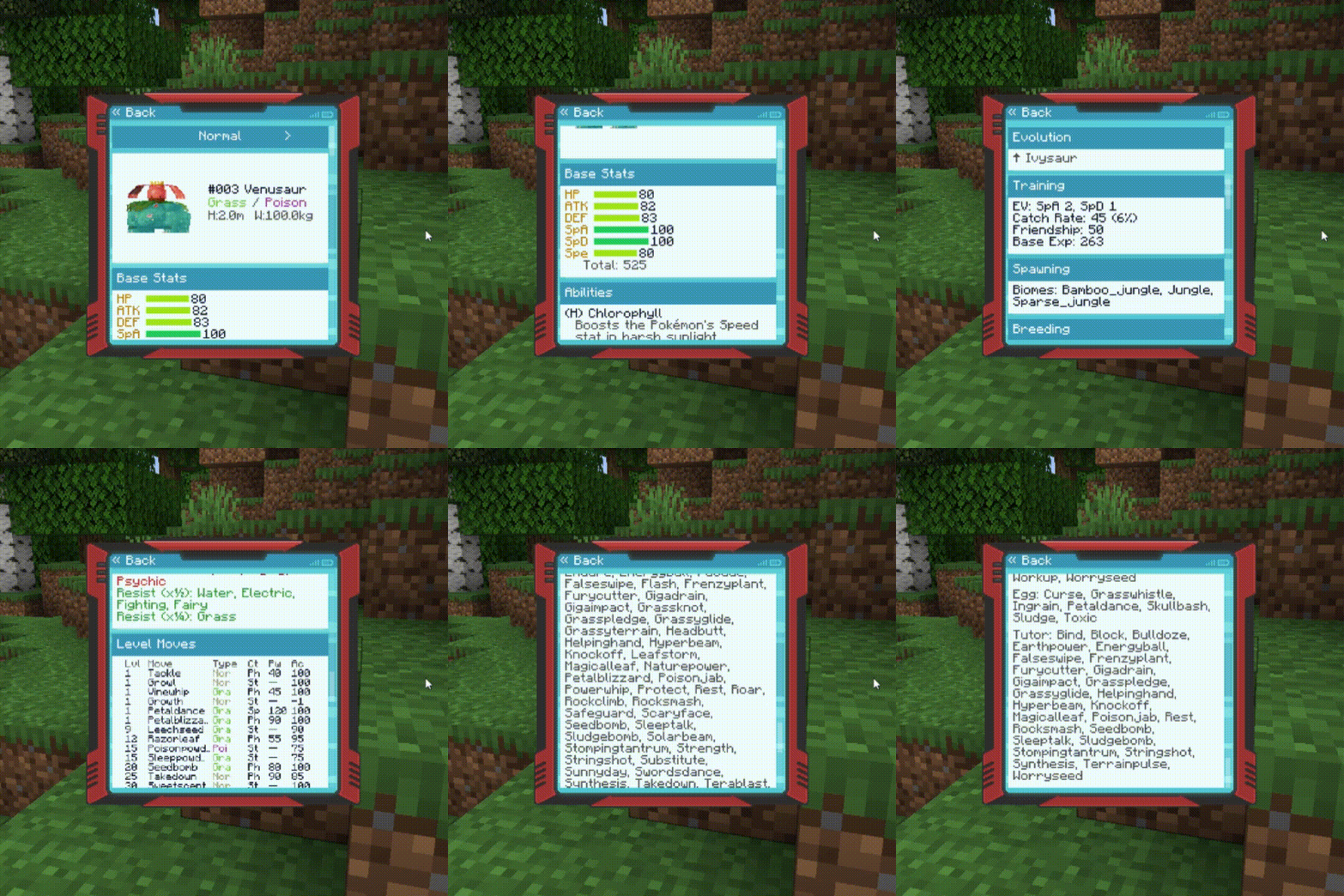
C) to quick-scan Pokémon. - PokeInfo - Pokemon Wiki inspired by sites like PokemonDB and BulbaPedia displaying various Pokémon information such as Base Stats, Abilities, Evolution, Training, Spawning, Breeding, Type Defenses, Level Moves, and Learnable Moves.
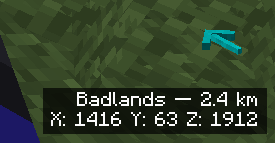
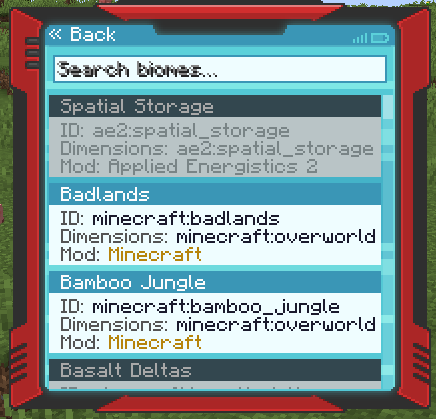
- GPS Biome Tracker - Search for any biome in the game and track its direction with a 3D compass overlay showing distance and coordinates. Requires the GPS upgrade.
- Structure Compass - Search for structures and track their location with a 3D compass overlay. Requires the Structure Compass upgrade.
- Crafting Table - Open a crafting table directly from your smartphone. Requires the Crafting upgrade.
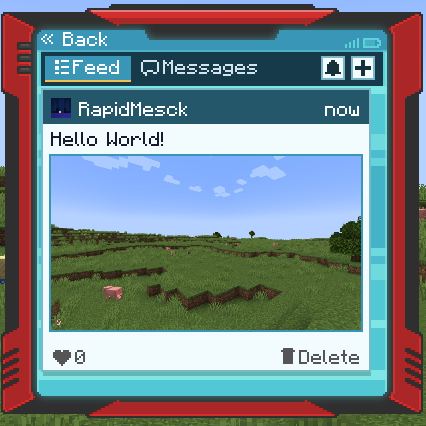
- Social Network - A full in-game social media system with feed, posts, likes, photo uploads, and Pokémon attachments.
- Direct Messaging - Send private messages to other players with unread badges and online status.
- Voice Calls - Make voice calls to other players using Simple Voice Chat integration (optional mod).
- 16 Colors - Smartphones are available in all 16 Minecraft dye colors!
- Smithing Upgrades - You can now upgrade your smartphone using a Smithing Table!
- Cobblemon Pokenav (Addon) - Combine your smartphone with a Pokenav (from the Cobblemon Pokenav mod) to access it directly from your smartphone interface.
- Waystones (Addon) - Combine your smartphone with a Warp Stone (from the Waystones mod) to access the Waystones teleport network on the go.
- Tom's Storage (Addon) - Combine your smartphone with a Terminal Link (from Tom's Storage mod) to access your storage terminals remotely.
- Refined Storage (Addon) - Combine your smartphone with a Wireless Transmitter (from Refined Storage) to access your RS network grid.
- AE2 (Addon) - Combine your smartphone with a Wireless Access Point (from Applied Energistics 2) to access your ME Terminal.
- FishingNav (Addon) - Combine your smartphone with a FishingNav item (from CobbleNav) to access fishing locations.
- GPS - Combine your smartphone with a compass to unlock biome tracking.
- Structure Compass - Combine your smartphone with a Recovery Compass to unlock structure tracking.
- Crafting - Combine your smartphone with a crafting table to unlock portable crafting.
- CobbleDollars (Addon) - Quick access to the CobbleDollars shop interface (requires the CobbleDollars mod).
- RCT Trainer Card (Addon) - Quick access to your Radical Cobblemon Trainers trainer card (requires the RCT mod).
- Quick Actions - Bind smartphone apps to hotkeys (6 slots) and use them without opening the phone UI.
- App Customization - Reorder, hide, or show apps per-player with a built-in settings screen. Right-click any app to assign it to a quick action slot.
- Retro Textures - Includes a built-in "Old Smartphone Textures" resource pack for a retro phone look!
Social Network
The social system is a full in-game social media platform:
- Feed - Browse posts from all players with pagination, likes, and Pokémon attachments.
- Posts - Create text posts with optional Pokémon party attachments (showing stats like IVs, EVs, nature, ability) and photo uploads.
- Photos - Take in-game screenshots using the camera mode (1280x720, JPEG compressed) and attach them to posts or messages.
- Direct Messages - Private 1:1 conversations with read tracking, unread badges, and online status indicators.
- Voice Calls - Call other players directly (requires Simple Voice Chat mod). Answer/decline with keybinds.
- Moderation - Server operators can ban players from posts/DMs or delete posts using
/socialcommands.
Social Commands
/social ban <player> [posts|dms|all]- Ban a player from social features/social unban <player>- Unban a player/social delete <id>- Delete a post
Integrations
The mod seamlessly integrates with Trinkets, Curios and Accessories, allowing you to equip the smartphone in special slots instead of keeping it in your main inventory.
Storage Mod Integrations
- Tom's Storage - Sneak + right-click a Storage Terminal to bind it. Access your storage network remotely from anywhere.
- Refined Storage - Sneak + right-click a Wireless Transmitter to bind it. Access your RS grid remotely.
- Applied Energistics 2 (NeoForge only) - Sneak + right-click a Wireless Access Point to bind it. Access your ME Terminal or Crafting Terminal remotely.
Optional Mod Integrations
- Simple Voice Chat - Enables voice calls between players through the smartphone.
- CobbleNav / FishingNav - Adds Pokenav and FishingNav access to the smartphone.
- Radical Cobblemon Trainers - Adds trainer card access to the smartphone.
Configuration Options
Feature Toggles
You can enable or disable any of the features in the config/cobblemon_smartphone.json config file:
enableHeal- Toggle the healing featureenablePC- Toggle PC accessenableCloud- Toggle Ender Chest accessenablePokedex- Toggle Pokedex accessenableScanner- Toggle the Pokedex scannerenablePokenav- Toggle the Pokenav integrationenableWaystone- Toggle the Waystones integrationenableCobbleDollars- Toggle CobbleDollars shop accessenablePokeInfo- Toggle Pokemon WikienableGps- Toggle GPS biome trackerenableStructureCompass- Toggle Structure CompassenableCrafting- Toggle portable crafting tableenableTomsStorage- Toggle Tom's Storage remote accessenableRefinedStorage- Toggle Refined Storage accessenableAE2- Toggle Applied Energistics 2 accessenableFishingnav- Toggle FishingNav accessenableRctTrainerCard- Toggle RCT trainer cardenableSocial- Toggle the social networkenableCalls- Toggle voice calls (requires Simple Voice Chat)enableQuickActions- Toggle quick action hotkeys
Cooldown Settings
Customize the cooldown times for each feature to maintain game balance:
- Healing Button: 60 seconds (default)
- PC Access: 5 seconds (default)
- Cloud Storage: 5 seconds (default)
- Waystone Access: 5 seconds (default)
- Pokedex Access: 1 second (default)
- Tom's Storage: 3 seconds (default)
- Refined Storage: 3 seconds (default)
- AE2: 3 seconds (default)
- Social Post: 30 seconds (default)
- Social Message: 1 second (default)
PokeInfo Settings
Toggle individual sections in the Pokemon Wiki:
showBaseStats- Show base statsshowAbilities- Show abilitiesshowEvolution- Show evolution chainsshowTraining- Show training datashowSpawning- Show spawn informationshowBreeding- Show breeding datashowTypeDefenses- Show type defensesshowLevelMoves- Show level-up movesshowLearnableMoves- Show learnable moves (TMs, TRs, tutors)
GPS Settings
maxSearchRadius- Maximum search radius in blocks (default: 10000)
Structure Compass Settings
searchRadiusChunks- Search radius in chunks (default: 100)skipKnownStructures- Skip already discovered structures (default: false)
Social Settings
maxPosts- Maximum posts stored (default: 1000)maxPostLength- Maximum characters per post (default: 280)feedPageSize- Posts per feed page (default: 20)maxMessagesPerThread- Maximum messages per DM thread (default: 500)maxMessageLength- Maximum characters per message (default: 280)messagePageSize- Messages per DM page (default: 30)threadPageSize- DM threads per page (default: 30)callRingTimeoutSeconds- Call ring timeout (default: 30)
Upgrade Recipes
Pokenav (Addon)

Waystone (Addon)

All Available Upgrades
| Upgrade | Required Item | Required Mod |
|---|---|---|
| PokeNav | Pokenav | CobbleNav |
| FishingNav | FishingNav | CobbleNav |
| Waystone | Warp Stone | Waystones |
| Tom's Storage | Adv. Terminal Link | Tom's Storage |
| Refined Storage | Wireless Transmitter | Refined Storage |
| AE2 Terminal | Wireless Access Point | Applied Energistics 2 |
| GPS | Compass | - |
| Structure Compass | Recovery Compass | - |
| Crafting | Crafting Table | - |
Custom Actions (Datapack/Mod)
Create your action for smartphone: https://rapidmesck.gitbook.io/cobblemon-smartphone
Contributors
Special Thanks: Thank you very much, ThievishJoke, for your contribution and also for being our first contributor.
ThievishJoke github: https://github.com/ThievishJoke
Special Thanks: A huge thank you to softiedevv for the incredible new item art!
Softiedevv youtube: https://www.youtube.com/@dasoftieguy
Special Thanks: Thank you very much, p1nero, for your contribution to the project with your addition and localization.
P1nero github: https://github.com/P1neapplell0
Verfügbare Versionen
Cobblemon Smartphone auf dem Server installieren
Server bestellen
Bestelle einen Minecraft Java Server mit mindestens 3 GB RAM (4 GB empfohlen).
fabric Loader setzen
Wähle im Panel unter "Egg" den fabric-Loader und die passende Minecraft-Version (1.21.1).
Mod installieren
Öffne den Mod-Browser im Dashboard und suche nach "Cobblemon Smartphone". Klicke "Installieren" – fertig! Alternativ: Lade die .jar via SFTP in den /mods Ordner.
Kompatibilität
Mod-Loader
Minecraft-Versionen
1.21.1
Server-seitig
✓ ErforderlichEmpfohlener RAM
4 GB(min. 3 GB)Häufige Fragen
Cobblemon Smartphone Server crasht beim Start – was tun?
Häufigste Ursache: falsche fabric-Version oder zu wenig RAM. Prüfe im Server-Log (latest.log), ob ein "OutOfMemoryError" oder "Mixin"-Fehler auftritt. Bei Mado Hosting: Stelle sicher, dass mindestens 3 GB RAM zugewiesen sind und der Loader zur Mod-Version passt (1.21.1). Über das Panel kannst du den Loader mit einem Klick wechseln.
Ist Cobblemon Smartphone mit fabric und neoforge kompatibel?
Cobblemon Smartphone unterstützt offiziell fabric, neoforge für Minecraft 1.21.1. Im Mado Dashboard werden inkompatible Loader-Kombinationen automatisch erkannt.
Server laggt mit Cobblemon Smartphone – wie optimiere ich die Performance?
Empfohlener RAM: 4 GB (+1 GB pro 8 Spieler). Prüfe mit /spark profiler, ob Cobblemon Smartphone den meisten Tick-Time verbraucht. Häufige Fixes: Server-View-Distance auf 8-10 reduzieren, bei Forge "performant" oder "starlight" als Zusatz-Mod installieren. Bei Mado Hosting läuft dein Server auf NVMe-SSDs mit dedizierten CPU-Kernen für minimale Latenz.
Ähnliche Mods




![[ETF] Entity Texture Features](https://cdn.modrinth.com/data/BVzZfTc1/af683d206d50b05258d865b0d6e4aa2f2cee12f2_96.webp)

Modded Server mieten
Installiere Cobblemon Smartphone mit nur einem Klick auf deinem Server.