
CobbleTypes Master
The Ultimate Pokemon Type Utilities in minecraft and cobblemon! Type Chart, Team analysis, Scanning and much more!
Screenshots


Über diese Mod
No more move doubts! Dominate the battlefield with tactical analysis! ⚡️
Tired of having to look up type weaknesses and resistances on a wiki while playing Cobblemon? Wish you had an in-game tool to quickly analyze matchups, both for a single Pokémon and your entire team? Ultra Type Chart is here to revolutionize your gameplay!
With the MAJOR UPDATE v2.0.0, the mod transforms from a simple reference manual into an arsenal of advanced tactical tools for Minecraft 1.21.1.

Main Features (v2.0.0):
💎 Survival Compatibility & Progression
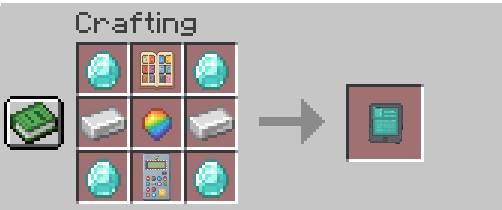
- Total Crafting: All advanced analysis tools are now craftable in Survival mode, starting with the Multitype Stone (obtainable with 9 Evolution Stones).

Photos of all crafting recipes are available further down this page.
Conditional Analysis: To add progression and realism, a Pokémon's analysis is only possible after it has been scanned and registered in your Pokédex.
Extended Compatibility: Full integration with custom types from the Gravel's Extended Battle mod (optional mod). All our tools will extend analysis to these new types.
📒 1. Type Chart (Base Item)
The quick and interactive reference manual:
- Interactive GUI: Right-click in the air to open the general screen with all Pokémon types. Hover over any type to see a summary of its interactions.
- Instant Profile (Chat): Right-click on any Pokémon to immediately see its complete profile (Offensive and Defensive) in chat.
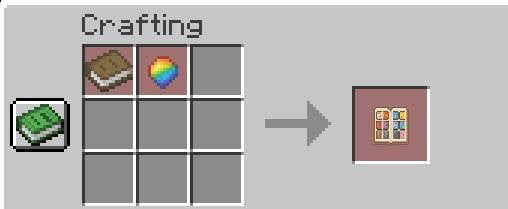
🧮 2. Type Calculator (Type Calculator): Flexibility
This interactive tool offers two powerful modes for planning and learning:
- Mode 1: Double Type Profile: Select up to two types to instantly see all their defensive interactions (4x weaknesses, 0.25x resistances, immunities, etc.).
- Mode 2: Attack Calculator: Select an Attack Type and up to two Defense Types to get the exact damage multiplier that would result (e.g., an Ice Attack against a Ground/Flying target).

🌐🥽 3. Tactical Visor (Tactical Visor): Advanced Analysis
This high-tech device offers the most powerful analysis features:
📊 Team Matchup Analysis (Right-Click on Pokémon): Click on an opposing Pokémon (wild or another trainer's) to get an instant ranking of your team. The system calculates and ranks your Pokémon from best to worst for that matchup, showing:
Damage (Dmg): The maximum potential damage your Pokémon can inflict on the target.
Takes: The maximum potential damage your Pokémon would receive from the target.
Immunity (Immune to): Any type your Pokémon is immune to.
📈 Complete Strategic Analysis (Right-Click in Air): Compiles a complete report highlighting your team's overlapping weaknesses and offensive gaps (types against which you have no Super Effective moves).
🛰️ AoE Tactical Scanner (Shift + Right-Click in Air): Executes a 30-block scan of the field, coloring wild Pokémon based on the Net Threat they pose to your lead Pokémon.
Enhanced Logic: Threat is calculated using an advanced formula that considers:
Squared Type Effectiveness (Types²), the ratio between Stats, and the Level of both Pokémon. (20s active / 30s cooldown).
🔊 Sound Feedback
- With every use of the Type Chart, you'll hear a satisfying page-turning sound!
How to Use:
Obtain the Multitype Stone via crafting and craft the tool you desire most!
In-game, you will find all the necessary descriptions to understand how the items work!
It also works with Fakemon/Fakemons!
Dependencies:
- Cobblemon (Version 1.21.1, tested with 1.6+)
🌍 Complete Multi-language Support:
The mod is fully translated and supports the following languages:
- English
- Italian
- Japanese
- Simplified Chinese
- French
- Spanish
- German
- Portuguese (Brazilian)
- Russian
Feedback: Bug reports and suggestions are welcome! You can write me on my Discord: #thecaptainfoxy
If you want to support me, you can subscribe to my YouTube channel "TheCaptainFoxy" and donate on my PayPal!
Verfügbare Versionen
CobbleTypes Master auf dem Server installieren
Server bestellen
Bestelle einen Minecraft Java Server mit mindestens 3 GB RAM (4 GB empfohlen).
fabric Loader setzen
Wähle im Panel unter "Egg" den fabric-Loader und die passende Minecraft-Version (1.21.1).
Mod installieren
Öffne den Mod-Browser im Dashboard und suche nach "CobbleTypes Master". Klicke "Installieren" – fertig! Alternativ: Lade die .jar via SFTP in den /mods Ordner.
Kompatibilität
Mod-Loader
Minecraft-Versionen
1.21.1
Server-seitig
✓ ErforderlichEmpfohlener RAM
4 GB(min. 3 GB)Häufige Fragen
CobbleTypes Master Server crasht beim Start – was tun?
Häufigste Ursache: falsche fabric-Version oder zu wenig RAM. Prüfe im Server-Log (latest.log), ob ein "OutOfMemoryError" oder "Mixin"-Fehler auftritt. Bei Mado Hosting: Stelle sicher, dass mindestens 3 GB RAM zugewiesen sind und der Loader zur Mod-Version passt (1.21.1). Über das Panel kannst du den Loader mit einem Klick wechseln.
Ist CobbleTypes Master mit fabric kompatibel?
CobbleTypes Master unterstützt offiziell fabric für Minecraft 1.21.1. Im Mado Dashboard werden inkompatible Loader-Kombinationen automatisch erkannt.
Server laggt mit CobbleTypes Master – wie optimiere ich die Performance?
Empfohlener RAM: 4 GB (+1 GB pro 8 Spieler). Prüfe mit /spark profiler, ob CobbleTypes Master den meisten Tick-Time verbraucht. Häufige Fixes: Server-View-Distance auf 8-10 reduzieren, bei Forge "performant" oder "starlight" als Zusatz-Mod installieren. Bei Mado Hosting läuft dein Server auf NVMe-SSDs mit dedizierten CPU-Kernen für minimale Latenz.
Ähnliche Mods






Modded Server mieten
Installiere CobbleTypes Master mit nur einem Klick auf deinem Server.