
CombatDistanceHUD
A lightweight, fully customizable Fabric client-side HUD mod that displays real-time combat distance information directly on your screen.
Screenshots
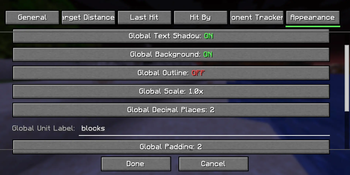
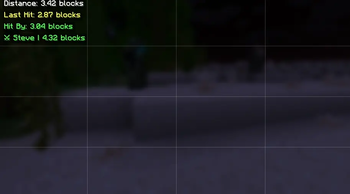
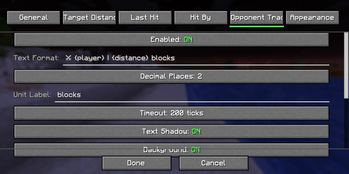
Über diese Mod
⚔️ Combat Distance HUD
A lightweight, fully customizable Fabric client-side HUD mod for Minecraft 1.21.9 – 1.21.11 that displays real-time combat distance information directly on your screen.
Track enemy distance, hit reach, incoming hits, and combat opponents with fully customizable text, colors, positions, and styling.
✨ Features
🎯 Target Distance HUD
Displays the distance to the player you're currently looking at.
Examples:
Distance: 3.42 blocks
🎯 3.42
Target → 3.42 Blocks Away
⚔ Steve | 3.42
⚔ Last Hit Distance HUD
Shows the exact distance when you successfully hit another player.
Examples:
Last Hit: 3.12 blocks
⚔ Reach: 3.12
Hit Steve: 3.12b
☠ Hit-By Distance HUD
Shows the distance at which another player hit you.
Examples:
Hit By: 2.98 blocks
☠ Enemy Reach: 2.98
Steve hit you: 2.98b
👤 Opponent Tracker HUD
Tracks the most recent player you entered combat with and updates their distance in real time.
Examples:
⚔ Steve | 4.32 blocks
Tracking: Steve - 4.32
🎯 Steve: 4.32 blocks
🔥 Main Features
- 4 independent HUD modules
- Real-time distance updates
- Fully customizable text formatting
- Drag-and-drop HUD editor
- Per-module settings
- Global appearance settings
- Unicode symbol support
- Emoji support
- Mod Menu integration
- Multi-language support
- Zero server installation required
- Client-side only
- Extremely lightweight
📝 Placeholder Support
Use placeholders anywhere in your HUD text.
| Placeholder | Description |
|---|---|
{distance} |
Distance value |
{player} |
Player name |
{unit} |
Unit label |
Example:
⚔ {player}: {distance} {unit}
Output:
⚔ Steve: 3.42 blocks
🎨 Customization
Every module supports:
Position
- X Offset
- Y Offset
- Anchor Selection
- Drag & Drop Placement
Appearance
- Text Color
- Background Color
- Outline Color
- Shadow Color
- Opacity
- Padding
- Scale
- Font Scale
Formatting
- Custom Text Templates
- Decimal Precision
- Unit Labels
- Visibility Options
⚙️ Commands
| Command | Description |
|---|---|
/combatdistance |
Mod information |
/combatdistance config |
Open config screen |
/combatdistance reload |
Reload config |
/combatdistance toggle |
Enable / disable mod |
/combatdistance reset |
Reset HUD positions |
/combatdistance resetall |
Reset all settings |
📥 Installation
Requirements
- Minecraft 1.21.9–1.21.11
- Fabric Loader 0.17.2+
- Fabric API
- Java 21+
Optional
- Mod Menu
Installation Steps
- Install Fabric Loader.
- Install Fabric API.
- Download Combat Distance HUD.
- Place the mod inside your
modsfolder. - Launch Minecraft.
📌 Supported Versions
| Version | Status |
|---|---|
| 1.21.9 | ✅ |
| 1.21.10 | ✅ |
| 1.21.11 | ✅ |
⚡ Performance
Designed to have virtually no FPS impact.
- CPU Usage: Negligible
- Memory Usage: < 2 MB
- Render Time: < 0.01ms/frame
- Safe for 500+ FPS clients
🔧 Compatibility
Works on:
- Vanilla Servers
- Fabric Servers
- Paper Servers
- Spigot Servers
- PvP Servers
- Minigame Servers
No server-side installation required.
❓ FAQ
- Does this work on servers?
Yes. The mod is entirely client-side and works on virtually any server.
- Is this allowed?
The mod only displays information already available to your client. Always follow individual server rules regarding client modifications.
- Can I move HUD elements?
Yes. Use the built-in HUD editor or configure positions manually.
- Can I use custom symbols?
Yes. Unicode symbols and emojis are supported.
- Does it affect performance?
No measurable impact during normal gameplay.
❤️ Credits
- Fabric Team
- Mojang
- TerraformersMC (Mod Menu)
📄 License
All Rights Reserved.
Combat Distance HUD — Know your reach, track your combat, dominate every fight. ⚔️
Verfügbare Versionen
CombatDistanceHUD auf dem Server installieren
Server bestellen
Bestelle einen Minecraft Java Server mit mindestens 3 GB RAM (4 GB empfohlen).
fabric Loader setzen
Wähle im Panel unter "Egg" den fabric-Loader und die passende Minecraft-Version (1.21.11).
Mod installieren
Öffne den Mod-Browser im Dashboard und suche nach "CombatDistanceHUD". Klicke "Installieren" – fertig! Alternativ: Lade die .jar via SFTP in den /mods Ordner.
Kompatibilität
Mod-Loader
Minecraft-Versionen
1.21.11, 1.21.10, 1.21.9
Server-seitig
✗ Nicht unterstütztEmpfohlener RAM
4 GB(min. 3 GB)Häufige Fragen
CombatDistanceHUD Server crasht beim Start – was tun?
Häufigste Ursache: falsche fabric-Version oder zu wenig RAM. Prüfe im Server-Log (latest.log), ob ein "OutOfMemoryError" oder "Mixin"-Fehler auftritt. Bei Mado Hosting: Stelle sicher, dass mindestens 3 GB RAM zugewiesen sind und der Loader zur Mod-Version passt (1.21.11). Über das Panel kannst du den Loader mit einem Klick wechseln.
Ist CombatDistanceHUD mit fabric kompatibel?
CombatDistanceHUD unterstützt offiziell fabric für Minecraft 1.21.11, 1.21.10, 1.21.9. Im Mado Dashboard werden inkompatible Loader-Kombinationen automatisch erkannt.
Server laggt mit CombatDistanceHUD – wie optimiere ich die Performance?
Empfohlener RAM: 4 GB (+1 GB pro 8 Spieler). Prüfe mit /spark profiler, ob CombatDistanceHUD den meisten Tick-Time verbraucht. Häufige Fixes: Server-View-Distance auf 8-10 reduzieren, bei Forge "performant" oder "starlight" als Zusatz-Mod installieren. Bei Mado Hosting läuft dein Server auf NVMe-SSDs mit dedizierten CPU-Kernen für minimale Latenz.
Ähnliche Mods






Modded Server mieten
Installiere CombatDistanceHUD mit nur einem Klick auf deinem Server.