
Compact F3
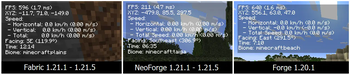
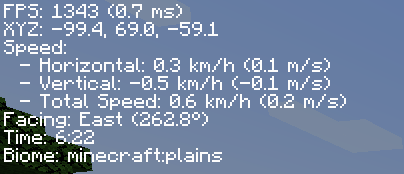
A mod that reduces the useless information from F3, can be toggalable with F8.
Screenshots
Über diese Mod
Description
This mod, as it's name suggests, will make the F3 menu go to shame, you can toggle the menu as you wish by toggling the F8 key to open/close the menu. It shows things such as FPS, XYZ Coordinates, Speed, Time, Biome, and more, while not causing any FPS drops since the GUI is rendered at the refresh rate of the monitor, instead of refreshing it as much as the game does. This GUI is not made to condone any malicious intent towards the player or the game servers, it only does one thing, perform.
Compability
As of Minecraft 1.21.1, this mod is developed exclusively for the Fabric and NeoForge mod loaders, as they provide a more streamlined development experience. Forge is no longer supported for Minecraft 1.21.1 and newer, as the vast majority of the modding community has transitioned to these two platforms.
Minecraft versions prior to 1.21.1 will continue to receive Forge support.


This mod is created using IntelliJ IDEA Community Edition 2024.3.5 by Jetbrains
Verfügbare Versionen
Compact F3 auf deinem Client installieren
Mod-Loader lokal installieren
Installiere fabric für deine lokale Minecraft-Version.
Passende Datei herunterladen
Wähle die Compact F3-Datei für fabric und Minecraft 26.2.
Mod installieren
Lege die .jar-Datei in deinem lokalen .minecraft/mods-Ordner ab und starte Minecraft neu. Eine Installation auf dem Server ist nicht nötig.
Kompatibilität
Mod-Loader
Minecraft-Versionen
26.2, 26.1.2, 26.1.1 (+21 weitere)
Server-seitig
✗ Nicht unterstütztEmpfohlener RAM
4 GB(min. 3 GB)Häufige Fragen
Muss Compact F3 auf dem Minecraft Server installiert werden?
Nein. Modrinth kennzeichnet Compact F3 serverseitig als nicht unterstützt. Installiere die Mod nur im lokalen Minecraft-Mods-Ordner. Dein Server kann unverändert bleiben, sofern die Mod-Seite keine zusätzliche Abhängigkeit nennt.
Welche Version und welchen Loader braucht Compact F3?
Nutze eine Datei für fabric, forge, neoforge und exakt deine Minecraft-Version. Unterstützte Versionen sind unter anderem 26.2, 26.1.2, 26.1.1. Loader-Dateien sind nicht untereinander austauschbar.
Compact F3 funktioniert nicht – was kann ich prüfen?
Prüfe zuerst Minecraft-Version, Loader-Version und erforderliche Abhängigkeiten. Lege die .jar-Datei im lokalen .minecraft/mods-Ordner ab und entferne ältere Duplikate. Da die Mod clientseitig ist, löst mehr Server-RAM dieses Problem nicht.
Ähnliche Mods






Minecraft Server für deine Gruppe
Compact F3 bleibt auf deinem Client. Hoste dazu eine kompatible Welt für deine Mitspieler.