
Complex Hex
An addon for Hexcasting with whatever I feel like
Screenshots


Über diese Mod
An addon for Hexcasting with whatever I feel like
Maths
-> Complex Numbers
Most normal maths operations work, as well as conjugations and complex multiplication.
Pretty useless, unless you feel like doing rotations in one of the normal 3 planes lmao 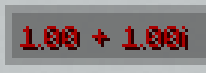
-> Quaternions
Again, most normal maths operations work, as well as inverses, and hamilton multiplication.
Basically everything you need to do 3D rotations with them!
(also you can turn them into MoreIotas Matrices which reperesent equivalent rotations (and vice versa) ) 
BIT Manipulation
Adds patterns to manipulate Block, Item, or Text Displays (BITs for short)
A spawn pattern for each, and a pattern for translation, rotation, and scaling and one to kill it as well as the associated patterns for entity purification/zone distillation 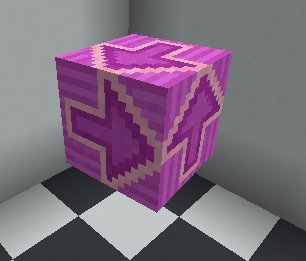
Bubbles
A way to put an iota in a bubble (an iota on the stack itself), which when executed via Hermes' or the likes will push its contained iota to the stack. 
Verfügbare Versionen
Complex Hex auf dem Server installieren
Server bestellen
Bestelle einen Minecraft Java Server mit mindestens 3 GB RAM (4 GB empfohlen).
fabric Loader setzen
Wähle im Panel unter "Egg" den fabric-Loader und die passende Minecraft-Version (1.20.1).
Mod installieren
Öffne den Mod-Browser im Dashboard und suche nach "Complex Hex". Klicke "Installieren" – fertig! Alternativ: Lade die .jar via SFTP in den /mods Ordner.
Kompatibilität
Mod-Loader
Minecraft-Versionen
1.20.1
Server-seitig
✓ ErforderlichEmpfohlener RAM
4 GB(min. 3 GB)Häufige Fragen
Complex Hex Server crasht beim Start – was tun?
Häufigste Ursache: falsche fabric-Version oder zu wenig RAM. Prüfe im Server-Log (latest.log), ob ein "OutOfMemoryError" oder "Mixin"-Fehler auftritt. Bei Mado Hosting: Stelle sicher, dass mindestens 3 GB RAM zugewiesen sind und der Loader zur Mod-Version passt (1.20.1). Über das Panel kannst du den Loader mit einem Klick wechseln.
Ist Complex Hex mit fabric kompatibel?
Complex Hex unterstützt offiziell fabric für Minecraft 1.20.1. Im Mado Dashboard werden inkompatible Loader-Kombinationen automatisch erkannt.
Server laggt mit Complex Hex – wie optimiere ich die Performance?
Empfohlener RAM: 4 GB (+1 GB pro 8 Spieler). Prüfe mit /spark profiler, ob Complex Hex den meisten Tick-Time verbraucht. Häufige Fixes: Server-View-Distance auf 8-10 reduzieren, bei Forge "performant" oder "starlight" als Zusatz-Mod installieren. Bei Mado Hosting läuft dein Server auf NVMe-SSDs mit dedizierten CPU-Kernen für minimale Latenz.
Ähnliche Mods






Modded Server mieten
Installiere Complex Hex mit nur einem Klick auf deinem Server.