
Configurable Cobblestone Generator
Configure lava-water cobble generators with weighted block outputs, vanilla defaults, and optional Create drill support for NeoForge 1.21.1.
Screenshots
Über diese Mod
Configurable Cobblegen
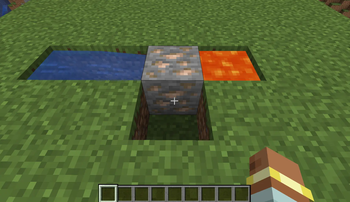
Configurable Cobblegen lets you control what lava and water generators produce. Keep the default vanilla cobblestone behavior, or add ores, blocks, and custom weighted outputs through a simple server config.
Built for NeoForge 1.21.1, this mod is designed for skyblock packs, progression packs, custom resource generation, and any setup where cobble generators should provide more than plain cobblestone.
Features
- Replaces vanilla lava-water cobblestone and stone generation with configurable weighted results.
- Keeps vanilla behavior by default with
minecraft:cobblestone=100. - Uses simple relative weights, so rare blocks stay rare and common blocks stay common.
- Supports any registered block id, including blocks from other mods when they are installed.
- Includes optional Create compatibility for drill-based cobblegen setups.
- Does not require Create to be installed.
- Falls back safely to cobblestone if the configured entries are invalid or empty.
Configuration
The server config contains a generation section:
Enabled Toggle
Use enabled to turn configurable generation on or off.
Weighted Blocks
Use generatedBlocks entries in this format:
namespace:block=weight
Example:
minecraft:cobblestone=100
minecraft:iron_ore=5
minecraft:gold_ore=2
Weights are relative. With the example above, cobblestone is the most common result, iron ore is uncommon, and gold ore is rarer than iron ore.
Create Compatibility
Configurable Cobblegen includes optional support for Create's optimized drill cobblegen behavior.
When Create is present, the mod hooks into Create's cobblegen optimization so drill-based generators can roll the configured weighted output instead of always returning the same vanilla block. Create is optional; the mod works normally without it.
Recommended For
- Skyblock modpacks
- Custom progression packs
- Ore generator setups
- Create-based cobble farms
- Servers that want config-driven resource generation
Verfügbare Versionen
Configurable Cobblestone Generator auf dem Server installieren
Server bestellen
Bestelle einen Minecraft Java Server mit mindestens 3 GB RAM (4 GB empfohlen).
neoforge Loader setzen
Wähle im Panel unter "Egg" den neoforge-Loader und die passende Minecraft-Version (1.21.1).
Mod installieren
Öffne den Mod-Browser im Dashboard und suche nach "Configurable Cobblestone Generator". Klicke "Installieren" – fertig! Alternativ: Lade die .jar via SFTP in den /mods Ordner.
Kompatibilität
Mod-Loader
Minecraft-Versionen
1.21.1
Server-seitig
✓ ErforderlichEmpfohlener RAM
4 GB(min. 3 GB)Häufige Fragen
Configurable Cobblestone Generator Server crasht beim Start – was tun?
Häufigste Ursache: falsche neoforge-Version oder zu wenig RAM. Prüfe im Server-Log (latest.log), ob ein "OutOfMemoryError" oder "Mixin"-Fehler auftritt. Bei Mado Hosting: Stelle sicher, dass mindestens 3 GB RAM zugewiesen sind und der Loader zur Mod-Version passt (1.21.1). Über das Panel kannst du den Loader mit einem Klick wechseln.
Ist Configurable Cobblestone Generator mit neoforge kompatibel?
Configurable Cobblestone Generator unterstützt offiziell neoforge für Minecraft 1.21.1. Im Mado Dashboard werden inkompatible Loader-Kombinationen automatisch erkannt.
Server laggt mit Configurable Cobblestone Generator – wie optimiere ich die Performance?
Empfohlener RAM: 4 GB (+1 GB pro 8 Spieler). Prüfe mit /spark profiler, ob Configurable Cobblestone Generator den meisten Tick-Time verbraucht. Häufige Fixes: Server-View-Distance auf 8-10 reduzieren, bei Forge "performant" oder "starlight" als Zusatz-Mod installieren. Bei Mado Hosting läuft dein Server auf NVMe-SSDs mit dedizierten CPU-Kernen für minimale Latenz.
Ähnliche Mods






Modded Server mieten
Installiere Configurable Cobblestone Generator mit nur einem Klick auf deinem Server.