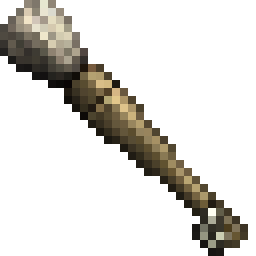
Conquest Reforged Paintbrush
Conquest Reforged Paintbrush adds a creative paintbrush that allows the user to "copy" and "paste" the material of a block onto another block while maintaining it's variant and properties.
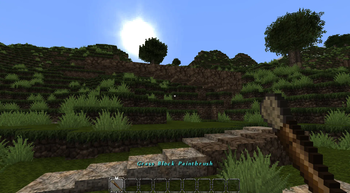
Screenshots
Über diese Mod
Conquest Reforged Paintbrush
Conquest Reforged Paintbrush adds a creative paintbrush that allows the user to "copy" and "paste" the material of a block onto another block while maintaining it's variant and properties. It also adds a Paintknife which allows the user to change the layer properties of a targeted block.
Usage
Primary click:
- With a paintbrush to copy the targeted block's material to the paintbrush.
- With a paintknife will decrease the layer of a targeted block if it has layer properties.
Secondary click:
- With a paintbrush to paint the selected material onto the targeted block. This attempts to find the same block variant in a material's conquest family.
- With a paintknife will increase the layer of a targeted block if it has layer properties.
Hold "Left Ctrl":
- With a paintbrush while selecting a material to select in strict mode. All painted blocks will be an exact copy.
- With a paintknife will change layers for a block adjacent to the blockface targeted.
Crouching will show the material that is currently selected on a paintbrush.
Credits
Credit to Monsterfish_ for the paintbrush and paint knife textures.
Verfügbare Versionen
Conquest Reforged Paintbrush auf dem Server installieren
Server bestellen
Bestelle einen Minecraft Java Server mit mindestens 3 GB RAM (4 GB empfohlen).
fabric Loader setzen
Wähle im Panel unter "Egg" den fabric-Loader und die passende Minecraft-Version (1.20.6).
Mod installieren
Öffne den Mod-Browser im Dashboard und suche nach "Conquest Reforged Paintbrush". Klicke "Installieren" – fertig! Alternativ: Lade die .jar via SFTP in den /mods Ordner.
Kompatibilität
Mod-Loader
Minecraft-Versionen
1.20.6, 1.20.5, 1.20.4 (+4 weitere)
Server-seitig
✓ ErforderlichEmpfohlener RAM
4 GB(min. 3 GB)Häufige Fragen
Conquest Reforged Paintbrush Server crasht beim Start – was tun?
Häufigste Ursache: falsche fabric-Version oder zu wenig RAM. Prüfe im Server-Log (latest.log), ob ein "OutOfMemoryError" oder "Mixin"-Fehler auftritt. Bei Mado Hosting: Stelle sicher, dass mindestens 3 GB RAM zugewiesen sind und der Loader zur Mod-Version passt (1.20.6). Über das Panel kannst du den Loader mit einem Klick wechseln.
Ist Conquest Reforged Paintbrush mit fabric kompatibel?
Conquest Reforged Paintbrush unterstützt offiziell fabric für Minecraft 1.20.6, 1.20.5, 1.20.4. Im Mado Dashboard werden inkompatible Loader-Kombinationen automatisch erkannt.
Server laggt mit Conquest Reforged Paintbrush – wie optimiere ich die Performance?
Empfohlener RAM: 4 GB (+1 GB pro 8 Spieler). Prüfe mit /spark profiler, ob Conquest Reforged Paintbrush den meisten Tick-Time verbraucht. Häufige Fixes: Server-View-Distance auf 8-10 reduzieren, bei Forge "performant" oder "starlight" als Zusatz-Mod installieren. Bei Mado Hosting läuft dein Server auf NVMe-SSDs mit dedizierten CPU-Kernen für minimale Latenz.
Ähnliche Mods





Modded Server mieten
Installiere Conquest Reforged Paintbrush mit nur einem Klick auf deinem Server.
Details
- Lizenz
- Creative Commons Attribution 4.0 International
- Server-seitig
- Erforderlich