
Construction Sticks
Sticks that make building easier
Screenshots
Über diese Mod
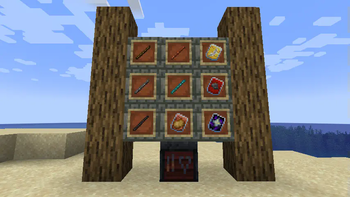
Construction Sticks allow you to place multiple blocks at once, up to 1024 at a time, extending your build in the direction you're facing. You can upgrade your stick to enhance its abilities, making construction faster and more efficient.
Sticks
There are five different tiers of Construction Sticks: Wood, Copper, Iron, Diamond, and Netherite. Each tier offers improved durability and block placement abilities, and can be further upgraded with templates.
| Stick | Durability | Max. Blocks | Upgradeable | Angel Distance | Max. Blocks (Destroy) |
|---|---|---|---|---|---|
| Wood | 59 | 3 | Yes | 1 | 1 |
| Copper | 131 | 9 | Yes | 2 | 3 |
| Iron | 250 | 27 | Yes | 4 | 9 |
| Diamond | 1561 | 128 | Yes | 8 | 25 |
| Netherite | 2031 | 1024 | Yes | 16 | 81 |
Upgrade Templates
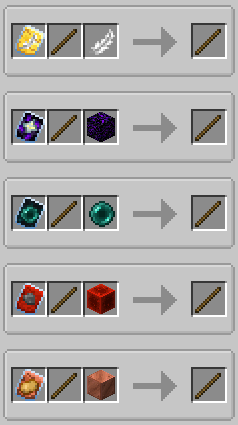
Templates add special upgrades to your Construction Sticks. To apply a template, combine the stick, template, and an additional item in a Smithing Table.
Available Templates:
- Angel: Place blocks behind the ones you're facing or in mid-air.
- Destruction: Remove blocks quickly and efficiently.
- Unbreakable: Removes durability consumption, allowing infinite block placement.
- Battery: Lets the stick use RF instead of durability.
Additional Features
- Shulker Boxes, Bundles, and Other Containers: Use them as sources for building blocks.
- Botania Compatibility: Use the Black Hole Talisman or Rods for infinite resources at the cost of Mana.
- Offhand Placement: Place blocks from your offhand instead of the one you're looking at.
Disclaimer
This is a fork of the original ConstructionWand mod, which is MIT licensed. It has been modified to add new features and improvements, including new tiers, templates, and functionality. The original mod was created by Theta-Dev.
Verfügbare Versionen
Construction Sticks auf dem Server installieren
Server bestellen
Bestelle einen Minecraft Java Server mit mindestens 3 GB RAM (4 GB empfohlen).
forge Loader setzen
Wähle im Panel unter "Egg" den forge-Loader und die passende Minecraft-Version (26.3).
Mod installieren
Öffne den Mod-Browser im Dashboard und suche nach "Construction Sticks". Klicke "Installieren" – fertig! Alternativ: Lade die .jar via SFTP in den /mods Ordner.
Kompatibilität
Mod-Loader
Minecraft-Versionen
26.3, 26.2, 26.1.2 (+10 weitere)
Server-seitig
✓ ErforderlichEmpfohlener RAM
4 GB(min. 3 GB)Häufige Fragen
Construction Sticks Server crasht beim Start – was tun?
Häufigste Ursache: falsche forge-Version oder zu wenig RAM. Prüfe im Server-Log (latest.log), ob ein "OutOfMemoryError" oder "Mixin"-Fehler auftritt. Bei Mado Hosting: Stelle sicher, dass mindestens 3 GB RAM zugewiesen sind und der Loader zur Mod-Version passt (26.3). Über das Panel kannst du den Loader mit einem Klick wechseln.
Ist Construction Sticks mit forge und neoforge kompatibel?
Construction Sticks unterstützt offiziell forge, neoforge für Minecraft 26.3, 26.2, 26.1.2. Im Mado Dashboard werden inkompatible Loader-Kombinationen automatisch erkannt.
Server laggt mit Construction Sticks – wie optimiere ich die Performance?
Empfohlener RAM: 4 GB (+1 GB pro 8 Spieler). Prüfe mit /spark profiler, ob Construction Sticks den meisten Tick-Time verbraucht. Häufige Fixes: Server-View-Distance auf 8-10 reduzieren, bei Forge "performant" oder "starlight" als Zusatz-Mod installieren. Bei Mado Hosting läuft dein Server auf NVMe-SSDs mit dedizierten CPU-Kernen für minimale Latenz.
Ähnliche Mods






Modded Server mieten
Installiere Construction Sticks mit nur einem Klick auf deinem Server.