
Craft More Chains
Increases the output of the chain recipe, giving 2 chains per craft instead of 1.
Screenshots


Über diese Mod
Craft More Chains
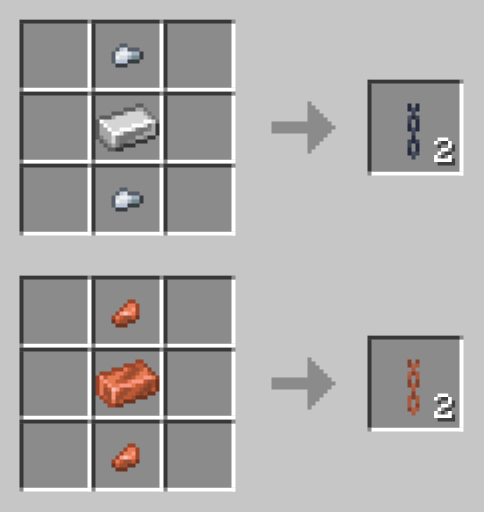
In vanilla Minecraft, crafting chains yields only 1 chain per recipe (using 1 ingot and 2 nuggets). Craft More Chains changes this by giving you 2 chains instead of 1.
Recipes
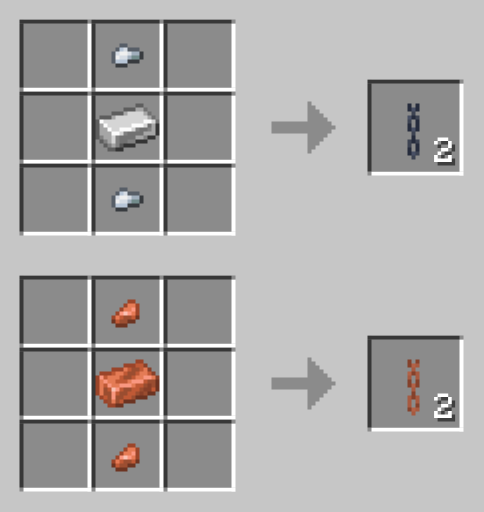
(Note: The copper chain recipe is only available for Minecraft versions 1.21.9 and above, as copper chains do not exist in earlier versions of the game.)
Can I get more than 2 chains per craft?
Yes! You can easily adjust the recipe output yourself.
How to get more than 2 chains:
- Extract the Download: Download the mod/datapack file and extract (unzip) it.
- Find the Recipe File(s):
- Minecraft 1.21.9 and above: Go to
data/minecraft/recipe/and edit bothiron_chain.jsonandcopper_chain.json. - Minecraft 1.21-1.21.8: Go to
data/minecraft/recipe/and editchain.json. - Minecraft 1.20.6 and below: Go to
data/minecraft/recipes/and editchain.json.
- Minecraft 1.21.9 and above: Go to
- Change the amount: Open the
.jsonfile, find"count": 2and change it to any number between 1 and 64. Save and close. - Re-pack the file: Select all files inside the extracted folder and compress (zip) them back together.
- Tip: Make sure the
datafolder is at the top level of your zip file, not tucked inside another folder!
- Tip: Make sure the
- Rename file extension: If you're using the mod version, rename the file extension
.zipto.jar. You're done!
Why I made Craft More Chains?
Craft More Chains is designed for use with Craftable Chainmail Armor. It lets you craft chainmail armor using chains, making it more expensive than iron armor. With Craft More Chains, chainmail armor becomes less expensive than iron armor.
Check out my other mods here.
Verfügbare Versionen
Craft More Chains auf dem Server installieren
Server bestellen
Bestelle einen Minecraft Java Server mit mindestens 3 GB RAM (4 GB empfohlen).
datapack Loader setzen
Wähle im Panel unter "Egg" den datapack-Loader und die passende Minecraft-Version (26.2).
Mod installieren
Öffne den Mod-Browser im Dashboard und suche nach "Craft More Chains". Klicke "Installieren" – fertig! Alternativ: Lade die .jar via SFTP in den /mods Ordner.
Kompatibilität
Mod-Loader
Minecraft-Versionen
26.2, 26.1.2, 26.1.1 (+36 weitere)
Server-seitig
✓ ErforderlichEmpfohlener RAM
4 GB(min. 3 GB)Häufige Fragen
Craft More Chains Server crasht beim Start – was tun?
Häufigste Ursache: falsche datapack-Version oder zu wenig RAM. Prüfe im Server-Log (latest.log), ob ein "OutOfMemoryError" oder "Mixin"-Fehler auftritt. Bei Mado Hosting: Stelle sicher, dass mindestens 3 GB RAM zugewiesen sind und der Loader zur Mod-Version passt (26.2). Über das Panel kannst du den Loader mit einem Klick wechseln.
Ist Craft More Chains mit datapack und fabric und forge und neoforge und quilt kompatibel?
Craft More Chains unterstützt offiziell datapack, fabric, forge, neoforge, quilt für Minecraft 26.2, 26.1.2, 26.1.1. Achtung: Forge- und Fabric-Mods sind NICHT untereinander kompatibel – wähle einen Loader und bleibe dabei. Im Mado Dashboard werden inkompatible Loader-Kombinationen automatisch erkannt.
Server laggt mit Craft More Chains – wie optimiere ich die Performance?
Empfohlener RAM: 4 GB (+1 GB pro 8 Spieler). Prüfe mit /spark profiler, ob Craft More Chains den meisten Tick-Time verbraucht. Häufige Fixes: Server-View-Distance auf 8-10 reduzieren, bei Forge "performant" oder "starlight" als Zusatz-Mod installieren. Bei Mado Hosting läuft dein Server auf NVMe-SSDs mit dedizierten CPU-Kernen für minimale Latenz.
Ähnliche Mods






Modded Server mieten
Installiere Craft More Chains mit nur einem Klick auf deinem Server.