
Climbable Ropes for Create Aeronautics
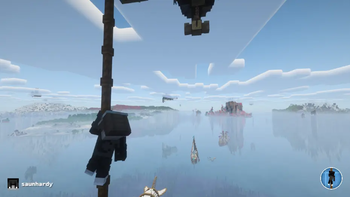
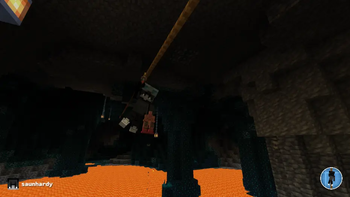
Adds an empty-hand climb mode for vertical ropes in Create Aeronautics. Right-click with bare hands to grab on, W/S to climb, Space to jump off, Sneak to let go.
Screenshots

Über diese Mod
Climbable Ropes adds the missing climb mechanic to Simulated rope strands
For configurations please see https://github.com/matejhozlar/Create-Aeronautics-Climbable-Ropes/blob/neoforge-1.21.1/README.md
In vanilla Aeronautics (the bundled Simulated module), you can grab onto a rope with a wrench and ride it as a zipline, but vertical strands are nearly useless. Gravity pulls you straight down, the assistance force can't fight it, and there's no input that means "go up." Ropes can be hung but not climbed. The Plunger Launcher's rope between two stuck plungers has the same problem.
This mod fills that gap with a parallel system. Right-click any near-vertical rope strand or any plunger rope with an empty main hand and you'll grab on. Once climbing:
- W / S -> climb up and down (or along the rope on plunger ropes)
- Sprint (CTRL) + S -> slide down with smooth acceleration; coasts to a stop when released instead of snapping
- Mouse -> turning the camera swings you around the rope
- Sneak (SHIFT) -> let go (drops you wherever you are)
- Space -> jump off with an upward impulse, or when you've climbed to the top of the rope and a block sits above, mantles you up onto it
Step onto solid ground without holding forward to auto-dismount
For plunger ropes, the "forward" direction is locked when you grab on vertical-ish ropes lock to the upper end, otherwise to whichever end you were facing, so a horizontal rope doesn't depend on which plunger was fired first. Slide acceleration scales with the rope's angle, so steep ropes are the fastest and shallow ropes don't accelerate beyond normal descend speed. Plunger ropes attached to assembled physics objects (ships, contraptions) work too.
Plunger ropes also support ziplining. Hold a chain-rideable item (Create's wrench, same trigger Simulated uses for its strand zipline) and right-click a plunger rope to latch on. There's no steepness gate, so a horizontal plunger rope between two pinned plungers becomes a walkable rope bridge - walk into it, traverse with WASD, Sneak to drop off. Steep ropes give you a regular gravity-fed slide; pushing past either end with momentum dismounts you off that side.
The vertical-rope hitbox highlights when you look at it bare-handed, the same way it does for the wrench, so you always know where the grab point is. The hanging animation is synced across all clients in multiplayer, so other players see you riding too.
To join our whitelist server running with Aeronautics, feel free to apply at https://createrington.com
Verfügbare Versionen
Climbable Ropes for Create Aeronautics auf dem Server installieren
Server bestellen
Bestelle einen Minecraft Java Server mit mindestens 4 GB RAM (6 GB empfohlen).
neoforge Loader setzen
Wähle im Panel unter "Egg" den neoforge-Loader und die passende Minecraft-Version (1.21.1).
Mod installieren
Öffne den Mod-Browser im Dashboard und suche nach "Climbable Ropes for Create Aeronautics". Klicke "Installieren" – fertig! Alternativ: Lade die .jar via SFTP in den /mods Ordner.
Kompatibilität
Mod-Loader
Minecraft-Versionen
1.21.1
Server-seitig
✓ ErforderlichEmpfohlener RAM
6 GB(min. 4 GB)Häufige Fragen
Climbable Ropes for Create Aeronautics Server crasht beim Start – was tun?
Häufigste Ursache: falsche neoforge-Version oder zu wenig RAM. Prüfe im Server-Log (latest.log), ob ein "OutOfMemoryError" oder "Mixin"-Fehler auftritt. Bei Mado Hosting: Stelle sicher, dass mindestens 4 GB RAM zugewiesen sind und der Loader zur Mod-Version passt (1.21.1). Über das Panel kannst du den Loader mit einem Klick wechseln.
Ist Climbable Ropes for Create Aeronautics mit neoforge kompatibel?
Climbable Ropes for Create Aeronautics unterstützt offiziell neoforge für Minecraft 1.21.1. Im Mado Dashboard werden inkompatible Loader-Kombinationen automatisch erkannt.
Server laggt mit Climbable Ropes for Create Aeronautics – wie optimiere ich die Performance?
Empfohlener RAM: 6 GB (+1 GB pro 5 Spieler). Prüfe mit /spark profiler, ob Climbable Ropes for Create Aeronautics den meisten Tick-Time verbraucht. Häufige Fixes: Server-View-Distance auf 8-10 reduzieren, bei Forge "performant" oder "starlight" als Zusatz-Mod installieren. Bei Mado Hosting läuft dein Server auf NVMe-SSDs mit dedizierten CPU-Kernen für minimale Latenz.
Ähnliche Mods




![[ETF] Entity Texture Features](https://cdn.modrinth.com/data/BVzZfTc1/af683d206d50b05258d865b0d6e4aa2f2cee12f2_96.webp)

Modded Server mieten
Installiere Climbable Ropes for Create Aeronautics mit nur einem Klick auf deinem Server.