
Create: Coal Recipe
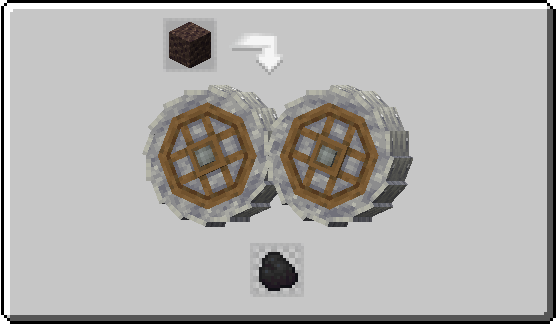
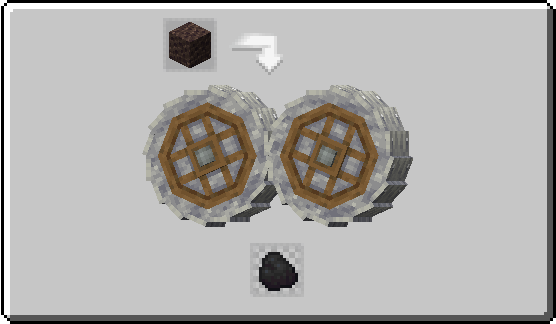
Create Add-on That Adds Coal Recipe Allowing Player To Automate It. Crush Scoria Using Crushing Wheel To Get 75% Coal
Screenshots
Über diese Mod
🌱 About
Create: Coal Recipe is an add-on for the Create mod, available as both a mod and a datapack. It introduces a new recipe for Coal, allowing players to renewably get Coal.
📋 Recipe
| Result | Ingredients | Type |
|---|---|---|
| Coal(75% chance) | Limestone | Crushing |
- Tip: Use Just Enough Items(JEI) To View The Recipe In-Game
🧩 Installation Guide
How to Install the Mod (.jar)
- Download the Mod: Get the .jar file.
- Drop the File: Drag the downloaded .jar file into the mods folder.
How to Install the Datapack (.zip)
- Download: Get the .zip file for the Datapack version.
- Open Your World Folder:
- Install: Open the datapacks folder and drag the downloaded .zip file inside.
⚙️ Supported Version
| Version | Loader | Support |
|---|---|---|
| 1.21.1 | NeoForge | ✅ |
| 1.20.1 | Forge/Neoforge | ✅ |
| 1.20.1 | Fabric | ✅ |
📦 Other Recipes For Create


👀 Play with friends
Want to run a flawless modded server? Check out Godlike Host! Setting up a server through them is the absolute best way to support us right now.
Don't just take our word for it—read the community reviews here: Best Minecraft Server Hosting.
👉 Click the image below or use this link: Godlike Host to get 50% off your first month!
Verfügbare Versionen
Create: Coal Recipe auf dem Server installieren
Server bestellen
Bestelle einen Minecraft Java Server mit mindestens 4 GB RAM (6 GB empfohlen).
datapack Loader setzen
Wähle im Panel unter "Egg" den datapack-Loader und die passende Minecraft-Version (1.21.1).
Mod installieren
Öffne den Mod-Browser im Dashboard und suche nach "Create: Coal Recipe". Klicke "Installieren" – fertig! Alternativ: Lade die .jar via SFTP in den /mods Ordner.
Kompatibilität
Mod-Loader
Minecraft-Versionen
1.21.1, 1.20.1
Server-seitig
✓ ErforderlichEmpfohlener RAM
6 GB(min. 4 GB)Häufige Fragen
Create: Coal Recipe Server crasht beim Start – was tun?
Häufigste Ursache: falsche datapack-Version oder zu wenig RAM. Prüfe im Server-Log (latest.log), ob ein "OutOfMemoryError" oder "Mixin"-Fehler auftritt. Bei Mado Hosting: Stelle sicher, dass mindestens 4 GB RAM zugewiesen sind und der Loader zur Mod-Version passt (1.21.1). Über das Panel kannst du den Loader mit einem Klick wechseln.
Ist Create: Coal Recipe mit datapack und fabric und forge und neoforge kompatibel?
Create: Coal Recipe unterstützt offiziell datapack, fabric, forge, neoforge für Minecraft 1.21.1, 1.20.1. Achtung: Forge- und Fabric-Mods sind NICHT untereinander kompatibel – wähle einen Loader und bleibe dabei. Im Mado Dashboard werden inkompatible Loader-Kombinationen automatisch erkannt.
Server laggt mit Create: Coal Recipe – wie optimiere ich die Performance?
Empfohlener RAM: 6 GB (+1 GB pro 5 Spieler). Prüfe mit /spark profiler, ob Create: Coal Recipe den meisten Tick-Time verbraucht. Häufige Fixes: Server-View-Distance auf 8-10 reduzieren, bei Forge "performant" oder "starlight" als Zusatz-Mod installieren. Bei Mado Hosting läuft dein Server auf NVMe-SSDs mit dedizierten CPU-Kernen für minimale Latenz.
Ähnliche Mods






Modded Server mieten
Installiere Create: Coal Recipe mit nur einem Klick auf deinem Server.