
Create Optical
Create addon all about a creative way to transport rotational energy
Screenshots

Über diese Mod


This addon adds new blocks, items and mechanics to the mod Create.
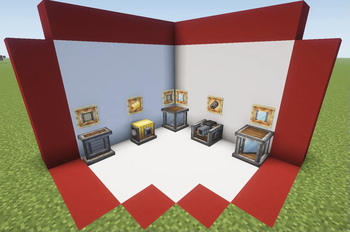
Included mechanics
- Optical Source: emit different types of beams based on the rotational force applied
- Optical Receptor: transform the received beam into rotational force based on its properties
- Optical Sensor: emit redstone signal based on the incident beam properties
- Mirror: reflect the beam perpendicularly
- Polarizing Filter: polarize the beam (duh)
- Beam Splitter Cube: split the beam in two and polarize the resultant beams perpendicularly
- Beam Condenser: condense up to three beams into one combining its properties
- Beam Focuser: new type of recipe based on beam characteristics
- Thermal Optical Source: similar to a normal source but with high su usage based on fluid aplications
- Hologram Display: display text or items in a hologram style
- Beam Reader: display the properties of the incident beam
* Beam Modulator: use it to comunicate through light
Different ways to generate light
Produce eletromagnetic waves with rotational force

New Receptor States
Transform eletromagnetic waves back to rotational force

Retextured Optical Sensor
A way to light ambients with style

New Components
Explore some of the other components of the mod (only stable on version 0.4)

All the crafts can be found with the JEI mod, and most additional mechanics can be explored with the Ponder Mod system.
Some things may break on changing versions. This mod is developed by one person and occasionally receives contributions via GitHub. Please understand that this project is treated as a hobby and not a full-time job.
Many thanks to those who translated the mod:
Russian: Mark2200 (0.2.2 or above)
Chinese Translation: CHN-YunRu (0.2.2 or above)
Brazilian Portuguese: lpcamors (0.2.2 or above)
Spanish: albertosaurio65 (0.2.2 or above)
Verfügbare Versionen
Create Optical auf dem Server installieren
Server bestellen
Bestelle einen Minecraft Java Server mit mindestens 4 GB RAM (6 GB empfohlen).
forge Loader setzen
Wähle im Panel unter "Egg" den forge-Loader und die passende Minecraft-Version (26.1.2).
Mod installieren
Öffne den Mod-Browser im Dashboard und suche nach "Create Optical". Klicke "Installieren" – fertig! Alternativ: Lade die .jar via SFTP in den /mods Ordner.
Kompatibilität
Mod-Loader
Minecraft-Versionen
26.1.2, 26.1.1, 26.1 (+17 weitere)
Server-seitig
✓ ErforderlichEmpfohlener RAM
6 GB(min. 4 GB)Häufige Fragen
Create Optical Server crasht beim Start – was tun?
Häufigste Ursache: falsche forge-Version oder zu wenig RAM. Prüfe im Server-Log (latest.log), ob ein "OutOfMemoryError" oder "Mixin"-Fehler auftritt. Bei Mado Hosting: Stelle sicher, dass mindestens 4 GB RAM zugewiesen sind und der Loader zur Mod-Version passt (26.1.2). Über das Panel kannst du den Loader mit einem Klick wechseln.
Ist Create Optical mit forge und neoforge kompatibel?
Create Optical unterstützt offiziell forge, neoforge für Minecraft 26.1.2, 26.1.1, 26.1. Im Mado Dashboard werden inkompatible Loader-Kombinationen automatisch erkannt.
Server laggt mit Create Optical – wie optimiere ich die Performance?
Empfohlener RAM: 6 GB (+1 GB pro 5 Spieler). Prüfe mit /spark profiler, ob Create Optical den meisten Tick-Time verbraucht. Häufige Fixes: Server-View-Distance auf 8-10 reduzieren, bei Forge "performant" oder "starlight" als Zusatz-Mod installieren. Bei Mado Hosting läuft dein Server auf NVMe-SSDs mit dedizierten CPU-Kernen für minimale Latenz.
Ähnliche Mods




Modded Server mieten
Installiere Create Optical mit nur einem Klick auf deinem Server.